Constraints between Fast and Slow Clocks
When the launch and capture clocks have the same frequency and phase, it does not
matter which clock waveform you use to calculate the setup and hold; the result will
be the same. However, when the clock frequencies are different, you need to specify
which clock waveform you want to use for the setup and hold calculation using the
-start and -end modifiers. You cannot use both
-start and -end at the same time.
-startuses the launch clock for the calculation.-enduses the capture clock for the calculation.
For setup, -start moves the launch edge backwards and
-end moves the capture edge forward. The default is
-end.
For hold, the -start moves the launch edge forward and
-end moves the capture edge backward. The default is
-start.
When the launch clock is faster than the capture clock, you need to ensure that the
set_multicycle_path constraint is applied to the launch clock.
For the setup constraint, you need to include -start. For hold,
-start is the default so you do not need to include it.
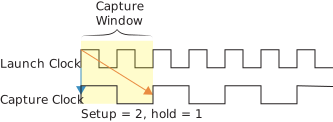
The constraints that represent this example are:
set_multicycle_path -setup -start -from a -to b 2
set_multicycle_path -hold -from a -to b 1
When the launch clock is slower than the capture clock, you need to ensure that the
set_multicycle_path constraint is applied to the capture clock. For
the setup constraint, you need -end, which is the default, so you do
not need to include it. For hold, include -end.
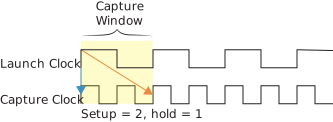
The constraints that represent this example are:
set_multicycle_path -setup -from a -to b 2
set_multicycle_path -hold -end -from a -to b 1