About the Programmer GUI
The graphical user interface makes it easy to select bitstream images and program Efinix FPGAs.
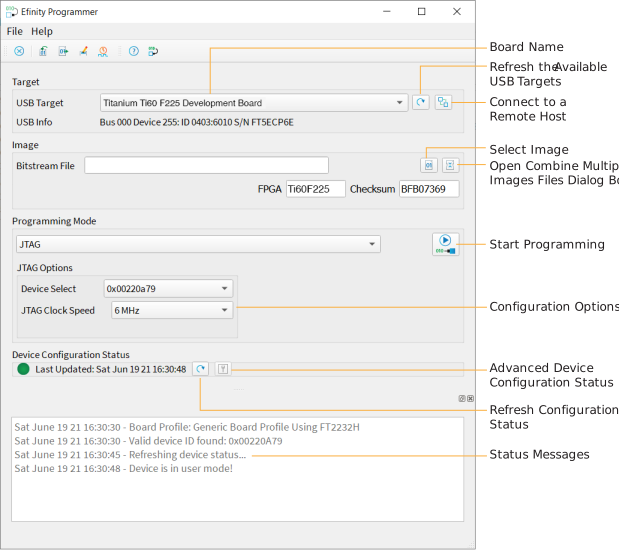
To use the Programmer:
- Choose a target. Click the Edit Remote Host List button to connect to a board attached to a remote host. See Working with Remote Hardware.
- Choose a bitstream file. Use a .hex file for SPI modes
or a .bit file for JTAG mode. After you select a
bitstream, the Programmer reads the bitstream and displays data in the
FPGA and Checksum fields.
The checksum excludes the pre-header and ignores whether characters are
uppercase or lowercase; therefore, it is a checksum of the bitstream
content, not a file checksum.Tip: You can also get the checksum from the command line using the command:
%EFINITY_HOME%\bin\python3 %EFINITY_HOME%\pgm\bin\efx_pgm\generate_checksum.py <bitstream> - Choose the programming mode and then select options.
Mode Options SPI Active Starting Flash Address Flash LengthErase Before ProgrammingVerify After ProgrammingSPI Passive Clock Speed JTAG Device Select JTAG Clock SpeedSPI Active using JTAG Bridge (Legacy) SPI Active using JTAG Bridge (New)SPI Active x8 using JTAG Bridge (Legacy)SPI Active x8 using JTAG Bridge (New)Starting Flash Address Flash LengthErase Before ProgrammingVerify After ProgrammingDevice SelectJTAG Clock Speed - Click the Program FPGA (SPI Passive or JTAG) or Program Flash (all other modes) button.
The Programmer has status information that gives you diagnostics:
- The FPGA or flash device's configuration status displays in the Device Configuration Status area. Click the Refresh button to refresh the status and display messages in the console.
- Use the Advanced Device Configuration Status button to get diagnostics that can be helpful when debugging why configuration is failing. Refer to Configuration Status Register for more information.
Note: For detailed information on how to use
configuration modes and set up your circuit board for configuration, refer to AN 006: Configuring Trion FPGAs or AN 033: Configuring Titanium FPGAs.