Example: Dynamic Multiplexers and create_clock -add
Titanium and Topaz
FPGAs have dynamic multiplexers that you can configure at
run-time. You can choose which clock source is active in the Interface Designer. Only
one of the four input clock sources is active at a time. You define multiple clocks at
the core clock pad using the create_clock -add option. The following
figure shows the corresponding timing constraint associated with this use case. It is
good practice to define only the most critical clock, if possible, because adding more
clocks to the system increases the runtime for timing analysis and place-and-route.
Notice that the examples uses the set_clock_groups command because only
one of the four clocks is active at a given time; therefore, from a timing perspective,
those clocks are considered exclusive.
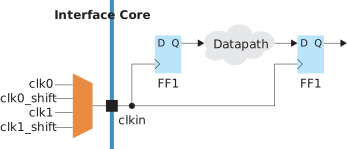
SDC Commands
create_clock -period 10 [get_ports clkin] -name clk0

# The following constraints use -add to avoid overwriting the previous setting
create_clock -period 10 –waveform {2.5 7.25} [get_ports clkin] -name clk0_shift -add
create_clock -period 20 [get_ports clkin] -name clk1 -add
create_clock -period 20 –waveform {4 16} [get_ports clkin] -name clk1_shift -add

# The four clocks are exclusive because they cannot operate at the same time
set_clock_groups -exclusive -group {clk0} -group {clk0_shift} -group {clk1} -group {clk1_shift}- Titanium or Topaz data sheets, "Driving the Global Clock Network" section.
- Titanium Interfaces User Guide or Topaz Interfaces User Guide, "Configuring the Dynamic Clock Multiplexers" section.