Run the Flow with the Dashboard Controls
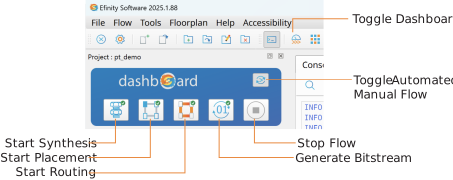
The Dashboard controls the software flow, which operates in two modes: automated and manual. Toggle automated and manual flows using the toggle button.
Note: The automated flow is on by default.
- Automated flow—Use automated mode to run the full flow from start to finish. Additionally, you can start the flow from any point and run it to the end. For example, after completing the full flow you can restart the automated flow at the placer stage and run the flow to the end.
- Manual flow—Disable the automated flow to run each stage manually.
When a stage completes, a marker indicates whether the stage completed successfully, with warnings, or with errors. You can stop and restart the flow at any point.