Program using a JTAG Bridge
About this task
Programming with a JTAG bridge is a two-step process: first you configure the FPGA to turn it into a flash programmer (.bit) and second you use the FPGA to program the flash device with the bitstream (.hex).
The SPI Active using JTAG Bridge mode (formerly named SPI Active using JTAG Bridge (New)) has pre-built flash loader (.bit) files that you can use. These .bit files do not require an external clock source. You can still use your own .bit file if you choose to do so.
Note: The JTAG bridge modes were changed in the Efinity software v2025.1.
If you are using an older version of software and want to use the SPI Active using
JTAG Bridge (Legacy) mode, refer to Appendix: Program using a JTAG Bridge (Legacy).
The JTAG bridge bitstream files bundled with v2025.1 and higher can only
be used with v2025.1 or higher. You cannot use older bundled JTAG bridge
bitstream files with v2025.1 or higher, and you cannot use the v2025.1 or higher
bundled files with older software versions. If you need to use the older bundled
files, use the Programmer v2024.2.
Tip: If you would like to incorporate the RTL files for the new flash loader
into your own design,
use
the JTAG to SPI Flash Bridge core in the IP Manager.
The Titanium and Topaz
.bit files include a custom JTAG USERCODE in the bitstream:
- Single flash .bit files—0x96C09A03
- Dual flash .bit files—0xC07FCFE2
Note: For Titanium
Topaz
FPGAs, the Programmer automatically loads the
.bit file based on the FPGA target. The Programmer has
separate pre-built .bit files for
JTAG
bridge
mode
For Trion
FPGAs, you need to specify the pre-built file to
use.
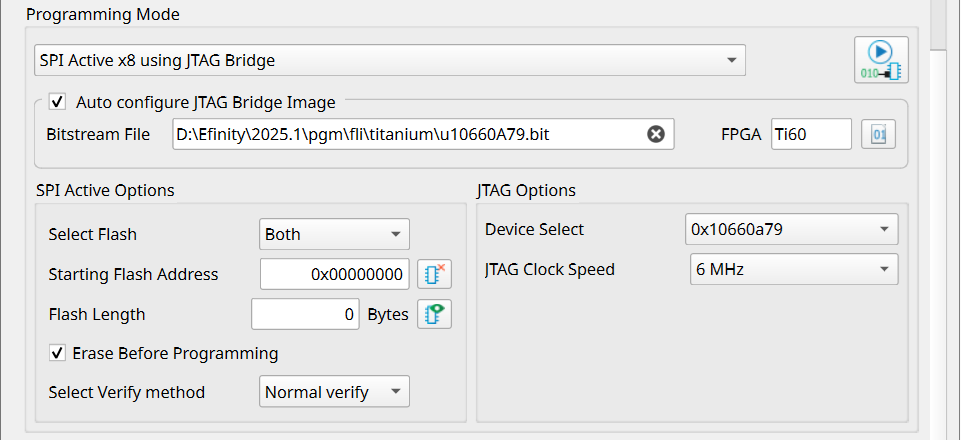
To program using a JTAG bridge:
Procedure
Results
Important: If you are using the Titanium
Topaz RSA bitstream authentication security feature, you need to use a
signed .bit file. Copy the bundled .bit
file from <Efinity
version>/pgm/fli/titanium/pgm/fli/topaz to another directory and sign
it. Then point to the signed .bit file in the Programmer. You
can also create your own .bit file if you prefer.
Refer to
Using the Efinity Bitstream Security Key Generator for information on signing existing
.bit files.
Efinix strongly recommends you to disable JTAG if you are using the
security features to achieve the highest security level. While disabled, you can
still
program
the flash with JTAG Bridge by connecting to a soft JTAG tap IP and four
GPIOs.
Refer to: