Project-Based Programming Options
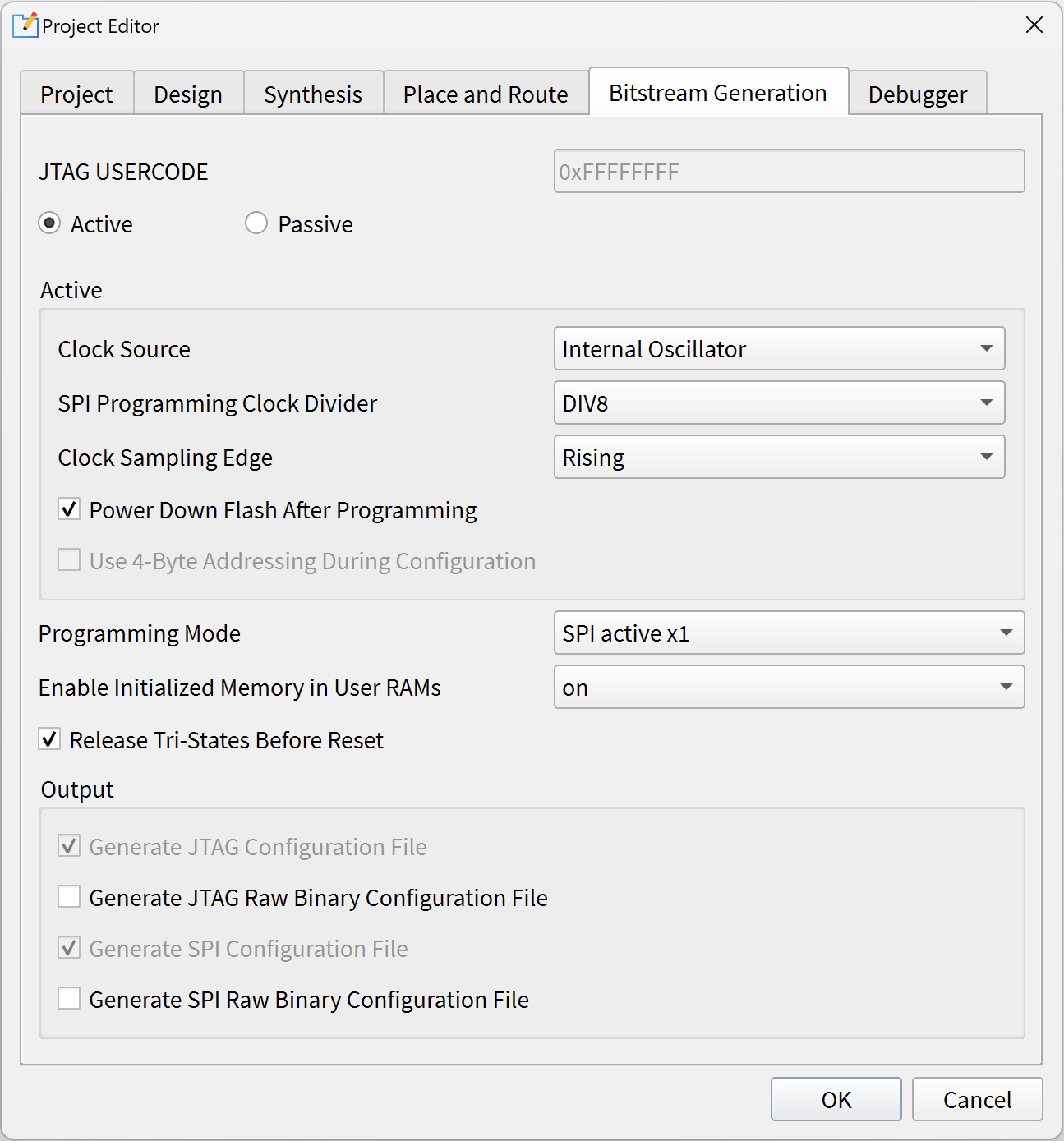
You specify project-based programming options in the tab in the Efinity® software. Efinix FPGAs support active and passive configuration in a variety of modes.
Note: Some of these project settings affect bits in the bitstream. Therefore, when you
program an FPGA with the Programmer, the setting you make in the Project Editor should
match what you intend to use in the Programmer.
| Option | Notes |
|---|---|
| Active/Passive | Active: SPI active mode. Passive: SPI passive mode. Your
choice of active or passive affects the pinout and determines which
choices are available in the Programming Mode box. |
| JTAG USERCODE | Use this field to specify a 32-bit user
electronic signature. The USERCODE is included in the
bitstream. You can read it from the FPGA via the JTAG
interface, and you can view the JTAG USERCODE in the
Programmer’s Advanced Device Status dialog box. Default:Fixed
at: 0xFFFFFFFF |
| Clock Source | For Titanium
Topaz
FPGAs, choose whether
you want to use the FPGA's internal oscillator or an external clock source as the
configuration clock. For Trion
FPGAs, this option is always
Internal Oscillator. |
| SPI Programming Clock Divider | Choose the divider for the SPI clock. This setting is reflected in
the bitstream file. Default: DIV8 |
| Clock Sampling Edge | For Titanium
Topaz
FPGAs, choose whether
the configuration clock should sample on the rising or falling edge.
The default is Falling. For Trion
FPGAs, this option is
always Rising. |
| Power down flash after programming | Enable this option to power down the flash device after the FPGA finishes programming.
This setting is reflected in the bitstream file, and you can only set it
here. Default: On |
| Use 4-byte addressing during configuration | (Titanium
Topaz
only). When you turn this option on, the control block issues 4-byte
addresses when it configures the FPGA. This
option is not supported for all Trion
Ti35 or Ti60Tz50
FPGAs. |
| Programming mode | Choose the programming mode and width; the choices depend on the FPGA and package you are
targeting. This setting is reflected in the bitstream file, and you can
only set it here. Default: SPI <active or passive>
x1 |
| Enable Initialized Memory in User RAMs | This setting is reflected in the bitstream file, and you can only set
it here. on: The bitstream has initialized
memory. off: The bitstream does not
have initialized memory. smart: For the Trion family,
this option has the same effect as
on. For the Titanium
Topaz family, this option gives a
slightly smaller bitstream. Default: smart |
| Release Tri-States before Reset | During configuration, core signals are held in reset and the I/O pins
are tri-stated. These states are released when the FPGA enters user
mode. On: (default) I/O pins are released from tri-state before
the core is released from reset (use this option when the
application is core sensitive). Off: Core signals are
released from reset before the I/O pins are released from tri-state
(use this option when the application is I/O
sensitive). |
| Enable Bitstream Compression | (Titanium
Topaz only) When turned on
(default), the software compresses the bitstream. If you choose
Bitstream Encryption or
Bitstream Authentication, this option is
turned off and disabled because you cannot compress a bitstream and
use the security features simultaneously. |
| Bitstream Encryption | (Titanium
Topaz only) On: The
software generates an encrypted bitstream. You also need to specify the
.bin file in the FPGA Key Data
File box. Off: (default) The software generates a
plaintext bitstream. |
| Randomize IV value during compilation | (Titanium
Topaz only) This option is used
with bitstream encryption. The encryption/decryption uses a 96-bit
initial vector (IV). If you want the software to generate a random IV
for every compilation, leave this option turned on. If you want to
specify an IV, turn this option off and specify the value in the
96-bit IV Value box. On (default): Let
the software generate the IV value. (The bitstream will be different
every time you compile, even if nothing has changed in your
design.) Off: The software does not generate the IV value;
the user will specify it in the 96-bit IV
Value box. (If nothing has changed in your design,
when you recompile, the bitstream remains the same) |
| 96-bit IV Value | (Titanium Topaz only) Click the refresh button next to this box to generate a random IV value. You can also enter a value you generate with another program. |
| Bitstream Authentication | (Titanium
Topaz only) On: The software
generates a signed bitstream. You also need to specify the
.bin file in the FPGA Key Data
File box and the RSA private key
(.pem) file in the RSA Private
Key box. Off: (default) The software generates an
unsigned bitstream. |
| FPGA Key Data File | (Titanium Topaz only) Specify the location and name of the .bin file you generated with the Efinity Bitstream Security Key Generator. |
| RSA Private Key | (Titanium Topaz only) Specify the location and name of the RSA private key file (.pem). |
| Generate JTAG configuration file | On (always): Generate a .bit file for JTAG configuration. |
| Generate JTAG raw binary configuration file | On: Generate a .bin file (raw binary) for JTAG
configuration. Off (default): Do not generate a
.bin file. |
| Generate SPI configuration file | On (always): Generate a .hex file for SPI programming. |
| Generate SPI raw binary configuration file | On: Generate a .bin file (raw binary) for SPI
programming. Off (default): Do not generate a
.bin file. |
When you change one of these options, you can simply re-run the bitstream generation flow step. You do not need to recompile the design.

Notice: Refer to the data sheet for your FPGA for
information on which configuration options it supports.
Refer to
AN 006: Configuring Trion FPGAs or AN 033: Configuring Titanium FPGAs for information
on configuration modes, timing, and board considerations.