Understanding Min and Max Delays
The set_min_delay and set_max_delay constraints
override the timing requirements derived from your clock constraints. These settings
tighten or relax the timing requirements for the paths. For example, you could use these
constraints to try to minimize skew within a bus of signals.
set_min_delay and
set_max_delay is a very risky way to close timing because you
can mask real setup and hold time violations unintentionally. If you use
set_max_delay or set_min_delay to override the
default clock-to-clock constraint calculated by the software, the software honors your
input and does not give any errors. However, the issue would likely appear on your board
as a setup or hold violation. This method is especially risky when used with beneficial
skew.Asynchronous Paths
The set_max_delay and set_min_delay SDC commands
support setting a combinational delay on an asynchronous path between ports. This
path does not associate with any clock. See Figure 1. Clock latency and clock
uncertainty are not considered for asynchronous data paths.
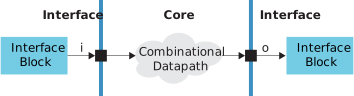
The constraints that represent this example are:
set_max_delay -from i to o <max delay>
set_min_delay -from i -to o <min delay>
Synchronous Paths
If you specify a maximum delay or a minimum delay for synchronous ports, you must
also specify the clock domains for both -from and
-to ports. In the following example, the input and output ports
of the core are connected to flipflops in the interface and special enable logic
controls the clock relationship.
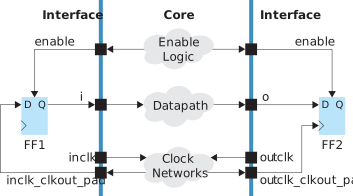
The constraints that represent this example are:
create_clock -period <inclk period> -name inclk [get_ports inclk]
create_clock -period <outclk period> -name outclk [get_ports outclk]
set_input_delay -max <input max delay> -clock inclk -reference_pin <inclk_clkout_pad>
set_input_delay -min <input min delay> -clock inclk -reference_pin <inclk_clkout_pad>
set_output_delay -max <output max delay> -clock outclk -reference_pin <outclk_clkout_pad>
set_output_delay -min <output min delay> -clock outclk -reference_pin <outclk_clkout_pad>
set_max_delay -from -i -to o <max delay>
set_min_delay -from i -to o <min delay>
Notice that the clock out pads are reference pins for the
set_input_delay and set_output_delay commands.
The set_max_delay and set_min_delay commands
override the default clock-to-clock constraints calculated by the system. The clock
path latency and clock uncertainty are considered for synchronous ports.
Mixed Asynchronous and Synchronous Paths
The Efinity software issues a warning and ignores the
set_max_delay and set_min_delay SDC commands
if one of the -to/-from ports is synchorous and
the other is synchronous. The following example only has a clock associated with the
-from port:
create_clock -name inclk -period 10.00 [get_ports inclk]
set_input_delay -clock inclk 0.1 [get_ports i]
set_max_delay 10 -from [get_ports i] to [get_ports o]
The software gives the following warning and ignores the
set_max_delay command.
Ignore the set_max_delay (<sdc_file>:<line#>) constraint due to unconstrained port in -toThe following example only has a clock associated with the -to post:
create_clock -name outclk -period 10.00 [get_ports outclk]
set_output_delay -clock outclk 0.2 [get_ports o]
set_max_delay 10 -from [get_ports i] -to [get_ports o]
The software gives the following warning and ignores the
set_max_delay command.
Ignore the set_max_delay ((<sdc_file>:<line#>) constraint due to unconstrained port in -from