Virtual Clocks
A virtual clock represents a system clock that is on the board but is off-chip from the FPGA. In your SDC files, you should use a virtual clock as a reference clock for the input and output delay instead of the board clock. The virtual clock provides a clean interface clock and means you do not have to worry about the shifted waveform on the board. Additionally, the virtual clock prevents timing analysis from treating the I/O path with overly tight and unrealistic requirements.
The following figure shows a virtual clock used with the set_input_delay
command. The oscillator drives the clock pad, clk_in, and the clock pin
of an external off-chip flipflop. The path from the oscillator to the
clk_in pad on the core is through the interface. The Interface
Designer can add extra clock latency and clock uncertainty to that path. To remove any
extra clock latency and uncertainty for the data_in pad, you use a
virtual clock.
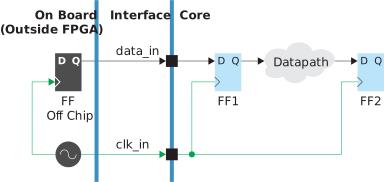
SDC Commands
create_clock -period 40 -name clk_in [get_ports clk_in]
create_clock -period 40 -name virtual_clk
set_input_delay -clock virtual_clk -max 0.3 [get_ports data_in]
set_input_delay -clock virtual_clk -min 0.1 [get_ports data_in]
Notice that virtual clock has the same period and characteristics as
clkin but it does not have a clock target referring to a net,
port, or pin in the netlist. The Efinity software displays an info
message for the virtual clock.
The following figure shows how to use a virtual clock with the
set_output_delay command.
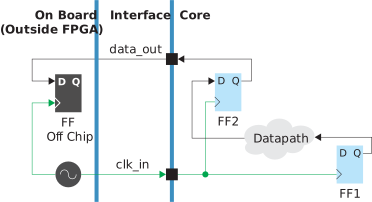
SDC Commands
create_clock -period 40 -name clk_in [get_ports clk_in]
create_clock -period 40 -name virtual_clk
set_output_delay -clock virtual_clk -max 0.4 [get_ports data_out]
set_output_delay -clock virtual_clk -min 0.3 [get_ports data_out]virtual_clk to/from clk_in. See Clock Relationships.