Input Receive Clock Delay
This example shows how to set constraints for an input receive clock.
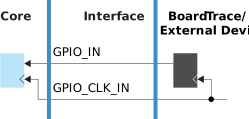
The SDC constraint formulas for the receive clock delay are:
set_input_delay -clock <clock> -max <max calculation> <ports>
set_input_delay -clock <clock> -min <min calculation> <ports>
The equations are:
<max calculation> = <max board constraint> + GPIO_INmax
<min calculation> = <min board constraint> + GPIO_INmin
The following example shows how to calculate the delays and set the constraints.
Constraining Input Receive Clock
You want to constrain the
din input with respect to clock clkin with a
max board constraint of 4 ns and a min board constraint of 2 ns.
The non-registered GPIO configuration data from the Interface Designer timing report
file is:Non-registered GPIO Configuration:
===================================
+---------------+----------+-------------+----------+----------+
| Instance Name | Pin Name | Parameter | Max (ns) | Min (ns) |
+---------------+----------+-------------+----------+----------+
| clkin | clkin | GPIO_CLK_IN | 1.954 | 0.526 |
| din | din | GPIO_IN | 1.954 | 0.526 |
| dout | dout | GPIO_OUT | 4.246 | 1.081 |
+---------------+----------+-------------+----------+----------+The
equations are:
<max calculation> = 4 + 1.954 = 5.954
<min calculation> = 2 + 0.526 = 2.526
The
resulting constraints are:
set_input_delay -clock clkin -max 5.954 din
set_input_delay -clock clkin -min 2.526 din
Note: The
GPIO_CLK_IN delay is accounted for in the
set_clock_latency constraint. Therefore, you do not need to
include it in the calculation for set_input_delay. Refer to Clock Latency.