Constraining Synchronous Inputs and Outputs
Synchronous inputs and outputs are interface signals that are connected to synchronous
elements in the FPGA's periphery. Because the Interface
Designer knows how the clock and data signals are connected to the synchronous elements,
the software can automatically determine the precise delays for the
set_input_delay and set_output_delay constraints.
These delays are provided in the <project name>.pt.sdc file. When the
Efinity software generates the constraints for synchronized output
and input pins, it creates a set_output_delay or
set_input_delay that captures the delay values of the synchronous
element and the core clock delay of the FPGA.
When the Efinity software models the timing, the minimum and maximum refer to different timing corners (fast corner and slow corner), not the minimum/maximum potential delay in one timing corner.
Understanding Input Delay Values
The following figure shows an example of a peripheral register, clock, clock-to-output delay, and data path.
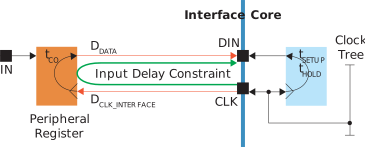
- tCO is the peripheral register's clock-to-output delay.
- DDATA is the delay from the peripheral register to the core.
- DCLK_INTERFACE is the clock delay to the peripheral register.
So the equations for the output delay are:
Maximum input delay = DDATA (max) + tCO + DCLK_INTERFACE (max)
Minimum input delay = DDATA (min) + tCO + DCLK_INTERFACE (min)
For example:
| Parameter | Max | Min |
|---|---|---|
| DDATA | 2 | 1 |
| tCO | 2 | 1 |
| DCLK_INTERFACE | 2 | 1 |
- Maximum input delay = 2 + 2 + 2 = 6
- Mininum input delay = 1 + 1 + 1 = 3
The generated constraint has the -reference_pin option, which lets
the software automatically calculate the core clock network delay.
Understanding Output Delay Values
The following figure shows an example of a peripheral register, clock, setup/hold, and data path.
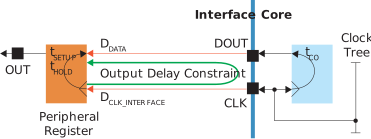
- tSETUP is the peripheral register's setup requirement.
- tHOLD is the peripheral register's hold requirement.
- DDATA is the delay from the core to the peripheral register.
- DCLK_INTERFACE is the clock delay to the peripheral register.
So the equations for the output delay are:
Maximum output delay (setup) = DDATA (max) + tSETUP - DCLK_INTERFACE (max)
Minimum output delay (hold) = DDATA (min) - tHOLD - DCLK_INTERFACE (min)
For example:
| Parameter | Max | Min |
|---|---|---|
| DDATA | 2 | 1 |
| tSETUP | 2 | – |
| tHOLD | – | 1 |
| DCLK_INTERFACE | 2 | 1 |
- Maximum output delay = 2 + 2 - 2 = 2
- Mininum output delay = 1 - 1 - 1 = -1
The generated constraint has the -reference_pin option, which lets
the software automatically calculate the core clock network delay.
Set Constraints
To set a constraint for synchronous inputs and outputs in your constraints file:
- Go to in the Efinity® dashboard.
- Double-click <project name>.pt.sdc to open the report.
- Copy the
set_input_delayandset_output_delayconstraints and paste them into your constraints file.
set_output_delay Constraints
set_output_delay -clock Clk -reference_pin [get_ports {Clk~CLKOUT~14~1}] -max 0.287
    [get_ports {MemWrite}]
set_output_delay -clock Clk -reference_pin [get_ports {Clk~CLKOUT~14~1}] -min 0.161
    [get_ports {MemWrite}]