About the Fractional PLL Interface
Topaz FPGAs have PLLs to synthesize clock frequencies. The PLLs are located in
the corners of the FPGA. You can use the PLL to compensate for clock skew/delay via
external or internal feedback to meet timing requirements in advanced applications. The
PLL reference clock has up to four sources. You can dynamically select the PLL reference
clock with the CLKSEL port. (Hold the PLL in reset when dynamically
selecting the reference clock source.)
Topaz FPGAs also support dynamic reconfiguration, programmable duty cycle, a fractional output divider, and spread-spectrum clocking. These features are described in later sections. The PLL consists of a pre-divider counter (N counter), a feedback multiplier counter (M counter), a post-divider counter (O counter), and output dividers (C). A delta sigma modulator supports the fractional output divider features.
At startup, Efinix recommends that you hold the PLL in reset until the PLL's reference clock source is stable.
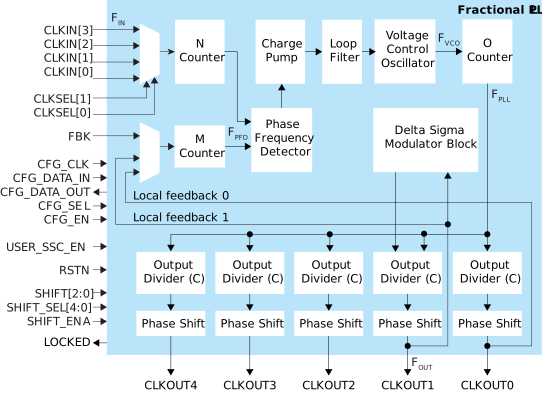
The counter settings define the PLL output frequency:
| Feedback Mode | Where: |
|---|---|
|
FPFD = FIN / N
FVCO = (FPFD x M x O x CFBK )
FPLL = FVCO / O
FOUT = (FIN x M x CFBK) / (N x
C)
|
FVCO is the voltage control oscillator frequency
FPLL is the post-divider PLL VCO
frequency FOUT is the output clock
frequency FIN is the reference clock
frequency FPFD is the phase frequency detector
input frequency O is the post-divider counter C is the
output divider |

| Signal | Direction | Description |
|---|---|---|
| CLKIN[3:0] | Input | Reference clocks driven by I/O pads or core clock tree. In dynamic mode, the CLKSEL pin chooses which of these inputs to use. |
| CLKSEL[1:0] | Input | You can dynamically select the reference clock from one of the clock in pins. |
| RSTN | Input | (Optional) Active-low PLL reset signal. When asserted, this signal
resets the PLL; when de-asserted, it enables the PLL. De-assert only
when the CLKIN signal is stable. Connect this signal in your design
to power-up or reset the PLL. Assert the RSTN pin for a minimum
pulse of 10 ns to reset the PLL. Assert RSTN when dynamically
changing the selected PLL reference clock. |
| FBK | Input | Connect to a clock out interface pin when the PLL is not in internal
feedback mode. Required when any output is using dynamic phase
shift. |
| CLKOUT0
CLKOUT1 CLKOUT2 CLKOUT3 CLKOUT4 |
Output | PLL output. You can route these signals as input clocks to the core's
GCLK network. The PLL output clock used as the feedback clock can
have a maximum frequency of 4x (integer) of the reference clock. If
all your system clocks do not fall within this range, you should
dedicate one unused PLL output clock for feedback. |
| LOCKED | Output | (Optional) Goes high when PLL achieves lock; goes low when a loss of
lock is detected. Connect this signal in your design to monitor the lock
status. This signal is not synchronized to any clock and the
minimum high or low pulse width of the lock signal may be smaller
than the CLKOUT’s period. |
| SHIFT[2:0] | Input | (Optional) Dynamically change the phase shift of the output selected
to the value set with this signal. Possible values from 000 (no
phase shift) to 111 (3.5 FPLL cycle delay). Each
increment adds 0.5 cycle delay. Required when any output
is using dynamic phase shift. |
| SHIFT_SEL[4:0] | Input | (Optional) Choose the output(s) affected by the dynamic phase
shift. Required when any output is using dynamic phase
shift. |
| SHIFT_ENA | Input | (Optional) When high, changes the phase shift of the selected PLL(s)
to the new value. Required when any output is using dynamic phase
shift. |
| CFG_CLK | Input | Configuration clock pin name; used with dynamic configuration. |
| CFG_DATA_IN | Input | Configuration data input pin name; used with dynamic configuration. |
| CFG_DATA_OUT | Output | Configuration data output pin name; used with dynamic configuration. |
| CFG_SEL | Input | Configuration select pin name; used with dynamic configuration. |
| CFG_EN | Input | Enable for dynamic configuration. |
| USER_SSC_EN | Input | User spread-spectrum clocking enable pin name. |
| Parameter | Choices | Notes |
|---|---|---|
| Instance Name | User defined | |
| PLL Resource | The resource listing depends on the FPGA you choose. | |
| Output Clock Inversion | On, off | Turn on to invert each output clock individually. |
| Connection Type | gclk, rclk, phyclk | All
output clocks can feed the global clock network.
Output clocks 3 and 4 can feed the
PHY
clock network. Some PLLs can also drive the regional clock network; see
"Driving the Regional Network" in the data sheet for details.
Refer to the device data sheet for whether your FPGA has a PHY clock
network. |
| Clock Source | External | PLL reference clock comes from an external pin. Select the available external clock. |
| Dynamic | PLL reference clock comes from four possible sources (external and core), and are controlled by the clock select bus. Specify the clock selector pin name and core clock pin name | |
| Core | PLL reference clock comes from the core. Specify the core clock pin name. | |
| Automated Clock Calculation | Pressing this button launches the PLL Clock Calculation window. The calculator helps you define PLL settings in an easy-to-use graphical interface. Refer to Using the Fractional PLL Clock Calculator for details. |