Dynamic Voltage Support
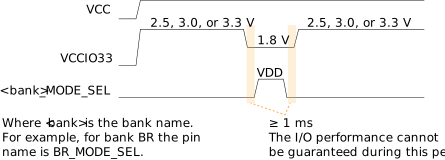
Topaz HVIO I/O banks support dynamic voltage shifting. This feature lets you change the voltage to the I/O bank during user mode. There are two methods for changing the voltage:
- If you are not using 1.8 V at all, you can simply change the voltage at any time. For example, you can change from 3.3 V to 2.5 V and then back to 3.3 V.
- If you are changing the voltage to 1.8 V, you must enable an option in the
Interface Designer (which creates a mode select
pin
<bank name>
_MODE_SEL) and follow the timing requirements for the voltage change as described below. The value of the mode select pin chooses the voltage:- High—Changes the voltage to 1.8 V
- Low—Changes the voltage back to 2.5, 3.0, or 3.3 V
To enable the option in the Interface Designer:
- Choose .
- Turn on Enable Dynamic Voltage.
- Save.
- Add the mode select pin (<bank>_MODE_SEL) to your RTL design.
- Recompile.
Note: Some HVIO I/O banks may not support the <bank
name>
_MODE_SEL pin. For example, if the I/O bank has dedicated
I/O pins such as JTAG pins, then you cannot change the voltage.When switching the voltage, pull down the voltage to 1.8 V for at least 1 ms before pulling the mode select signal high. Similarly, wait for at least 1 ms after releasing the mode select signal before changing the voltage back to the higher level.