About the Spread-Spectrum Clocking PLL Interface
The Topaz MIPI D-PHY interface includes a spread-spectrum clocking (SSC) PLL that spreads or varies the signal spectrum around the ideal clock frequency. If you are not using the MIPI D-PHY TX interface for MIPI signals, you can use the SSC PLL as another clock source.
| Family | Available In |
|---|---|
| Topaz | Tz110 and Tz170 |
The PLL consists of a pre-divider counter (N counter), a feedback multiplier counter (M counter), a post-divider counter (O counter), and output divider (C). You cannot modify the counter settings. Instead, you specify the output frequency you want and the reference clock frequency. If the SSC PLL cannot exactly match the output frequency, it displays (and uses) the frequency that is closest to your setting.
By default, the SSC PLL acts as a regular PLL. You enable the spread-spectrum clocking by turning on the Enable Spread Spectrum Clock (SSC) option in the Interface Designer.
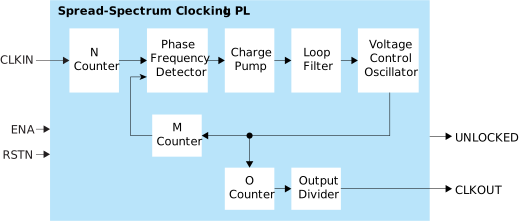

| Signal | Direction | Description |
|---|---|---|
| CLKIN | Input | Reference clocks from core, PLL, or GPIO. |
| CLKOUT | Output | PLL SSC Clock Out Pin Name. |
| RSTN | Input | Active-low PLL SSC reset signal. |
| UNLOCKED | Output | PLL Unlock State Pin Name. Goes high when PLL SSC is in unlock state. Connect this signal in your design to monitor the lock status. |
| ENA | Input | (Optional) PLL SSC Enable Pin Name: Always enable:
1 Disable: 0 Can be driven by an active signal
for dynamic enable. |
| Parameter | Choices | Notes |
|---|---|---|
| Clockout Frequency (MHz) | 5 - 312.5 | Click Update Output Clock Frequency and select the valid frequency. |
| Instance Name | User defined | |
| PLL SSC Resource | None, MIPI_TX0, MIPI_TX1, MIPI_TX2, MIPI_TX3 | Choose the resource. |
| Reference Clock Frequency | 12, 19.2, 25, 26, 27, 38.4, 52 | Choose reference clock in MHz. |
| Reference Clock Source Type | pll, gpio, core | Choose which resource generates the reference clock. For gpio and pll, the Block Editor shows you which resource to connect as the reference clock. For core, you specify the clock name. |
| Option | Choices | Notes |
|---|---|---|
| Enable Spread Spectrum Clock (SSC) | On or off | Turn on to enable SSC. Turn off to use the SSC PLL as a regular
PLL without the waveform variation. |
| SSC Frequency (kHz) | 30 - 33 | Spread-spectrum clock frequency setting. Default:
30 |
| SSC Initial Amplitude (PPM) | 2501 - 5000 | Spread-spectrum clock initial spread down amount in ppm. The initial
amplitude value must be larger than the amplitude value. Default:
5000 |
| SSC Amplitude (PPM) | 2500 - 4999 | Spread-spectrum clock amount in ppm. Default: 4999 |
| Clockout Connection Type | gclk, rclk | Choose whether to connect to a global clock
(gclk) or regional clock
(rclk). Default: gclk |
| <description> Pin Name | User defined | Control and status pin names. Efinix recommends that you use the defaults. |