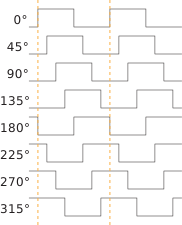
Understanding PLL Phase Shifting
The PLL supports clock phases from 0 to 315 degrees.
- You can set a phase shift for a clock output in the PLL Clock Calculator. The calculator tries to get as close to that number as it can.
- If you want to set the phase shift manually, where you use the options to set the M, N, O, divider, and shift values, the phase shift results you get are 0, 45, 90, 135, 180, 225, 270, and 315.
You can also control the phase shifting dynamically. To turn on dynamic phase shifting, click the Dynamic button next to the clock frequency in the PLL Clock Calculator. The GUI adds three pins to control the shift. the shift select, and the shift enable. You can dynamically change the phases simultaneously.