MIPI TX
The MIPI TX is a transmitter interface that translates video data from the Trion® core into packetized data sent over the HSSI interface to the board. Five high-speed differential pin pairs (four data, one clock), each of which represent a lane, connect to the board. Control and video signals connect from the MIPI interface to the core.
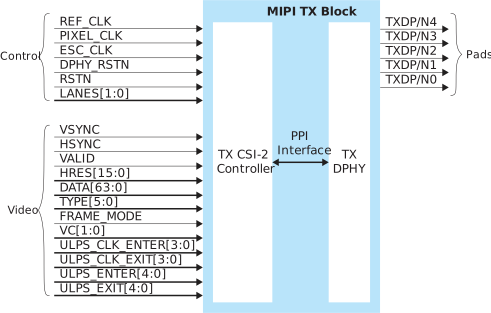
The control signals determine the clocking and how many transceiver lanes are used. All control signals are required except the two reset signals. The reset signals are optional, however, you must use both signals or neither.
The MIPI block requires an escape clock (ESC_CLK) for use when the
MIPI interface is in escape (low-power) mode, which runs between 11 and 20
MHz.
The video signals receive the video data from the core. The MIPI interface block encodes is and sends it out through the MIPI D-PHY lanes.

| Signal | Direction | Clock Domain | Description |
|---|---|---|---|
| REF_CLK | Input | N/A | Reference clock for the internal MIPI TX PLL used to generate the
transmitted data. The FPGA has a
dedicated GPIO resource (MREFCLK) that you must configure to provide
the reference clock. All of the MIPI TX blocks share this
resource. The frequency is set using Interface Designer
configuration options. |
| PIXEL_CLK | Input | N/A | Clock used for transferring data from the core to the MIPI TX
block. The frequency is based on the number of lanes and video
format. Refer to Understanding the RX and TX Pixel Clock. |
| ESC_CLK | Input | N/A | Slow clock for escape mode (11 - 20 MHz). |
| DPHY_RSTN | Input | N/A | (Optional) Reset for the D-PHY logic, active low. Reset with the
controller. See MIPI Reset Timing. |
| RSTN | Input | N/A | (Optional) Reset for the CSI-2 controller logic, active low.
Typically, you reset the controller with the PHY. (See MIPI Reset Timing.) However, when dynamically changing the horizontal
resolution, you only need to trigger RSTN. |
| LANES[1:0] | Input | PIXEL_CLK | Determines the number of lanes enabled. Can only be changed
during reset. 00: lane 0 01: lanes 0 and
1 11: all lanes |
| Signal | Direction | Clock Domain | Description |
|---|---|---|---|
| VSYNC | Input | PIXEL_CLK | Vertical sync. |
| HSYNC | Input | PIXEL_CLK | Horizontal sync. |
| VALID | Input | PIXEL_CLK | Valid signal. |
| HRES[15:0] | Input | PIXEL_CLK | Horizontal resolution. Can only be changed when VSYNC is low, and should be stable for at least one TX pixel clock cycle before VSYNC goes high. |
| DATA[63:0] | Input | PIXEL_CLK | Video data; the format depends on the data type. New data arrives on every pixel clock. |
| TYPE[5:0] | Input | PIXEL_CLK | Video data type. Can only be changed when HSYNC is low, and should be stable for at least one TX pixel clock cycle before HSYNC goes high. |
| FRAME_MODE | Input | PIXEL_CLK | Selects frame format. 1 0: general frame 1: accurate
frame Can only be changed during reset. |
| VC[1:0] | Input | PIXEL_CLK | Virtual channel (VC). Can only be changed when VSYNC is low, and should be stable at least one TX pixel clock cycle before VSYNC goes high. |
| ULPS_CLK_ENTER | Input | PIXEL_CLK | Place the clock lane into ULPS mode. Should not be active at the same time as ULPS_CLK_EXIT. Each high pulse should be at least 5 μs. |
| ULPS_CLK_EXIT | Input | PIXEL_CLK | Remove clock lane from ULPS mode. Should not be active at the same time as ULPS_CLK_ENTER. Each high pulse should be at least 5 μs. |
| ULPS_ENTER[3:0] | Input | PIXEL_CLK | Place the data lane into ULPS mode. Should not be active at the same time as ULPS_EXIT[3:0]. Each high pulse should be at least 5 μs. |
| ULPS_EXIT[3:0] | Input | PIXEL_CLK | Remove the data lane from ULPS mode. Should not be active at the same time as ULPS_ENTER[3:0]. Each high pulse should be at least 5 μs. |
| Pad | Direction | Description |
|---|---|---|
| TXDP[4:0] | Output | MIPI transceiver P pads. |
| TXDN[4:0] | Output | MIPI transceiver N pads. |
| Tab | Parameter | Choices | Notes |
|---|---|---|---|
| Base | PHY Bandwidth (Mbps) | 80.00 - 1500.00 | Choose one of the possible PHY bandwidth values. |
| Frequency (reference clock) | 6, 12, 19.2, 25, 26, 27, 38.4, or 52 MHz | Reference clock frequency. | |
| Enable Continuous PHY Clocking | On or Off | Turns continuous clock mode on or off. | |
| Control | Escape Clock Pin Name | User defined | |
| Invert Escape Clock | On or Off | ||
| Pixel Clock Pin Name | User defined | ||
| Invert Pixel Clock | On or Off | ||
| Lane Mapping | TXD0, TXD1, TXD2, TXD3, TXD4 | clk, data0, data1, data2, or data3 | Map the physical lane to a clock or data lane. |
| Clock Timer | |||
| Timing | TCLK-POST TCLK-TRAIL TCLK-PREPARE TCLK-ZERO |
Varies depending on the PHY frequency | Changes the MIPI transmitter timing parameters per the DPHY specification. Refer to D-PHY Timing Parameters. |
| Escape Clock Frequency (MHz) | User defined | Specify a number between 11 and 20 MHz. | |
| TCLK-PRE | Varies depending on the escape clock frequency | Changes the MIPI transmitter timing parameters per the DPHY specification. Refer to D-PHY Timing Parameters. | |
| Data Timer | |||
| THS-PREPARE THS-ZERO THS-PTRAIL |
Varies depending on the PHY frequency | Changes the MIPI transmitter timing parameters per the DPHY specification. Refer to D-PHY Timing Parameters. | |