Create an LVDS RX Interface
About this task
The following figure shows a completed LVDS RX interface, where n is the deserialization width and m is the number of RX lanes.
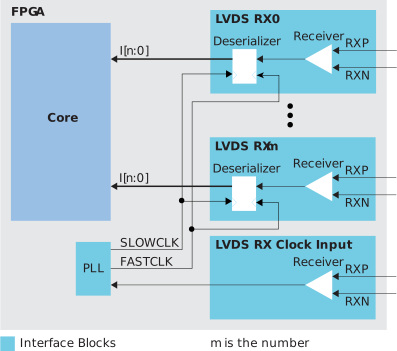
Note: Use LVDS RX blocks from the same side of the FPGA to
minimize skew between data lanes and RX clock input in an LVDS RX
interface.
Follow these steps to build an LVDS RX interface using the Efinity® Interface Designer.
Procedure
-
Add an
LVDS
/ SLVS RX block to act as the PLL reference clock input:
Option Description LVDS Type Receiver (RX) LVDS Resource Use GPIOB_CLK0 when designing with T8 (Q144), T13, and T20 (Q100, Q144, F169, F256) FPGAs. Otherwise, use any resource.Connection Type pll_clkin Input Pin/Bus Name Use the clock LVDS RX clock output name as the incoming clock. -
Add a PLL block with the following settings:
Option Description Resource Always use PLL_BR0 for the RX interface when designing with T8 (Q144), T13, and T20 (Q100, Q144, F169, F256) FPGAs. Otherwise, use any resource.Reference Clock Mode External Reference Clock Frequency Set the reference clock frequency to match the clock coming from the LVDS RX reference clock you created in step 1. Output Clock For LVDS deserializer widths 2 - 8, define the output clocks so that you have one for the fast clock (serial) and one for the slow clock (parallel). Set the relationship between the clocks such that the serial clock frequency = parallel clock frequency * (serialization / 2). The serial clock must use the 90 degree phase shift. -
Add an LVDS RX block with these settings:
Option Description LVDS Type Receiver (RX) LVDS Resource Any channel Enable Deserialization On Deserialization Width n Output Pin/Bus Name Any Serial Clock Pin Name Use the fast clock output name that corresponds to the PLL you chose. Parallel Clock Pin Name Use the slow clock output name that corresponds to the PLL you chose. - Repeat step 3 for each LVDS RX data lane you want to implement.