LVDS TX
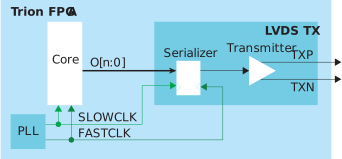
| Signal | Direction | Notes |
|---|---|---|
| O[n-1:0] | Input | Parallel output data where n is the serialization factor.
A width of 1 bypasses the serializer. |
| FASTCLK | Input | Fast clock to serialize the data to the LVDS pads. |
| SLOWCLK | Input | Slow clock to latch the incoming data from the core. |
| Pad | Direction | Description |
|---|---|---|
| TXP | Output | Differential P pad. |
| TXN | Output | Differential N pad. |
Important: For QFP100F3 packages, do
not toggle the CCK pin when any LVDS TX is used.
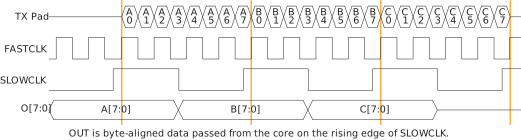
The following waveform shows the relationship between the fast clock, slow clock, TX data going to the pad, and byte-aligned data from the core.


Note: For LVDS TX
interfaces with multiple LVDS TX lanes and an LVDS TX reference clock output, use the
LVDS TX blocks from the same side of the FPGA to minimize skew between data lanes and TX
reference clock output.
| Parameters | Choices | Notes |
|---|---|---|
| Instance Name | User defined | |
| LVDS Resource | Resource list | Choose a resource. |
| Mode | serial data output or reference clock output | serial data output—Simple output buffer or
serialized output. reference clock output—Use
the transmitter as a clock output. When choosing this mode, the
Serialization Width you choose should
match the serialization for the rest of the LVDS bus. |
| Parallel Clock Division | 1, 2 | 1—The output clock from the LVDS TX lane is
parallel clock frequency. 2—The output clock
from the TX lane is half of the parallel clock
frequency. |
| Enable Serialization | On or off | When off, the serializer is bypassed and the LVDS buffer is used as a normal output. |
| Serialization Width | 2, 3, 4, 5, 6, 7, or 8 | Supports 8:1, 7:1, 6:1, 5:1, 4:1, 3:1, and 2:1. Specify the serial clock and parallel clock. |
| Output Pin/Bus Name | User defined | Output pin or bus that feeds the LVDS transmitter parallel data. The width should match the serialization factor. |
| Output Enable Pin Name | User defined | Use with serial data output mode. Only available when
serialization is disabled. |
| Reduce VOD Swing | On or off | When true, enables reduced output swing (similar to slow slew rate). |
| Output Load | 3, 5, 7, or 10 | Output load in pF. Use an output load of 7 pF or higher to achieve the maximum supported toggle rate. See ref_dc_switch_t20.html#ref_dc_switch_t20__table_vvf_ft5_pyb. |
| Output Load | QFP144:
5, 7, or 10 All others:
3, 5, 7, or 10 |
Output load in pF. Use an output load of 7 pF or higher to achieve the maximum supported toggle rate. Refer to the data sheet for the maximum toggle rate. |