Understanding PLL Phase Shifting
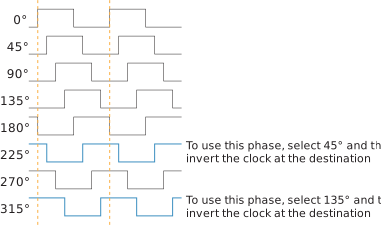
The PLL supports clock phases from 0 to 315 degrees.
- You can select phases 0, 45, 90, 135, 180, and 270 in the Interface Designer directly.
- For phase 225, select 45 in the Interface Designer and then invert the clock at the destination.
- For phase 315, select 135 in the Interface Designer and then invert the clock at the destination.
Invert the Clock in the Interface Designer
If you connect the PLL clock output to a GPIO and want to invert it at the GPIO, use
the Interface Designer GPIO Block Editor to do the inversion:
- Add the GPIO block.
- Choose clkout as the Mode.
- Turn on the Inverted option.
Invert the Clock in Verilog HDL
This Verilog HDL example shows how to invert the clock
clk_45:always @ (negedge clk_45) begin // the negative edge inverts the clock
<your code>
endInvert the Clock in VHDL
This VHDL example shows how to invert the clock
clk_45:
process (clk_45)
    begin  -- process
      if falling_edge(clk_45) then  // the falling edge inverts the clock
        <your code>
      end if;
end process;