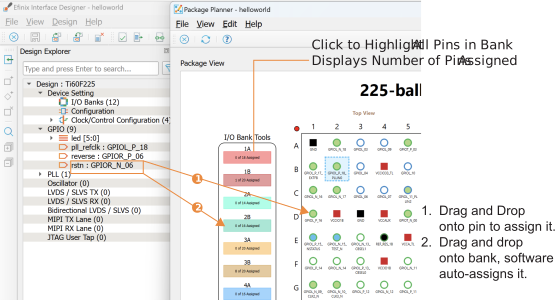
Drag-and-Drop Assignments
In v2025.2 you can use drag-and-drop to assign instances to a pin or bank. Position the Interface Design and Package Planner windows so that they are side by side or overlapping. Click the instance name and drag it onto the Package Planner. Drag to a pin to assign the instance to that pin. Drag to a block in the I/O Bank Tools and the software auto-assigns it to a pin in the chosen bank.
In v2025.2 you can drag and drop GPIO, LVDS, MIPI lanes, MIPI D-PHY, DDR, SPI flash, and PLL SSC blocks. For the multi-pin instances, drag the instance onto one of the pins. For example for MIPI D-PHY, drag the instance onto any of the MIPI pins. Additional instance support (such as buses) is planned for a future software release.