LVDS RX
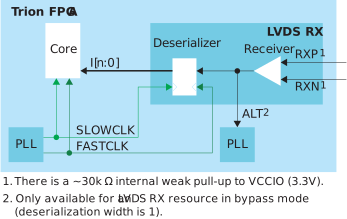
| Signal | Direction | Notes |
|---|---|---|
| I[n-1:0] | Output | Parallel input data where n is the de-serialization factor.
A width of 1 bypasses the deserializer. |
| ALT | Output | Alternative input, only available for an LVDS RX resource in bypass mode (deserialization width is 1; alternate connection type). Alternative connections are PLL_CLKIN. |
| FASTCLK | Input | Fast clock to de-serialize the data from the LVDS pads. |
| SLOWCLK | Input | Slow clock to latch the incoming data to the core. |
| Pad | Direction | Description |
|---|---|---|
| RXP | Input | Differential P pad. |
| RXN | Input | Differential N pad. |
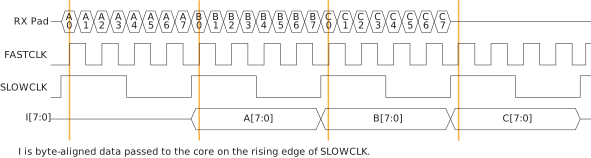
The following waveform shows the relationship between the fast clock, slow clock, RX data coming in from the pad, and byte-aligned data to the core.
Note: For LVDS RX
interfaces with multiple LVDS RX lanes and an LVDS RX clock input, use the LVDS RX
blocks from the same side of the FPGA to minimize skew between data lanes and RX clock
input.
| Parameter | Choices | Notes |
|---|---|---|
| Instance Name | User defined | |
| LVDS Resource | Resource list | Choose a resource. |
| Connection Type | normal, pll_clkin | normal—Regular RX function.
pll_clkin—Use the PLL CLKIN
alternate function of the LVDS RX resource. |
| Input Pin/Bus Name | User defined | Input pin or bus that feeds the LVDS transmitter parallel data. The width should match the deserialization factor. |
| Enable Deserialization | On or off | When off, the de-serializer is bypassed and the LVDS buffer is used as a normal input. Specify the serial clock and parallel clock. |
| Deserialization Width | 2, 3, 4, 5, 6, 7, or 8 | Supports 8:1, 7:1, 6:1, 5:1, 4:1, 3:1, and 2:1. |
| Enable On-Die Termination | On or off | When on, enables an on-die 100-ohm resistor. |
| Static Mode Delay Setting | 0 - 63 | Choose the amount of static delay, each step adds approximately 25 ps of delay. |