TX Requirements for Dynamically Changing the Horizontal Resolution
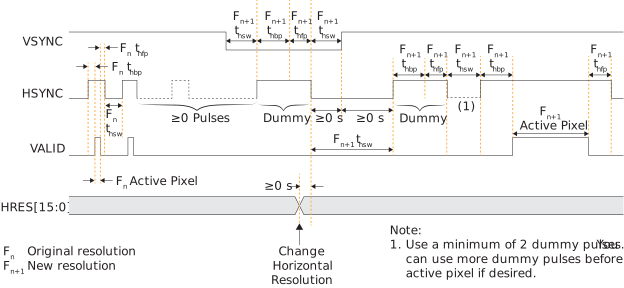
You can dynamically change the resolution by frame. You change the horizontal resolution
(HRES[15:0] signal) during the frame (or vertical) blanking period,
which happens between the frame start and frame end packets.
To correctly handle the resolution change, you need to fine-tune the TX interface's front
and back porch timing and insert at least 2 dummy HSYNC pulses before
the TX sends the active pixel.
You can pulse the HSYNC signal any number of times before the first
dummy pulse. You change the resolution on HRES[15:0] at the end of the
first dummy pulse.
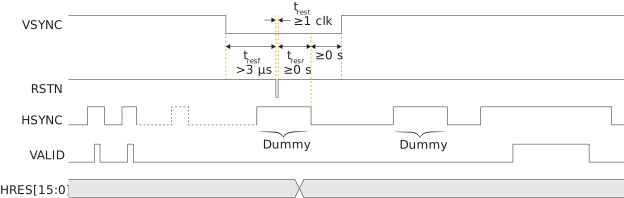
You should pulse the active-low CSI-2 controller logic reset, RSTN,
during the first dummy pixel. You do not need to reset the D-PHY.
provides an additional worksheet in the MIPI Utility to help you determine the correct back and front porch timing values for the resolutions you are using in your application. Refer to Using the Dynamic Horizontal Resolution (HRES) TX Utility for details.