About the Advanced PLL Interface
The Trion has 5 available PLLs to synthesize clock frequencies.
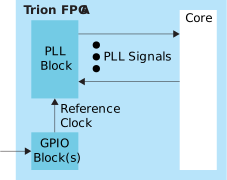
Trion FPGAs have PLLs to synthesize clock frequencies. The number of PLLs depends on the FPGA and package.
You can use the PLL to compensate for clock skew/delay via external or internal feedback
to meet timing requirements in advanced application. The PLL reference clock has up to
four sources. You can dynamically select the PLL reference clock with the
CLKSEL port. (Hold the PLL in reset when dynamically selecting the
reference clock source.)
One of the PLLs can use an LVDS RX buffer to input it’s reference clock.
Depending on the package, one or more of the PLLs can use an LVDS RX buffer to input it’s reference clock.
The PLL consists of a pre-divider counter (N counter), a feedback multiplier counter (M counter), a post-divider counter (O counter), and output divider.
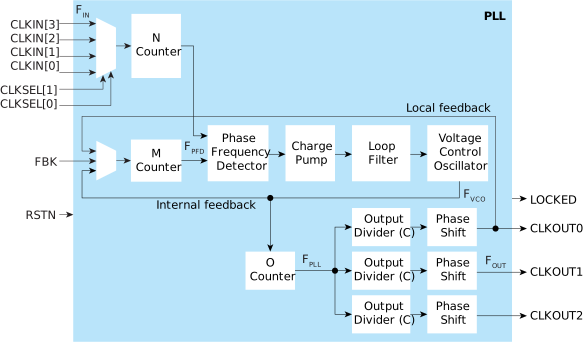
The counter settings define the PLL output frequency:
| Internal Feedback Mode | Local and Core Feedback Mode | Where: |
|---|---|---|
|
FPFD = FIN / N
FVCO = FPFD x M
FOUT = (FIN x M) / (N x O x C)
FPLL = FVCO / O
|
FPFD = FIN / N
FVCO = (FPFD x M x O x CFBK )
1
FOUT = (FIN x M x CFBK) / (N x
C)
FPLL = FVCO / O
|
FVCO is the voltage control oscillator
frequency FOUT is the output clock
frequency FIN is the reference clock
frequency FPFD is the phase frequency
detector input frequency FPLL is
the post-divider PLL frequency C is the output
divider O is the post-divider M is the
multiplier N is the pre-divider CFBK
is the output divider for CLKOUT0 |
| Signal | Direction | Description |
|---|---|---|
| CLKIN[3:0] | Input | Reference clocks driven by I/O pads or core clock tree. |
| CLKSEL[1:0] | Input | You can dynamically select the reference clock from one of the clock in pins. |
| RSTN | Input | Active-low PLL reset signal. When asserted, this signal resets the
PLL; when de-asserted, it enables the PLL. De-assert only when the CLKIN
signal is stable. Connect this signal in your design to power up or
reset the PLL. Assert the RSTN pin for a minimum pulse of 10 ns to
reset the PLL. Assert RSTN when dynamically changing the selected
PLL reference clock. |
| FBK | Input | Connect to a clock out interface pin when the PLL feedback mode is not internal. |
| CLKOUT0 CLKOUT1 CLKOUT2 |
Output | PLL output. The designer can route these signals as input clocks to the core's GCLK network. |
| LOCKED2 | Output | Goes high when PLL achieves lock; goes low when a loss of lock is
detected; remains at previous state if the CLKIN goes discontinuous.
Connect this signal in your design to monitor the lock status. This
signal is not synchronized to any clock and the minimum high or low
pulse width of the lock signal may be smaller than the CLKOUT’s
period. |
| Parameter | Choices | Notes |
|---|---|---|
| Instance Name | User defined | |
| PLL Resource | The resource listing depends on the FPGA you choose. | |
| Clock Source | External | PLL reference clock comes from external source through the REFCLK pin. Select the available external clock. |
| Dynamic | PLL reference clock comes from up to four possible sources (external and core), and are controlled by the clock select bus. Specify the clock selector and core clock names. | |
| Core | PLL reference clock comes from the core. Specify the core clock pin name. | |
| Automated Clock Calculation | Pressing this button launches the PLL Clock Caclulation window. The calculator helps you define PLL settings in an easy-to-use graphical interface. |
| Parameter | Choices | Notes |
|---|---|---|
| Reset Pin Name | User defined | |
| Locked Pin Name | User defined | |
| Feedback Mode | Internal | PLL feedback is internal to the PLL resulting in no known phase relationship between clock in and clock out. |
| Local | PLL feedback is local to the PLL. Aligns the clock out phase with clock in. | |
| Core | PLL feedback is from the core. The feedback clock is defined by the COREFBK connection, and must be one of the three PLL output clocks. Aligns the clock out phase with clock in and removes the core clock delay. | |
| Reference clock Frequency (MHz) | User defined | |
| Multiplier (M) | 1 - 255 (integer) | M counter. |
| Pre Divider (N) | 1 - 15 (integer) | N counter. |
| Post Divider (O) | 1, 2, 4, 8 | O counter. The value must be 2 or higher if you enable more than 1 PLL output. |
| Clock 0, Clock 1, Clock 2 | On, off | Use these checkboxes to enable or disable clock 0, 1, and 2. |
| Pin Name | User defined | Specify the pin name for clock 0, 1, or 2. |
| Divider (C) | 1 to 256 | Output divider. |
| Phase Shift (Degree) | 0, 45, 90, 135, 180, or 270 | Phase shift CLKOUT by 45°, 90°, 135°, 180°, or 270°. The phase shifts
are supported with the following C divider settings: C divider = 2 :
90°, 180°, and 270° C divider = 4 : 45°, 90°, and
135° C divider = 6 : 90° To phase shift 225°,
select 45° and invert the clock at the destination. To
phase shift 315°, select 135° and invert the clock at the
destination. |
| Use as Feedback | On, off |
| PLL | REFCLK1 | REFCLK2 |
|---|---|---|
| PLL_BR0 | Differential: GPIOB_CLKP0, GPIOB_CLKN0 Single Ended:
GPIOB_CLKP0 |
GPIOR_157_PLLIN |
| PLL_TR0 | GPIOR_76_PLLIN0 | GPIOR_77_PLLIN1 |
| PLL_TR1 | GPIOR_76_PLLIN0 | GPIOR_77_PLLIN1 |
| PLL_TL0 | GPIOL_74_PLLIN0 | GPIOL_75_PLLIN1 |
| PLL_TL1 | GPIOL_74_PLLIN0 | GPIOL_75_PLLIN1 |