Hardware Set Up for Trion® T120 BGA324 Development Board
The following figure shows the hardware setup steps for Trion T120 BGA324 Development Board example design. If you have not already done so, attach standoffs to the board.
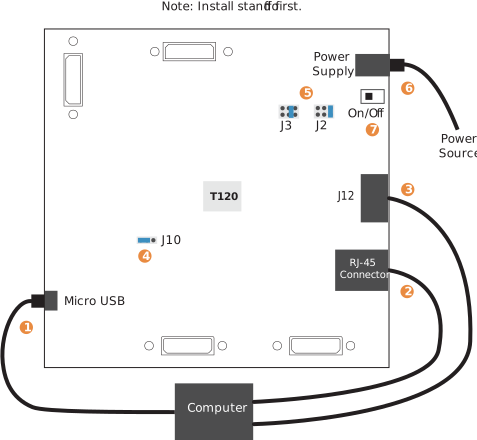
- Connect a USB cable to the board and to your computer.
- Connect an Ethernet cable to the RJ-45 receptable on the board and to your computer.
- Connect a USB-to-UART module to the J12 header. See Set Up a USB-to-UART Module.
- On header J10, connect pins 2 – 3 with a jumper (default) to use the on-board oscillator.
- Leave the jumper on J2 at the defaults (connecting pins 1 -2). On J3, connect pins 1 – 2.
- Connect the 12 V power supply to the board connector from a power source.
- Turn on the board.
Note: Ensure that you install the driver for the correct interface.
Refer to the Trion T120 BGA324 Development Kit User Guide
for information about installing the drivers.