QEMU Emulator

About this task

The QEMU Emulator lets you try out your program without hardware. This feature is helpful for emulating your program before the hardware is ready.

To get started with the QEMU emulator, follow these steps:

Procedure

  1. Select Import Projects... in the Project Explorer.
  2. In the Import Projects window, select General > Existing Projects into Workspace > Next.
  3. Choose the Select archive file > Browse. Browse to the <Efinity IDE Installation Path>/efinity-riscv-ide-2022.2.2/examples/qemu32-baremetal.zip. Click Open.
  4. Turn on for qemu32-baremetal project.
    Figure 1. Importing QEMU Project
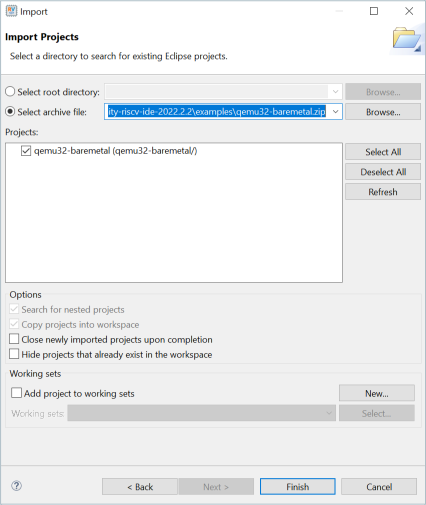
  5. Click Finish.
  6. You can now browse through all source files in the project.
    Figure 2. Project Explorer Pane showing qemu32-baremetal Project
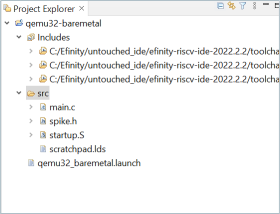
  7. To clean the project, right-click the project name and select Clean Project. Select Build Project to start building the program.
  8. To start debugging the QEMU, right-click on the QEMU project and select Debug As > Debug Configurations....
  9. In the Debug Configurations, select qemu32_baremetal in Ashling_QEMU Simulator Debugging.
  10. Click Debug to start the debugging process.
    Note: Windows Security Alert might prompt you to ask for permission to allow the QEMU machine emulator to run. Click Allow access.

Results