Peripheral Register View
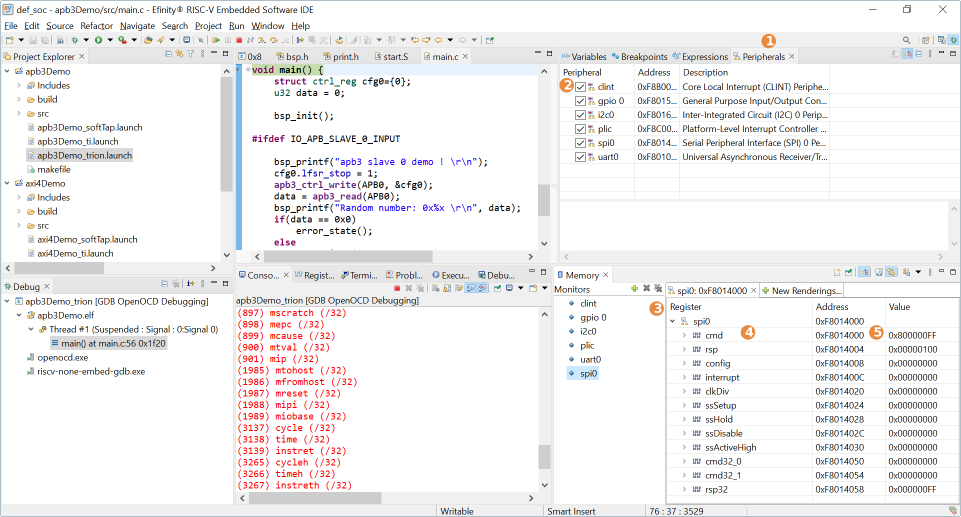
With the Peripheral Register View, you can easily view the value of each register of the peripherals you have enabled for the Sapphire SoC. The view helps you with your debugging process without the need to view through memory addresses.
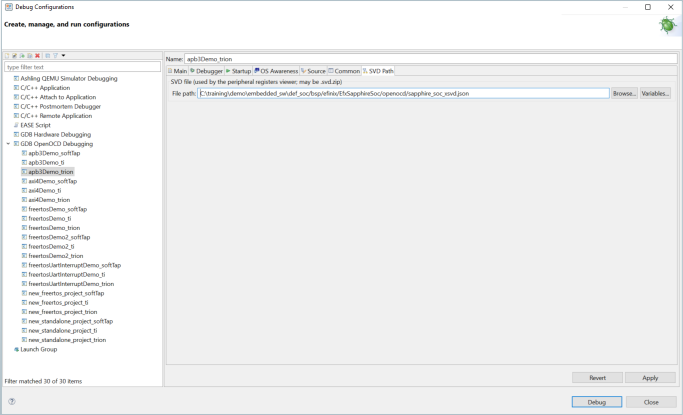
The IDE automatically points to the .xsvd file generated by the Efinity software. If you want to point to a different xsvd file, you may do it by going to and browse to another xsvd.json file. The default generated .xsvd file is located in /bsp/efinix/EfxSapphireSoc/openocd/sapphire_soc_xsvd.json
Notice: For more information on xsvd
format, refer to the xPack SVD Definitions. This brings you to the website upon
clicking.
When working with the Peripherals View, note that:
- All available peripherals for the current Sapphire SoC are listed in the Peripherals tab.
- To view the specific peripheral, turn on the preferred peripheral.
- Once you have chosen the peripheral(s), the Memory Monitor shows up on the bottom right.
- To view the register, just select the specific peripheral in the Monitor.
- Each register has its own address and value in the memory. Hover your mouse over the register to view more information on each register.
- The color on the register row changes if the current value is different from the previous value.