Updating Bootloader with Efinity BRAM Initial Content Updater
The Efinity BRAM Initial Content Updater provides a convenient way to modify the default firmware (either bootloader or other application) within the Sapphire SoC on-chip RAM. This process enables you to update the on-chip RAM initial content without recompiling the entire project.
To update the on-chip RAM initial content, follow these steps:
- Compile and locate the .hex file: Compile your new application in Efinity RISC-V Embedded Software IDE and locate the corresponding .hex file that contains the compiled code.
- Generate the Sapphire SoC with the new
application: By using the Sapphire SoC IP
Configurator, update the default on-chip RAM application with your new
application compiled in the provious step. You may refer to the Modify the Bootloader Software to Extend the External Memory Size on how to use the Custom On-Chip RAM Application in
the Sapphire SoC IP Configurator. and you are now ready
for the updating process.Note: You may opt to generate the binaries with the binGen.py helper script provided manually. Refer to Appendix: Re-Generate the Memory Initialization Files Manually.
- Locate the new binaries for your application: After the Sapphire SoC is generated with your application, locate the new binaries, EfxSapphireSoc.v_toplevel_system_ramA_logic_ram_symbol<n>.bin where <n> is the range from 0 to 3 (up to 7 if FPU extension is enabled).
- Open the BRAM Initial Content Updater: Click on the BRAM
Initial Content Updater tab to launch the BRAM
Initial Content Updater.
Figure 1. Open the BRAM Initial Content Updater 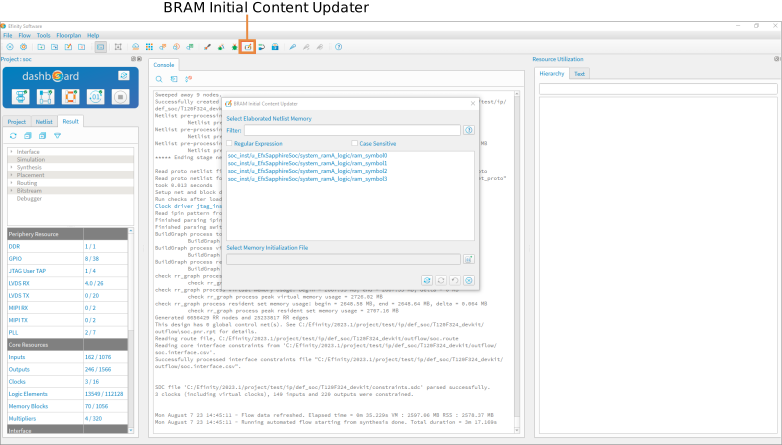
- Select Memory Initialization File: In the BRAM Initial
Content Updater window, locate
the Sapphire SoC BRAM that you would like to update
and click on the *_symbol0.
In the Select Memory Initialization File section,
click the Select Memory Initialization
tab. Browse to the updated
EfxSapphireSoc.v_toplevel_system_ramA_logic_ram_symbol<n>.bin
and click Open.
Figure 2. Select Memory Initialization File 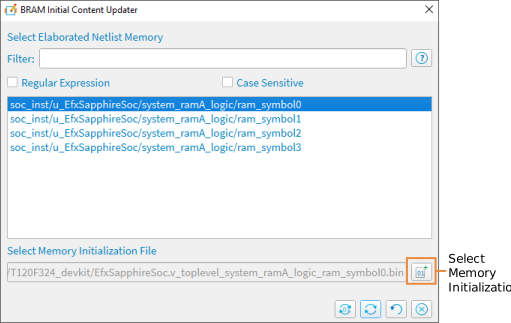
- Update the BRAM: Click on the Update Memory
Content tab to update the symbol0 BRAM with
the new application symbol0 binary.
Figure 3. Update the BRAM with New Application 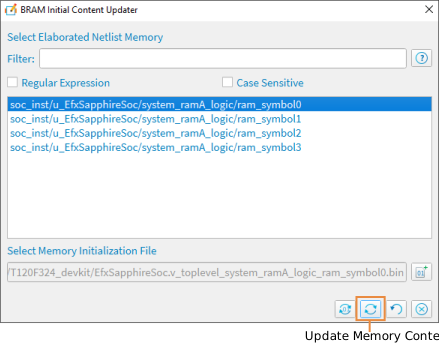
- Update the remaining BRAM: Repeat step 5 and 6 for all the available symbol files. Update the BRAM with the corresponding binary. For example, update *_ram_symbol2 BRAM with EfxSapphireSoc.v_toplevel_system_ramA_logic_ram_symbol2.bin binary file.
- Generate the new bitstream: Click on the Regenerate
Bitstream icon to regenerate the bitstream. The generated new
bitstreams are located in the outflow folder.
Figure 4. Generate the New Bitstream 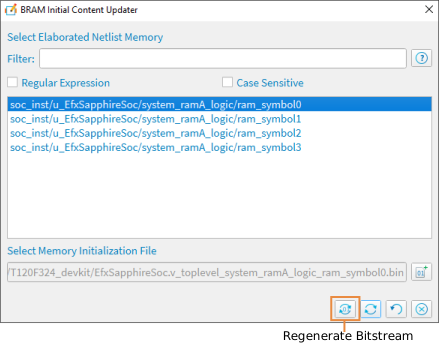
Note: For more information on the Efinity BRAM
Initial Content Updater and its application, see the Efinity Software User Guide.