smpDemo (for Sapphire SoC)
This demo (smpDemo directory) illustrates how to use multiple cores to process multiple encryption pat the same time in parallel. Each core is assigned an encryption algorithm with an input keys (each core has a different key). Core 0 prints the final encrypted values after the other cores complete the encryption. If a single core performed the encryption, it would take four times more clock cycles to complete the process.
To run the smpDemo correctly, ensure your Sapphire SoC is
configured with more than 1 core, or else you may encounter a build error. If your
Sapphire SoC is configured as a multi-core, the
*_mc.launch scripts are generated by the Efinity RISC-V Embedded Software IDE. Launch the *_mc.launch based on your
configuration.
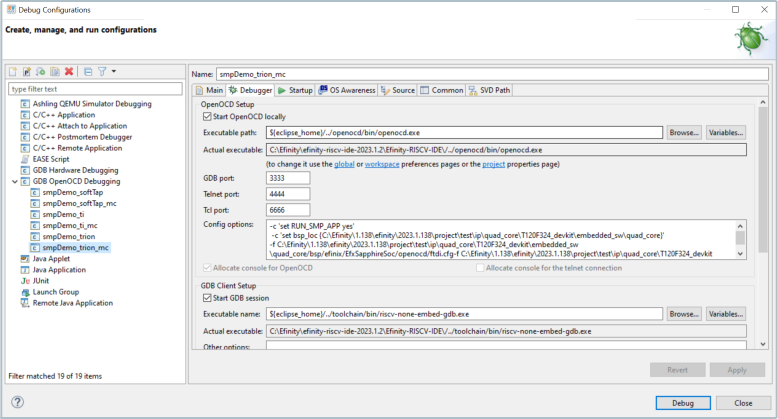
Click Apply and start the debugging by clicking Debug.
The demo outputs the following messages to a terminal:
smpDemo with multiple cpu processing
synced!
processing clock cycles:24353

hart 0 encrypted output A:167C6CC6
hart 0 encrypted output B:465E6781
hart 1 encrypted output A:E39A3A87
hart 1 encrypted output B:70CF21D1
hart 2 encrypted output A:CBA365FF
hart 2 encrypted output B:003FDFA8
hart 3 encrypted output A:93D5278B
hart 3 encrypted output B:62F40A6F