When you turn on the Enable Soft JTAG TAP option in the IP
Configuration wizard, the example design assigns the JTAG pins to resources in the
interface design. Use the following figures to connect the table to the JTAG pins. By
default, the C232HM-DDHSL-0 JTAG is targeted. Select your preferred JTAG cable in
Debug and Linker Scripts Support under the Debug tab in the
IP Manager
Note: If you have not already done so, install the driver for the FTDI mini-module as
described in Installing USB Drivers.
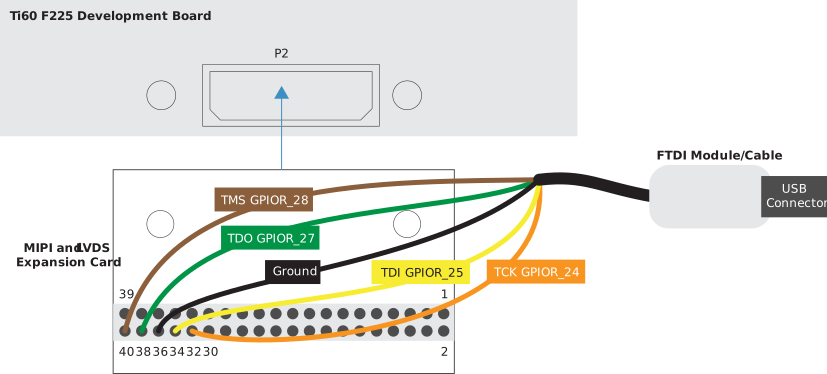
Connecting to the Titanium Ti60 F225 Development Board
Figure 1. Connecting the FTDI Module or C232HM-DDHSL-0 Cable
Table 1. FTDI to Daughter Card Connections
Port
Resource
MIPI and LVDS Expansion Daughter Card (P2) Pin
TCK
GPIOR_24
32
TDI
GPIOR_25
34
TDO
GPIOR_27
38
TMS
GPIOR_28
40
GND
–
36
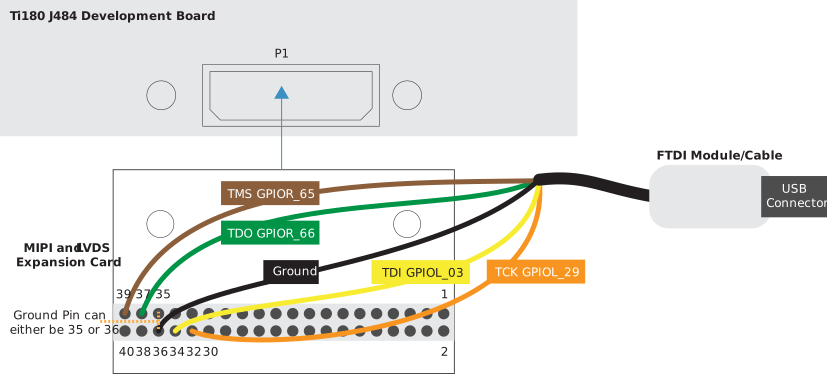
Connecting to the Titanium Ti180 J484 Development Board
Figure 2. Connecting the FTDI Module or C232HM-DDHSL-0 Cable
Table 2. FTDI to Daughter Card Connections
Port
Resource
MIPI and LVDS Expansion Daughter Card (P1) Pin
TCK
GPIOL_29
32
TDI
GPIOL_03
34
TDO
GPIOR_66
37
TMS
GPIOR_65
39
GND
–
35/36
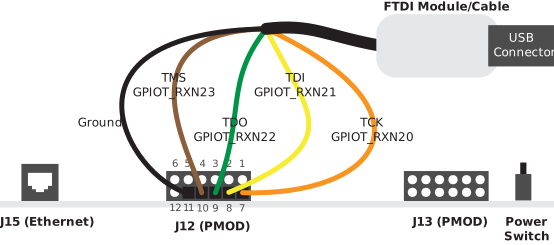
Connecting to the Trion® T120 BGA324 Development Board
Figure 3. Connecting the FTDI Module or C232HM-DDHSL-0 Cable
Table 3. FTDI to PMOD Connections
Port
Resource
PMOD (J12) Pin
TCK
GPIOT_RXN20
7
TDI
GPIOT_RXN21
8
TDO
GPIOT_RXN22
9
TMS
GPIOT_RXN23
10
GND
–
5 or 11
Debugging in Efinity RISC-V Embedded Software IDE
Open your Efinity RISC-V Embedded Software IDE
project.
Run or debug the software with the OpenOCD debugger using the
default_softTap to launch the configuration.