PCI Express RP Outbound Tab
In the RP Outbound tab you configure the root port. If you have not yet configured anything, this tab only shows the Root Port Outbound Settings button. Click it to open the Root Port Outbound Settings dialog box where you create and configure regions. After you have configured one or more regions, the RP Outbound tab shows a summary of the region settings.
You can enter cofigurations for up to 32 regions in the Root Port Outbound Settings dialog box. Click the Verify button to perform a design check. If the software finds any configuration errors, it highlights them in the Console. Refer to Design Check: PCI Express Messages for a description of the error messages. When you finish configuration, the software saves it into the specified .json file in your project directory.
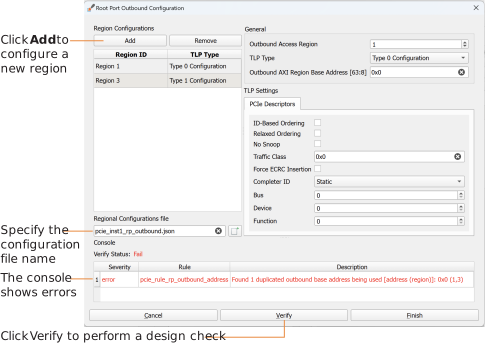
| Parameter | Choices | Notes |
|---|---|---|
| Outbound Acccess Region | 0 - 31 | Select the region number. |
| TLP Type | Type 0 Configuration Type 1 Configuration |
Type 0 is for endpoints. Type 1 is for switches, bridges, or downstream
ports. |
| Outbound AXI Region Base Address {63:8] | User defined | Default: 0x0 |
| ID-Based Ordering | On, off | Default: off |
| Relaxed Ordering | On, off | Default: off |
| No Snoop | On, off | Default: off |
| Traffic Class | User defined | Default: 0x0 |
| Force ECRC Insertion | On, off | Default: off |
| Completer ID | Static Dynamic through AXI ports pcie_master_AW/RADI |
Default: Static If you choose a dynamic ID, you need to specify the
Bus, Device, and
Function options. |
| Bus | 0 - 255 | Choose the bus number. |
| Device | 0 - 31 | Choose the device number. |
| Function | 0 - 7 | Choose the function number. |