Create a MIPI RX Interface with GCLK or RCK
About this task
To build a complete MIPI RX interface you need to have at least one data lane and one clock lane in the same MIPI group. The following figure shows the blocks used for a complete MIPI RX interface.
Tip: The Interface Designer Block Summary shows the MIPI group name in the
Features property. You can also refer to MIPI Groups by Package.
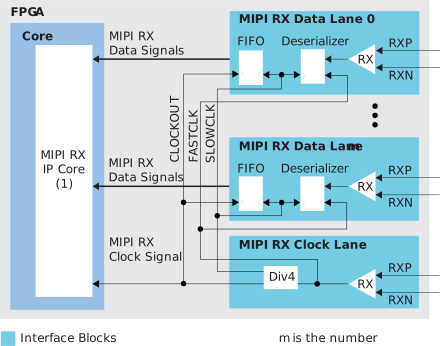
1. Refer to the Efinity Software User Guide for a listing of available MIPI-related IP cores.
Procedure
-
Add MIPI RX Lane block for the data lane:
Option Description MIPI Lane Resource Choose a resource in any MIPI group (all lanes should be in the same MIPI group). Mode data lane - Repeat step 1 for each MIPI RX data lane you want to implement.
-
Add another MIPI RX Lane block for the clock lane:
Option Description MIPI Lane Resource Choose a resource in the same MIPI group as the data lane(s). Mode clock lane Byte Clock (core) Pin Name The name for the byte clock that feeds the core and automatically is used to clock the FIFO from the data lanes in this MIPI group. - Implement the rest of the MIPI RX interface in RTL using a MIPI RX IP core (CSI-2, D-PHY, or DSI). Refer to the user guide for the IP core for instructions.