Using the PCI Express Interface
You use the Efinity Interface Designer to implement a PCI Express block and configure it. Additionally, your interface design requires a PLL and a GPIO block for clock and reset signals. The PERST pin is a GPIO resource. The reference clock pin is a dedicated package pin.
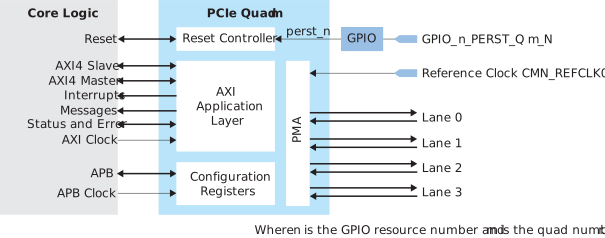
See GPIO Block (PERST_N) and Reference Clock for
the resource and pin information.
Note: You also need to enable the configuration user status pin. See Enable Configuration User Status Pin.
Additionally, the PCI Express
block requires you to have an APB clock. Specify a clock name in the Interface
Designer.
Tip: The PCIe Express interface is complicated. If you find yourself turning a lot
of options on and off to enable or disable features, some of the GUI menus might get out of
sync. Therefore, Efinix suggests that you note the settings you want, and then
start fresh with a newly created PCI Express block with only the settings you want.