lwipIperfServer
(For Sapphire High-Performance SoC)
This demonstration (lwipIperfServer directory) illustrates how to use the LWIP software stack to enable the Sapphire high-performance RISC-V SoC as an Iperf server. Iperf is a simple performance measuring tool used to check Ethernet bandwidth. You can use iPerf2 on a PC as the client. Before running the iPerf2 tool, ensure that you can ping your device from your computer to establish a connection.
Before running this design, you need to set up your Ethernet adapter as follows:
- Set the IPv4 and netmask as follows:
Figure 1. Setting the IPv4 and Netmask 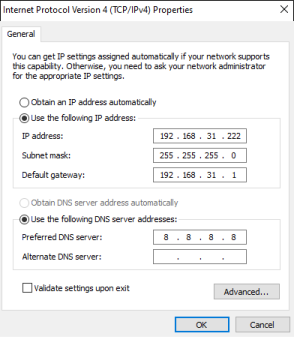
- Set the network adapter speed according to your RTL design. The default setting
is 1.0 Gbps full duplex.
Figure 2. Setting the Network Adapter Speed 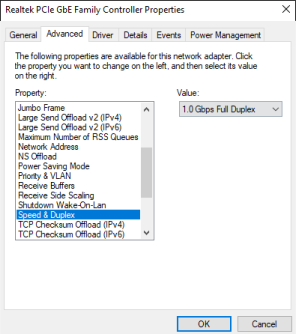
The demo outputs the following messages to a
terminal:
***Starting TSEMAC Demo***
Phy Init ..
Waiting Link Up ..
Linked Up
Link Partner Full duplex 1000 Mbps

iperf server Up

=========================================
======Lwip Raw Mode Iperf TCP Server ====
=========================================
======IP:               192.168.31.55
======Netmask:          255.255.255.0
======GateWay:          192.168.31.1
======link Speed:       1000 Mbps
=========================================