Open a Terminal
You can use any terminal program, such as Putty, termite, or the built-in terminal in the Efinity RISC-V Embedded Software IDE, to connect to the UART. These instructions explain how to use the built-in terminal while the others are similar.
- In Efinity RISC-V Embedded Software IDE, choose . The Terminal tab opens.
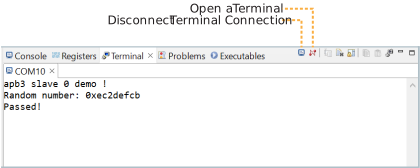
- Click the Open a Terminal button.
- In the Launch Terminal dialog box, enter these
settings:
Option Setting Choose terminal Serial Terminal Serial port COMn (Windows) or ttyUSBn (Linux) where n is the port number for your UART module.Baud rate 115200 Data size 8 Parity None Stop bits 1 Encoding Default (ISO-8859-1) - Click OK. The terminal opens a connection to the UART.
- Run your application. Messages are printed in the terminal.
- When you are finished using the application, click the Disconnect Terminal Connection button.