Hardware
The Sapphire SoC is a design block that has a CPU, peripherals, and I/Os while the Sapphire high performance SoC covers the CPU part and traffic interconnects. It includes the AXI interface ports, custom instruction interface ports, and interrupt ports to core fabric, which allows you to design the peripheral and connects them to the Sapphire high performance SoC.
The following figure illustrates a simplified block diagram of a Sapphire SoC design.
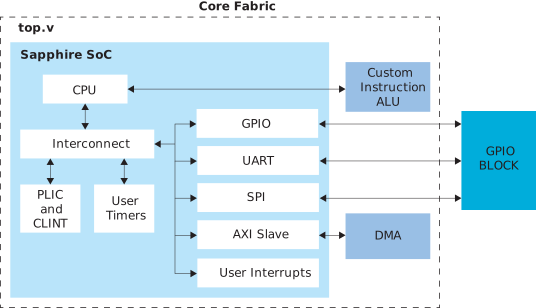
With reference to the Figure 1, the CPU and its peripherals are embedded in the core fabric. You are required to instantiate the Sapphire SoC and other logics like DMA and custom logic ALU in the same top file. The input and output pins from the GPIO, UART, and SPI are routed to the GPIO block to communicate to external devices.
The equivalent design of Figure 1 in the Sapphire high-performance SoC should look like the following figure.
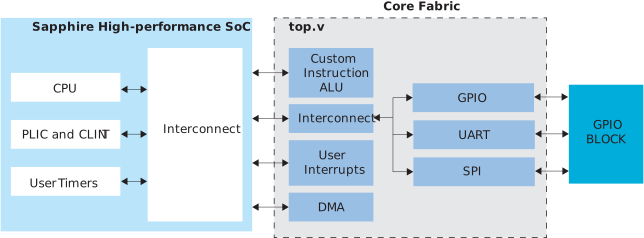
In Sapphire high-performance SoC, you should focus on connecting your logic to the interface pins provided by the SoC. The connection between the Sapphire SoC and the peripheral should be detached. You can put them as the top-level pins to be used later to connect to the Sapphire high-performance SoC interfaces pins. To ease the integration process, Efinix recommends you the following steps.
- On the HRB or Hardened RISC-V Block page, select your desired interface.
- On the SLB-I or SLB-II page, select your desired peripheral to instantiate for your design.
- On the PLL Configuration page, enter your clock frequency to run the CPU and interfaces.
- On the LPDDR4 Configuration page, enter the basic configuration to enable the LPDDR4/4x controller.
- On the Embedded Software page, enter the debug type to use in the linker script information.
- Click Generate once you are done with the configuration.
The IP Manager helps to create soft IPs like SPI, UART, and GPIO, and attach to an interconnect. The interconnect is connected to the AXI4 master interface of Sapphire high-performance SoC. Additionally, it enables the hardened peripherial, e.g., PLL, LPDDR4, JTAG user tap, GPIO block, and hardened SoC block according to your selection in the IP Manager. Furthermore, the IP Manager connects the top-level pins to the hardened SoC block, thus eliminates the need to insert them manually.
Once the generation is completed, you can connect your logic like DMA or custom instruction ALU onto the top file. The IP Manager generates the example top file for your reference, so you do not need to code everything from scratch. The example top file is available at location ip/EfxSapphireHpSoc_slb/EfxSapphireHpSoc_wrapper.v.
You can compile the project once you have finished adding your logic to the top file.