Enabling Soft JTAG in Static Example Design
To enable soft JTAG for Ti375
C529
Sapphire High-Performance SoC, follow these steps.
- Open the Sapphire High-Performance SoC IP Configuration on your current
design with Sapphire High-Performance SoC IP. In the
HRB tab, select JTAG with GPIO
for JTAG debug interface selection before regenerating the IP. The GPIO JTAG
pins (
io_jtag_*) are included in the GPIO blocks.Figure 1. Selecting JTAG with GPIO in the HRB Tab 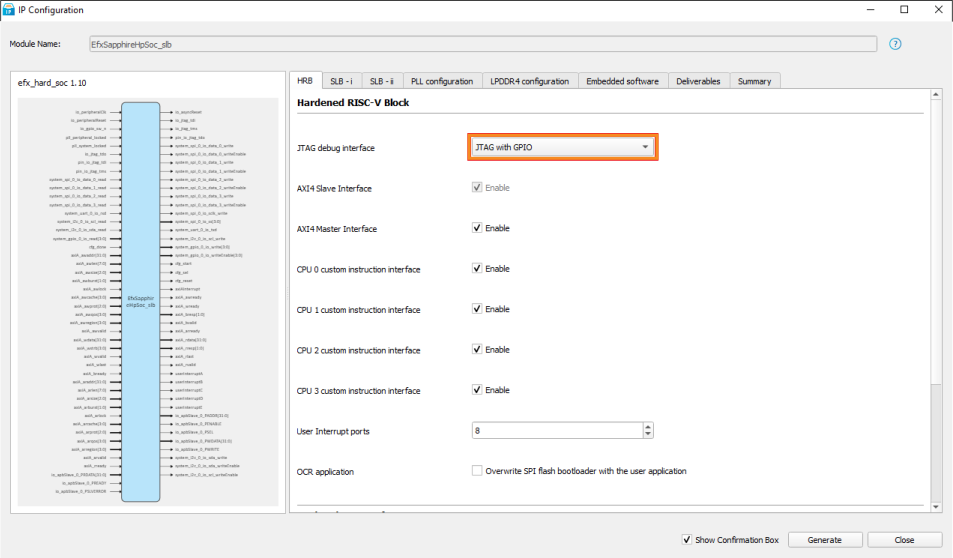
- Open Efinity Interface Designer. Click on
Quad-Core RISC-V (1) block in the Design
Explorer. In the Block Editor, click on
Debug tab. Ensure that the JTAG Interface
Type for the Quad-Core RISC-V block is configured to
CPU option. The CPU indicates that JTAG is using the
TAP controller from the CPU while selecting the FPGA option indicates that JTAG is using
the TAP controller from the FPGA device.
Figure 2. Setting JTAG Interface Type for Quad-Core RISC-V Block 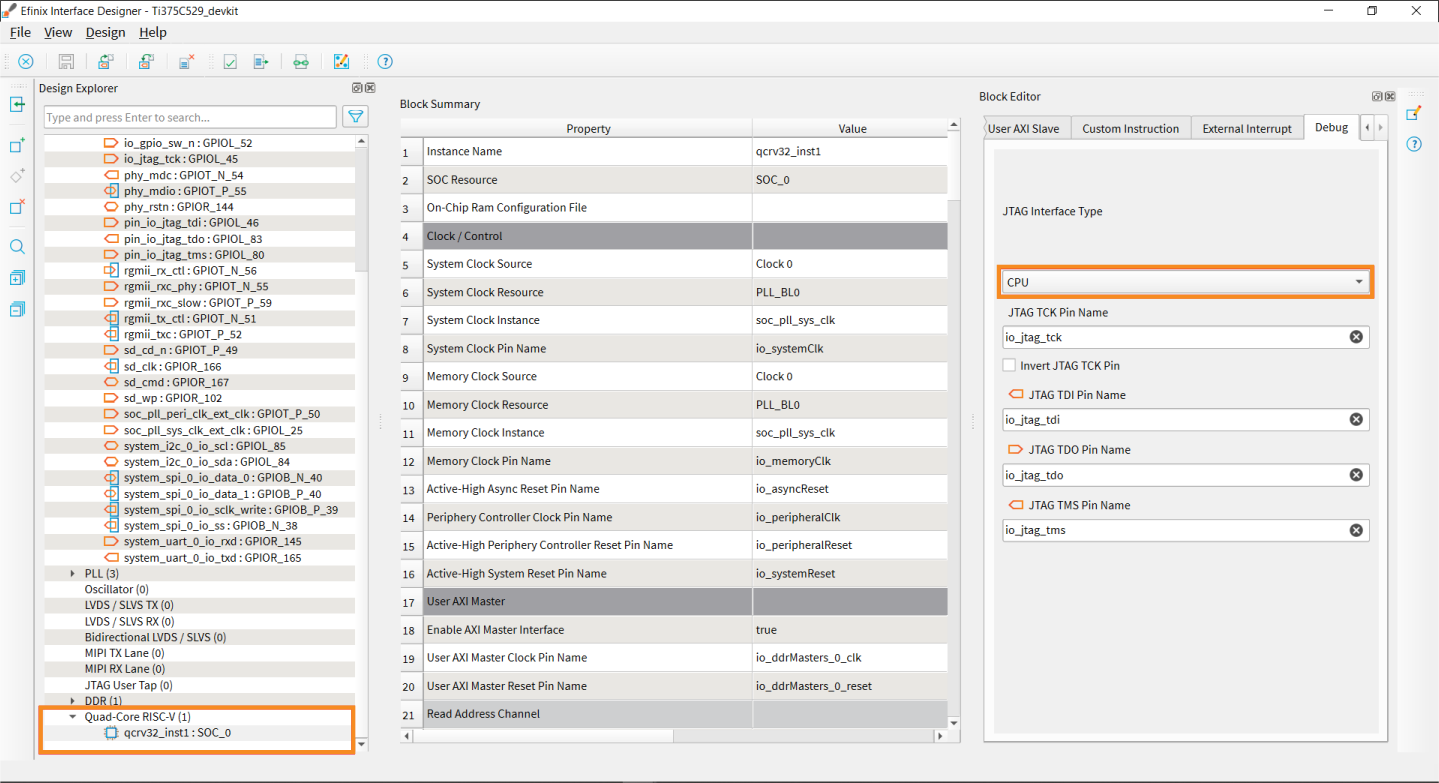
- In the top module (i.e., top_soc.v), remove and replace the
following I/Os:
Table 1. Remove and Replace I/O I/O Type I/O Name Remove Input ut_jtagCtrl_tdi, ut_jtagCtrl_enable, ut_jtagCtrl_capture, ut_jtagCtrl_shift,ut_jtagCtrl_update, ut_jtagCtrl_reset, jtagCtrl_tdo. Output ut_jtagCtrl_tdo, jtagCtrl_tdi, jtagCtrl_enable, jtagCtrl_capture, jtagCtrl_shift, jtagCtrl_update, jtagCtrl_reset. Replace Input io_jtag_tdo, pin_io_jtag_tdi, pin_io_jtag_tms. Output io_jtag_tdi, io_jtag_tms, pin_io_jtag_tdo. - In the top module (i.e., top_soc.v), remove and replace the
following I/Os in the
EfxSapphireHpSoc_slbmodule instantiation:Remove I/O .jtagCtrl_tdi (jtagCtrl_tdi), .jtagCtrl_tdo (jtagCtrl_tdo), .jtagCtrl_enable (jtagCtrl_enable), .jtagCtrl_capture (jtagCtrl_capture), .jtagCtrl_shift (jtagCtrl_shift), .jtagCtrl_update (jtagCtrl_update),.jtagCtrl_reset (jtagCtrl_reset), .ut_jtagCtrl_tdi (ut_jtagCtrl_tdi), .ut_jtagCtrl_tdo (ut_jtagCtrl_tdo),.ut_jtagCtrl_enable (ut_jtagCtrl_enable), .ut_jtagCtrl_capture (ut_jtagCtrl_capture),.ut_jtagCtrl_shift (ut_jtagCtrl_shift), .ut_jtagCtrl_update (ut_jtagCtrl_update),.ut_jtagCtrl_reset (ut_jtagCtrl_reset).Replace I/O .io_jtag_tdi (io_jtag_tdi), .io_jtag_tdo (io_jtag_tdo), .io_jtag_tms (io_jtag_tms), .pin_io_jtag_tdi (pin_io_jtag_tdi), .pin_io_jtag_tdo (pin_io_jtag_tdo), .pin_io_jtag_tms (pin_io_jtag_tms). - Compile the design. The Sapphire High-Performance SoC can now be debugged
through soft JTAG port when launched with the
*_softTap.launch(single core) or*_softTap_mc.launch(multi core) in the Efinity RISC-V Embedded Software IDE.
Note: On the Titanium
Ti375
C529 Development Board, you must ensure that the J22 and PJ17
pin headers are not shunted. Shunting these pin headers can cause communication issues
with the JTAG signals.