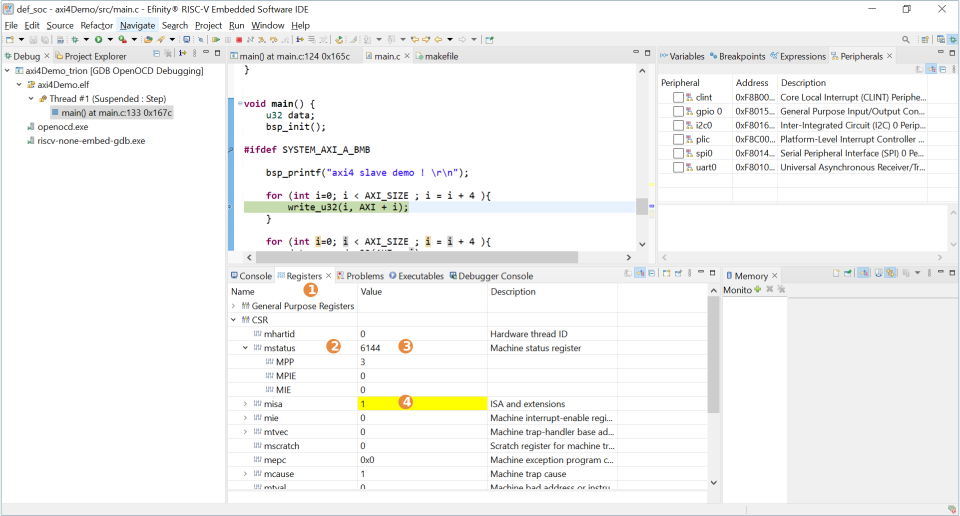
CSR Register View
The CSR Register View displays all CSR values while you are debugging.
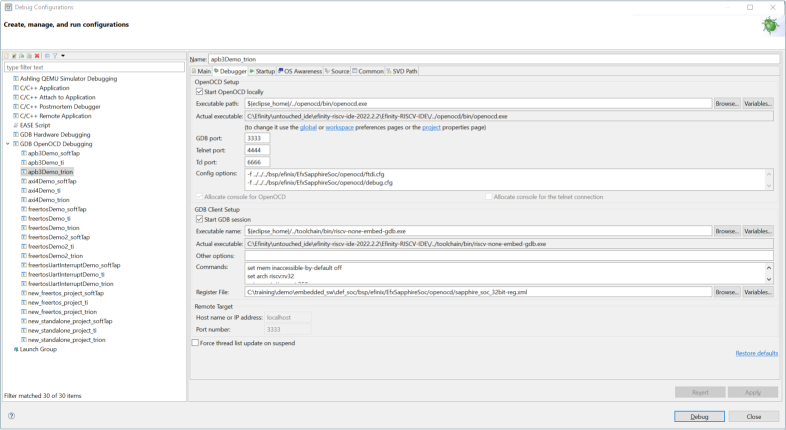
The IDE automatically points to the GDB Description file generated by the IP Manager when you generate the Sapphire High-Performance SoC. If you want to point to a different .xml file, you may do it by going to and browse to the new xml file. The default generated xml file is located in /bsp/efinix/EfxSapphireSoc/openocd/ sapphire_soc_32bit-reg.xml.
When working with the CSR Register View, note that:
- The CSR View is on the Registers tab.
- All supported RISC-V CSRs are listed in the registers depending on the Sapphire High-Performance SoC configuration (example: FPU enabled, MMU enabled).
- Each CSR has its own value and description. CSRs are represented in bits and show up in drop-down menu.
- The cell value is highlighted when the current value is different from the previous value.