Booting Multiple Cores
The Sapphire High-Performance SoC has four or more identical processors that share a common main memory and the same set of hardware I/Os. The processors can execute programs simultaneously; one processor can access the processed data or result from other processors because they are connected in a shared backplane.
With symmetric multi-processing (SMP), you can share the workload across all of the processors, resulting in less time to get a result compared to using a single-core processor. Thus, SMP helps improve overall system throughput and performance. The following flow chart explains how to do multi-core programming in a baremetal environment.
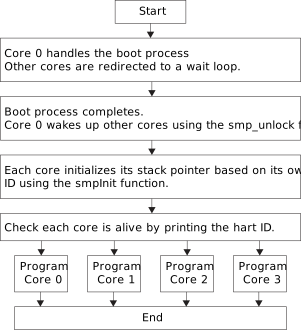
| File | Description |
|---|---|
| start.S | Functions to lock and unlock additional cores directory. To
enable these functions, you should include following flag in your
makefile: |
| smpInit.S | Function to initialize the core. |
These files are located in the embedded_sw/standalone/common/ directory.
#define SYSTEM_PLIC_SYSTEM_CORES_0_EXTERNAL_INTERRUPT 0
#define SYSTEM_PLIC_SYSTEM_CORES_1_EXTERNAL_INTERRUPT 1
#define SYSTEM_PLIC_SYSTEM_CORES_2_EXTERNAL_INTERRUPT 2
#define SYSTEM_PLIC_SYSTEM_CORES_3_EXTERNAL_INTERRUPT 3MTIMECMP register that you can use
to set the trigger. You should provide the hart ID to the API to determine which core
receives the interrupt from the Clint timer. For
example:clint_setCmp(BSP_CLINT, TriggerValue, HartID);