AN 044: Aligning LVDS Clock and Data Signals in Trion Devices
Introduction
Trion FPGAs support LVDS TX (transmit) and RX (receive) channels for high-speed and noise-tolerant data transmission. This application note describes how to align the LVDS clock and data signals for different applications.
Trion LVDS Feature Summary
The following table summarizes the LVDS interface features in Trion FPGAs related to the scope of this application note. Refer to the respective device data sheets for detailed LVDS specifications.
| Feature | Notes |
|---|---|
| Mode | Half-rate only. |
| Serialization width | Up to 8:1, 7:1, 6:1, 5:1, 4:1, 3:1, 2:1 |
| Delay modes | Static delay only |
| Dynamic phase alignment | Not supported |
| Serialization | Half-rate only |
| Maximum data rate per channel | 800 Mbps 600 Mbps (Center-Aligned) |
Hardware Design
High-speed differential signal quality is sensitive and strongly affected by the board design. You must consider trace routing, impedance matching, and crosstalk in both the schematic and PCB design when planning a board design with high-speed differential signals.
Observe the following design best practices when implementing LVDS data transmission:
- Use LVDS blocks from the same side of the FPGA to
minimize skew between the data lanes, and between the clock and data lanes in an
LVDS interface. For example, looking at the package from above, signals sent
from or received at the top edge of the chip should utilize LVDS resources
located in the top I/O banks. All clock lanes and data lanes associated with the
channel should use the
GPIOT_PN_<number>pins. - Delay matching is required for all PCB traces in an LVDS transmission channel.
Understanding LVDS Serialization
LVDS signals are serialized differential signals that are normally sent out synchronously with a differential clock signal. Differential pairs that carry data signals are called data lanes, while differential pairs that carry clock signals are called clock lanes. Data lanes and their synchronized clock lanes make up a channel. The following figure shows how the parallel data serialized on the TX side is sent, received, and deserialized back into parallel data on the RX side.
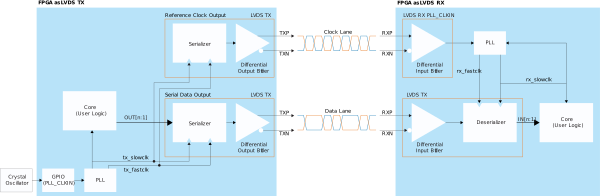
With serialization, you send parallel data at a width that varies according to the serialization width. When using LVDS serialization, you need a parallel clock and serial clock from the same PLL. In the previous figure, the parallel clock and serial clock are named SLOWCLK and FASTCLK, respectively. SLOWCLK is a parallel clock used to load parallel data into the serializer register of the LVDS interface. SLOWCLK is also the same clock domain as the input and output data received and transmitted to the LVDS interface. FASTCLK, on the other hand, is a serial clock that serializes or deserializes the data.
Signal Alignment
Trion FPGAs only support LVDS serialization at half-rate only. In half-rate mode, data is sent and received on both the rising edge and falling edge of the serial clock.
Edge-Aligned Signals
For edge-aligned signals, the clock signals are aligned to edge of data signal bit 0.
TX Edge-Aligned
- SLOWCLK—Parallel clock for LVDS TX blocks, both clock lane and data lanes.
- FASTCLK—Serial clock for LVDS TX blocks, both clock lane and data lanes.
For the frequency, phase, and clock settings, the data rate must be less than or equal to the maximum toggle rate stated in the device data sheet.
| Clock | Frequency | Phase |
|---|---|---|
| SLOWCLK | Date rate ÷ N | 0° |
| FASTCLK | SLOWCLK × (N ÷ 2) | 90° |
| Feedback Clock | Same clock as SLOWCLK with core feedback. | |
Example:
Scenario:
- Trion T120
- I/O standard: LVDS
- Serialization width: 8:1
- Data rate: 800 Mbps
- SLOWCLK as core feedback clock signal for PLL.
- SLOWCLK frequency = 800 Mbps ÷ 8 = 100 MHz
- FLASTCLK frequency = 100 MHz × (8 ÷ 2) = 400 MHz
- SLOWCLK phase = 0°
- FASTCLK phase = 90°
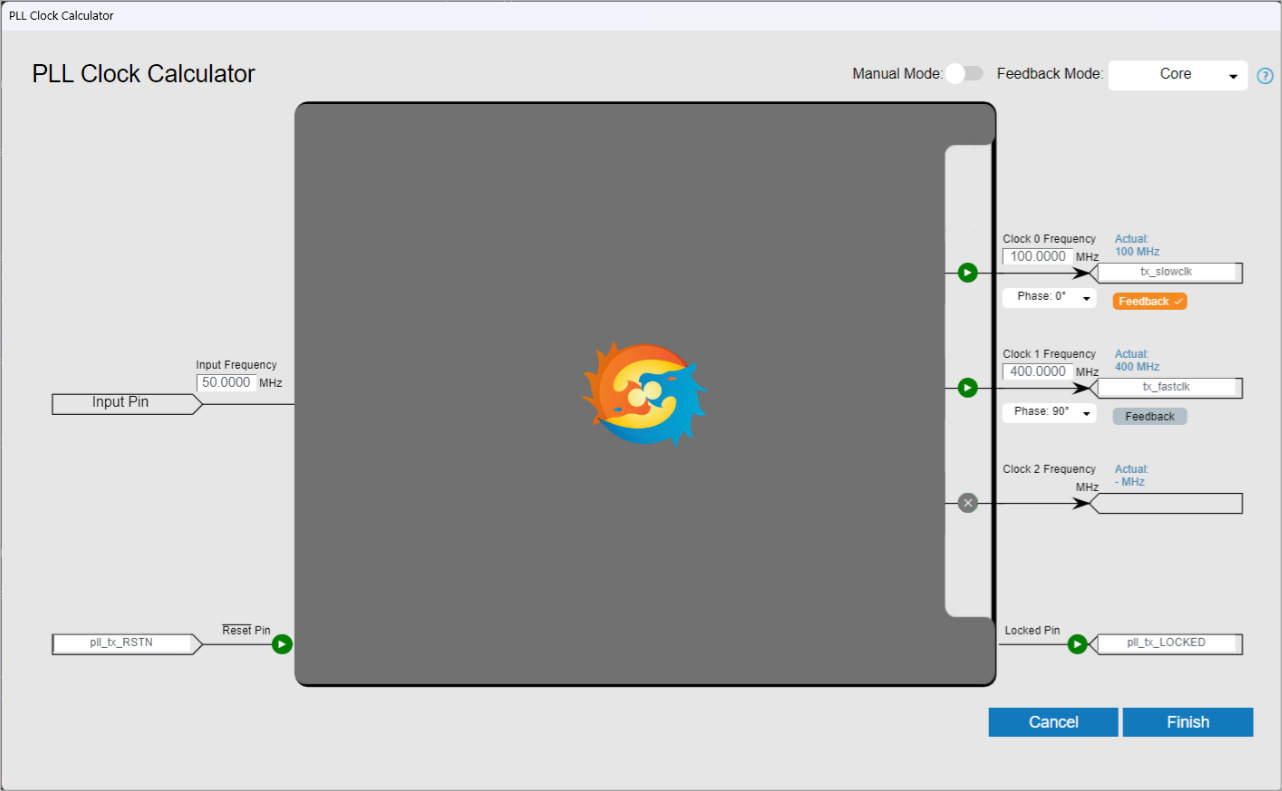
The following edge-aligned waveform illustrates half-rate LVDS serialization.

RX Edge-Aligned
- SLOWCLK—Parallel clock for LVDS RX blocks, data lanes.
- FASTCLK—Serial clock for LVDS RX blocks, data lanes.
For the frequency, phase, and clock settings, the data rate must be less than or equal to the maximum toggle rate stated in the device data sheet.
| Clock | Frequency | Phase |
|---|---|---|
| SLOWCLK | Data rate ÷ N | 0° |
| FASTCLK | Data rate ÷ 2 | 90° |
| Feedback Clock | Same clock as SLOWCLK with core feedback. | |

Center-Aligned Signals
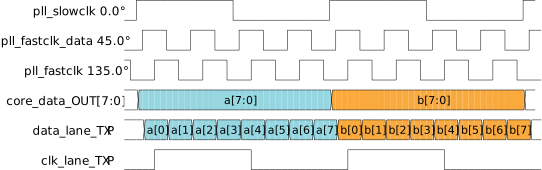
For center-aligned signals, the clock signals are aligned to the center of data signal bit 0.
TX Center-Aligned
- SLOWCLK—Parallel clock for LVDS TX blocks, both clock lane and data lanes.
- FASTCLK (clock)—Serial clock for LVDS TX blocks, clock lane only.
- FASTCLK (data)—Serial clock for LVDS TX blocks, data lanes only.
For the frequency, phase, and clock settings, the data rate must be less than or equal to the maximum toggle rate for center-aligned configuration (follows the device data sheet).
| Clock | Frequency | Phase |
|---|---|---|
| SLOWCLK | Data rate ÷ N | 0° |
| FASTCLK (clock) |
SLOWCLK × (N ÷ 2)
|
135° |
| FASTCLK (data) | SLOWCLK × (N ÷ 2) | 45° |
| Feedback Clock | Same as SLOWCLK with core feedback. | |
RX Center-Aligned
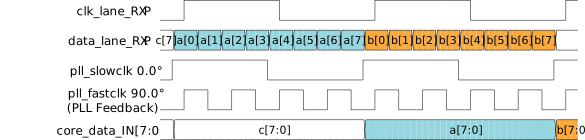
The connection type for the LVDS RX clock lane must be set to pll_clkin.
A single PLL must generate the following clock signals and send them to the LVDS RX interface for center-aligned signals:
- SLOWCLK—Parallel clock for LVDS RX blocks, data lanes.
- FASTCLK—Serial clock for LVDS RX blocks, data lanes.
For the frequency, phase, and clock settings, the data rate must be less than or equal to the maximum toggle rate for center-aligned configuration (follows the device data sheet).
| Clock | Frequency | Phase |
|---|---|---|
| SLOWCLK | Data rate ÷ deserialization width | 0° |
| FASTCLK | Data rate ÷ 2 | 90° |
| Feedback Clock | Same as FASTCLK with core feedback. | |
7:1 Serialization Examples
When receiving data from Trion LVDS TX, the input clock signal is
1110000 for one data set. You have to set up the clock and PLL
depending on the data alignment as described previously.
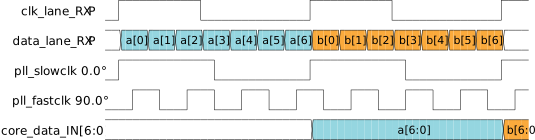
Be aware that many sensors on the market transmit edge-aligned LVDS TX data with a
shifted clock pattern of 1100011, which differs from the Trion LVDS RX clock–data lane alignment. As a result, each 7-bit
word received on the LVDS RX interface arrives in the shifted format
{<current_data>[4:0], <previous_data>[6:5]}. Therefore, you
need to add an extra register stage to your RTL design to realign each word to
data[6:0].
| Serialization Width | Edge-Aligned | Center-Aligned |
|---|---|---|
| 8 | SLOWCLK = data rate ÷ NSLOWCLK phase = 0°FASTCLK = SLOWCLK × (N ÷ 2)FASTCLK phase = 90° | SLOWCLK = data rate ÷ NSLOWCLK phase = 0°FASTCLK (data) = SLOWCLK × (N ÷ 2)FASTCLK (data) phase = 45°FASTCLK (clock) = FASTCLK (data)FASTCLK (clock) = 135° |
| 7 | ||
| 6 | ||
| 5 | ||
| 4 | ||
| 3 | ||
| 2 |
- SLOWCLK—Shared parallel clock for LVDS TX, clock lane and data lanes.
- FASTCLK—Shared serial clock for LVDS TX clock, lanes and data lanes.
- FASTCLK (data)—Serial clock for LVDS TX, data lanes.
- FASTCLK (clock)—Serial clock for LVDS TX, clock lane.
| Serialization Width | Edge-Aligned | Center-Aligned |
|---|---|---|
| 8 | SLOWCLK = data rate ÷ deserialization widthSLOWCLK phase = 0°FASTCLK = data rate ÷ 2FASTCLK phase = 90°SLOWCLK as PLL core feedback clock signal. | SLOWCLK = data rate ÷ deserialization widthSLOWCLK phase = 0°FASTCLK = data rate ÷ 2FASTCLK phase = 90°FASTCLK as PLL core feedback clock signal. |
| 7 | ||
| 6 | ||
| 5 | ||
| 4 | ||
| 3 | ||
| 2 |
- SLOWCLK—Parallel clock for LVDS RX, data lanes.
- FASTCLK—Serial clock for LVDS RX, data lanes.
Delay Calibration
There is an optimal window that is considered the center point of a valid data sampling window. The source synchronous clock and data signals should arrive at the deserializer inputs at the same time; however, the optimal window can vary depending upon package LVDS lane position (i.e., top, bottom, left, or right) and PCB trace design.
Your system will probability have some skew due to slight variations in production. Therefore, Efinix strongly recommends calibrating the delay settings for LVDS clock and data alignment to ensure best performance.
Passing Window Calibration
The optimal sampling point lies at the center of the data eye, or unit interval (UI). For reliable data capture, source-synchronous clock and data signals should ideally arrive at the deserializer input pins simultaneously. In practice, however, some variation in the skew between clock and data signals is to be expected due to PCB trace design and the physical placement of LVDS lanes within I/O banks (i.e., top, bottom, left, or right).
Production variations also create slight skew. Therefore, Efinix strongly recommends calibrating delay settings for LVDS clock and data alignment to achieve maximum performance.
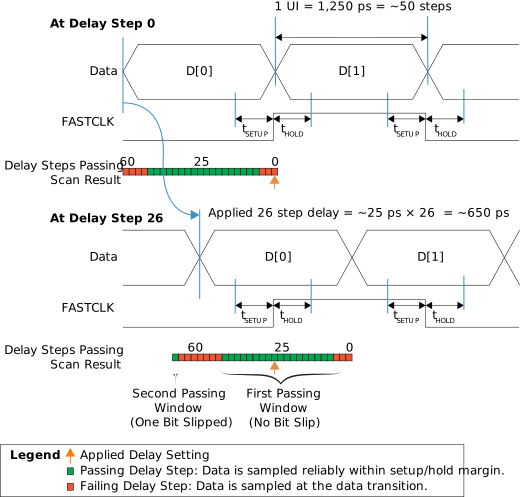
The previous figure illustrates how delay settings influence the sampling position of the FASTCLK signal relative to incoming data.
- Delay step 0: The sampling clock edge occurs too close to the data transition, violating the hold time requirement. This results in unstable data sampling.
- Delay step 26: With approximately 650 ps of added delay (based on a typical 25 ps per step1), the sampling point shifts to the center of the data eye. This ensures stable and reliable data capture.
The horizontal bar (0–63) represents the results of the delay step scan. At a data rate of 1.5 Gbps, the scan reveals three distinct passing windows:
- First window: The deserializer samples the data correctly without bit shifts, so word alignment is unnecessary.
- Second and third windows: The deserializer samples the data correctly, but the results slip by 1 bit and 2 bits, respectively. In these cases, the word aligner restores proper word boundaries.
Calibrating with Static Delay
To calibrate a static delay process, a known synchronous data pattern is sent via a transmitter to an FPGA, which acts as a receiver. The data pattern consists of a repeating string; for example, deserialization width of 8, cycling 8’h4b, 8’h57, 8’h7c, 8’h3e. The FPGA is loaded with an RTL calibration design that does the word alignment and verifies receipt of the data pattern. Once received data pattern after word aligning is mismatch with the known data pattern, a FAIL signal asserted.
- With the calibration design project peripheral design opened in the Interface Designer, set Static Mode Delay setting for clock lane and all data lanes to 0. Turn on the Enable Delay option.
- Save the peripheral design, generate Efinity constraint files, then re-generate the bitstream. Synthesis, Place and Route compilation steps can be skipped as no changes are made in RTL design files.
- Program the FPGA with the newly generated bitstream.
- Send the known synchronous data pattern from the transmitter. Check any received data pattern mismatch with the known data pattern. Observe the checker and record any pass or fail results for all data lanes.
- Repeat step 2 to 4 by sweeping the Static Mode Delay setting from 0 to 63 for all data lanes.
- If two passing window edges are found, select the middle value in the passing
window range. For example, with passing window following, the valid range is
from 9 to 47; therefore, select the middle value (i.e., 28) for all data lanes.
Formula: middle value = (upper edge – lower edge) ÷ 2 + lower edge.
Figure 9. Static Delay Calibration – Passing Window 1 
- If valid windows are found at both ends, the passing window is assumed to be a
loop. Select the middle value. For example, referring to the passing window
following, there are passing ranges on both ends, lower edge = 13, upper edge =
50, select middle value = 0 for all data lanes. Formula: middle value = lower edge - [(64 – upper edge) + lower edge] ÷ 2.
Figure 10. Static Delay Calibration – Passing Window 2  Note: Bit slip TX sends a counter sequence, (8’h28, 8’h29, 8’h2A…), if the passing window on left (step 0 to 13) receives a counter sequence without any bit slip (8’h28, 8’h29, 8’h2A…); therefore, a passing window on the right (step 50 to 63) will receive a counter sequence with one bit slip (8’h50, 8’h52, 8’h56,…) as a word:{d0[6:0], d1[7]}.
 - If the data rate is 700 Mbps or lower, change the static delay setting for the clock
lane to 63 and the sweeping static delay setting from 0 to 63 again for the data
lanes. Using the same method as described in step 6 or 7 (depending upon the
situation), use the middle value of the passing window. For example in the case of
the passing window shown below, select 50 for all data lanes, and 63 for the clock lane.
Figure 11. Static Delay Calibration – Passing Window 3 
- Repeat the above steps for each part until you have a static delay setting that
adequately compensates for any manufacturing variation.
Note: The center point of the passing window is dedicated to the PLL and global clock buffer. If any changes to these settings changes the center point of the window, you might need to screen the passing window again to get a new center point.
Revision History
| Date | Version | Description |
|---|---|---|
| February 2026 | 2.2 |
Titanium and Topaz information relocated to
a new document (AN-074). (DOC-2597)
|
| June 2025 | 2.1 | Updated Calibrating with Dynamic Delay (/ only). (DOC-2531) |
| March 2025 | 2.0 | Major update of whole document. (DOC-2333) |
| August 2024 | 1.5 |
Corrected half-rate serialization for Titanium
FPGAs. (DOC-1937)
|
| March 2024 | 1.4 |
Corrected RX_DLY_RST in dynamic delay waveform (Figure 1). (DOC-1697)
|
| February 2024 | 1.3 | Added description about using LDS blocks from the same FPGA side to minimize skew.
(DOC-1150) Updated dynamic delay waveform (Figure 1). (DOC-1697) |
| February 2023 | 1.2 | Updated Feature Summary table. (DOC-1079) Updated PLL setting
description to mention setting the PLL FVCO above 1.6
GHz. (DOC-1026) Updated Calibrating Titanium
FPGAs using DPA topic. |
| October 2022 | 1.1 | Added DPA example waveform. Added TX center-aligned method
information. Added Titanium dynamic and
static delay options. Added PLL setup example
settings. |
| May 2022 | 1.0 | Initial release. |