AN 042: Working with PLLs
Introduction
Trion® and Titanium FPGAs have PLLs that you can use to generate clock signals in your design. The PLLs are located in the corners of the FPGA. You can use the PLL to compensate for clock skew/delay via external or internal feedback to meet timing requirements in advanced applications. This application note describes various methods of connecting the PLL in your design and describes the delays that can result. Use this application note together with:
- The FPGA data sheet for details on the PLL structure.
- The Titanium Interfaces User Guide for instructions on using the Titanium PLL interface in the Efinity® Interface Designer.
- The Trion Interfaces User Guide for instructions on using the Trion PLL interface in the Efinity® Interface Designer.
About Delays
Global clock signals incur delays as they traverse the FPGA. As you would expect, a signal that travels from one end of the FPGA to the other will have more delay than one that only travels a short distance. Additionally, for Trion® and Titanium FPGAs, when signals go from the interface into the core, there is another delay.
Clock Insertion Delay
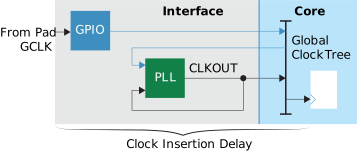
The clock insertion delay is the time it takes for a clock signal to travel from the pad of a GPIO configured as a global clock (GCLK) through the global clock network to the destination register. This document calls it the "base" clock insertion delay. The Efinity Timing Closure User Guide discusses how to handle these delays to close timing.

Notice that the previous figure does not include a PLL. As soon as you use a PLL to generate clock signals, you need to account for it from a delay perspective. The delay effect caused by the PLL is called the PLL compensation delay.
PLL Compensation Delay
The PLL compensation delay is the delay that is removed from the base clock insertion delay to create the actual insertion delay. It is always an amount you subtract from the clock insertion delay. Some PLL modes have a PLL compensation delay and some do not.
PLL Modes and Their Delays
The following sections describe some of the ways you can set up the PLL in your system, and explains the delays for each scenario.
Internal Feedback Mode
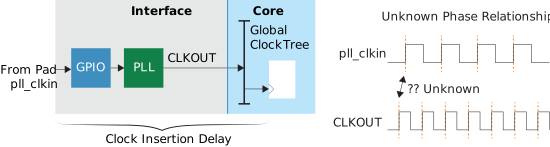
Trion PLLs support an internal feedback mode (Titanium PLLs do not have this mode). In this mode, the clock insertion delay is the same as for a regular GBUF to register (base clock insertion delay), and there is no compensation delay for the PLL.
Having no PLL compensation delay may seem like a good thing, but the big problem with this mode is that there is no known phase relationship between the reference clock and the global clock network. Therefore, you never want to use this mode when you want to synchronize signals coming from off chip.
Local Feedback Mode
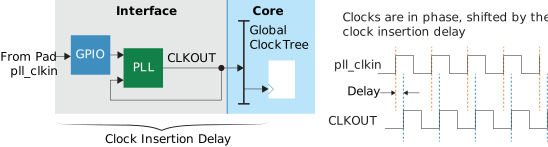
Trion and Titanium PLLs support a local feedback mode. In this mode, the clock insertion delay is the same as for a regular GBUF to register (base clock insertion delay), and there is no compensation delay for the PLL.
Unlike internal feedback mode, with local feedback mode the clock at the global clock network is in phase with the reference clock, shifted by the insertion delay.
Core Feedback Mode
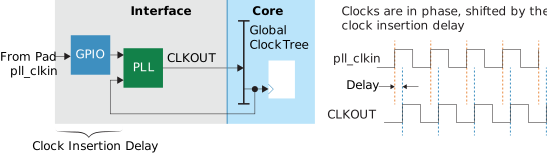
Trion and Titanium PLLs support a core feedback mode. In this mode, the only delay is from the GBUF. The clock insertion delay is the GPIO buffer delay from the PLL reference pin to the PLL, which matches the GPIO buffer delay feeding the GPIO input registers. Therefore, the clock and data are aligned at the input register. There is no delay for the global clock network. So overall you have less insertion delay than the local feedback mode.
The clock at the global clock network is in phase with the reference clock, shifted by the insertion delay. The PLL compensation delay is equal to the core clock network delay. So the PLL compensation delay and the global clock network delay cancel out. You subtract the core clock network delay from the base clock insertion delay to get the actual delay.
Remember, if your design is edge aligned, you need to use a phase shift on the PLL's
CLKOUT to move the signal into the middle of the sampling window
(90° for DDIO and 180° for SDIO).
External Feedback Mode
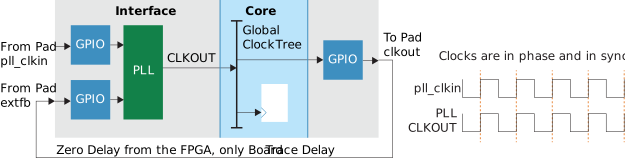
Titanium PLLs support an external feedback mode (Trion PLLs do not have this mode). In this mode, the only delay is from the board trace where the GPIO clkout pad connects to the GPIO extfb pad. This mode is also known as zero buffer delay mode. The CLKOUT and pll_clkin signals are in sync and there is no delay between them.
In this mode, the PLL compensation delay is equal to the GBUF, clkout,
and global clock network delays, so all of the delays on the FPGA
cancel out.
When you design using this mode, you want the smallest variation possible between the
reference clock and the GPIO clkout. Therefore, make the trace length
on the board between GPIO clkout and GPIO extfb as
small as possible.
GCLK as the PLL Reference Clock
You usually want to use an external clock coming from a GPIO (as
pll_clkin) as the reference clock. In some situations, however, you
want to use a global clock (GCLK). For example, if you do not use a PLL at the beginning
and then later discover you need one to clock your system the way you want. Most likely,
you added the PLL to try to reduce the clock insertion delay. Keep in mind that you
always get more clock insertion delay when you use a GCLK.
A few reasons you may want to use the GCLK instead of pll_clkin are:
- The GCLK is being used as a clock for something else in addition to the PLL.
- You may want to use the same GCLK as the reference clock for more than one PLL.
- Because of board limitations, you may only be able to use a GCLK and not a
pll_clkin.
GCLK with Core Feedback
In this mode, you have the same clock insertion delay as for local feedback mode. So to reduce the delay, you have to play around with the PLL phase shifting to try to improve it. However, because of the nature of phase shifting, there is only so much you can do to fix it.
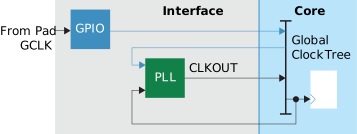
GCLK with Local Feedback
In this configuration, you get twice the global clock delay plus the GBUF delay and you have used up two clock lines.
PLL Cascading
With PLL cascading, the clock insertion delay is the sum of the clock insertion of the two PLLs. So if both PLLs are using core compensation, then the clock insertion is just the GPIO delay.
If you want to cascade PLLs, the first PLL must have a CLKOUT with a
50/50 duty cycle. The reference clock of the second PLL in the cascade needs a clock
with a duty cycle no worse than 45/55. The Efinity Interface Designer
issues a warning if the PLL's auto calculated result cannot result in a 50/50 duty
cycle.

Conclusion
Working with PLLs and delays does not have to be complicated when you follow a few simple rules. Make sure to choose the right PLL mode for the task in hand and try to avoid using a GCLK as the PLL reference clock. When you are ready for the challenge of analyzing timing delays, go to the Efinity Timing Closure User Guide for more information.
Revision History
| Date | Version | Description |
|---|---|---|
| March 2022 | 1.0 | Initial release. |