AN 072: ECC Encoder and Decoder
Introduction
The Encoder Correction Code (ECC) Encoder and Decoder provides a single error correction and a double error detection (SECDED) function based on the Hamming code.
The core provides a separate encoder and decoder, where users can create their wrapper based on their requirement to fit different types of memory blocks such as signal port memory, simple dual-port memory, FIFO, etc.
Features
- Coding methodology: Hamming code
- Data width: 8 to 1024 bits
- Error bit detection: 1 or 2
- Error bit correction: 1
- Encoding latency: 2 or 3 (optional pipeline registers to optimize latency or/and performance)
- Decoding latency: 2 or 3 (optional pipeline registers to optimize latency or/and performance)
Device Support
| FPGA Family | Supported Device |
|---|---|
| Trion | All |
| Titanium | All |
| Topaz | All |
Resource Utilization and Performance
| FPGA | Data Width of Coding | DED Enable | Option Register | Resource | fMAX (MHz) 1 | Efinity Version 2 | |||
|---|---|---|---|---|---|---|---|---|---|
| Encoder | Decoder | ||||||||
| FFs | LUTs | FFs | LUTs | ||||||
| Ti60 F225 | 8 | Yes | No | 35 | 30 | 18 | 26 | 677 | 2024.2.294.4.15 |
| 16 | Yes | No | 61 | 54 | 28 | 49 | 651 | ||
| 32 | Yes | No | 95 | 86 | 51 | 73 | 632 | ||
| 64 | Yes | No | 161 | 87 | 151 | 151 | 627 | ||
| 128 | Yes | No | 291 | 283 | 158 | 282 | 625 | ||
| 256 | Yes | No | 549 | 286 | 539 | 554 | 567 | ||
| 512 | Yes | No | 1063 | 1055 | 1127 | 1221 | 390 | ||
| 1024 | Yes | No | 2089 | 2082 | 2033 | 3027 | 335 | ||
| 8 | Yes | Yes | 60 | 32 | 28 | 28 | 653 | ||
| 16 | Yes | Yes | 104 | 49 | 58 | 49 | 583 | ||
| 32 | Yes | Yes | 156 | 85 | 90 | 75 | 661 | ||
| 64 | Yes | Yes | 254 | 153 | 154 | 148 | 636 | ||
| 128 | Yes | Yes | 449 | 312 | 285 | 285 | 620 | ||
| 256 | Yes | Yes | 836 | 542 | 590 | 524 | 574 | ||
| 512 | Yes | Yes | 1607 | 1058 | 1070 | 1087 | 574 | ||
| 1024 | Yes | Yes | 3567 | 2418 | 2084 | 3127 | 459 | ||
| FPGA | Data Width of Coding | DED Enable | Option Register | Resource | fMAX (MHz) 3 | Efinity Version 4 | |||
|---|---|---|---|---|---|---|---|---|---|
| Encoder | Decoder | ||||||||
| FFs | LUTs | FFs | LUTs | ||||||
| T120 F324 | 8 | Yes | No | 35 | 30 | 18 | 26 | 154 | 2024.2.294.4.15 |
| 16 | Yes | No | 61 | 54 | 28 | 46 | 149 | ||
| 32 | Yes | No | 95 | 85 | 50 | 76 | 143 | ||
| 64 | Yes | No | 161 | 151 | 88 | 151 | 132 | ||
| 128 | Yes | No | 291 | 284 | 154 | 292 | 142 | ||
| 256 | Yes | No | 549 | 539 | 311 | 551 | 131 | ||
| 512 | Yes | No | 1063 | 1056 | 1100 | 1587 | 108 | ||
| 1024 | Yes | No | 2089 | 2080 | 1977 | 3085 | 95 | ||
| 8 | Yes | Yes | 60 | 32 | 28 | 28 | 176 | ||
| 16 | Yes | Yes | 104 | 58 | 49 | 45 | 171 | ||
| 32 | Yes | Yes | 151 | 91 | 87 | 78 | 150 | ||
| 64 | Yes | Yes | 254 | 154 | 187 | 149 | 139 | ||
| 128 | Yes | Yes | 449 | 285 | 397 | 296 | 119 | ||
| 256 | Yes | Yes | 836 | 556 | 544 | 567 | 124 | ||
| 512 | Yes | Yes | 1741 | 1011 | 1064 | 1451 | 123 | ||
| 1024 | Yes | Yes | 3406 | 2257 | 2306 | 2868 | 115 | ||
Functional Description
- No error
- Single error correction
- Double error detection
DOUT. Users
can create wrappers with BRAM or/and ECC Encoder and
Decoder. This IP core provides the example wrappers for the simple
dual-port RAM with ECC and the FIFO with ECC.However, the ECC Encoder and Decoder do not support the block memory with byte-write enabled and mixed-width (all port widths must be identical).
| Input Data Width (n) | SEC | SEC with DED | ||
|---|---|---|---|---|
| Extra Check Bits (j) | Encoder Output Data Width (m) | Extra Check Bits (j) | Encoder Output Data Width (m) | |
| 8 to 11 | 4 | 9 to 15 | 5 | 10 to 16 |
| 12 to 26 | 4 | 17 to 31 | 6 | 18 to 32 |
| 27 to 57 | 6 | 33 to 63 | 7 | 34 to 64 |
| 58 to 64 | 7 | 65 to 71 | 8 | 66 to 72 |
| 65 to 120 | 7 | 72 to 127 | 8 | 73 to 128 |
| 121 to 247 | 8 | 129 to 255 | 9 | 130 to 256 |
| 248 to 502 | 9 | 257 to 511 | 10 | 258 to 512 |
| 503 to 1013 | 10 | 513 to 1023 | 11 | 514 to 1024 |
| 1014 to 1024 | 11 | 1025 to 1035 | 12 | 1026 to 1036 |

Ports
Table 5 shows the input and output signals of the ECC modules:
| Port | Signal | Direction | Description |
|---|---|---|---|
| ECC Encoder (efx_ecc_enc_top) | i_clk | Input | Clock input of encoder module. |
| i_reset | Input | Enable reset of encoder module. Default: Off |
|
| i_datain [n-1:0] | Input | Data input for encoder module. | |
| i_enc_err_in [1:0] | Input | 00: No error inserted 01: One error inserted 10: Two
errors inserted 11: Invalid |
|
| o_enc_dataout [m-1:0] | Output | o_enc_dataout [n-1:0]: Data input for encoding. o_enc_dataout
[m-1:n]: Extra check bits. |
|
| ECC Decoder (efx_ecc_dec_top) | i_clk | Input | Clock input of decoder module. |
| i_reset | Input | Enable reset of decoder module. Default: Off |
|
| i_enc_datain [m-1:0] | Input | i_enc_datain [n-1:0]: Data input for encoding. o_enc_datain
[m-1:n]: Extra check bits. |
|
| o_dec_dataout [n-1:0] | Output | Data output after encoding. | |
| o_dec_err_out [1:0] | Output | 00: No error detected 01: One error detected 10: Two
errors detected 11: Invalid |
ECC Encoder
In the ECC encoder, the data input would be encoded through an XOR array. If there is an
err_in signal to the encoder block, the generated error mask merges
one- or two-bit errors into the dataout. This feature allows for error detection and
error correction, where the errors are exterminated. The gray blocks are optional extra
pipelines before the output if there is a requirement to improve the timing route, e.g.,
if there is a wide data width. The following figure shows the input and output signals
of the ECC encoder.

ECC Decoder
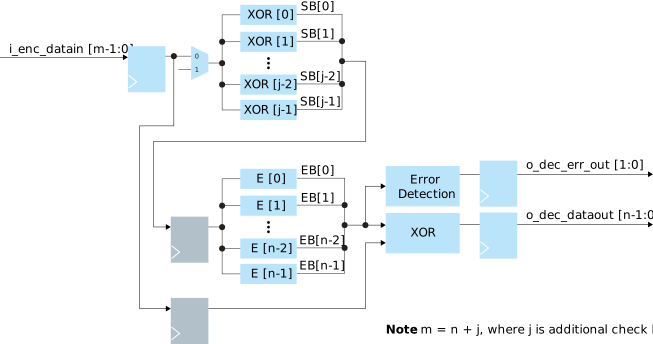
In the ECC decoder, the data output would be decoded through an XOR array. If an error is detected, the error bit (EB) arrays calculate the location of a bit error for error correction. The gray blocks are optional extra pipelines before the output to improve the timing route, e.g., if there is a wide data width. The following figure shows the input and output signals of the ECC decoder.
Timing Latencies
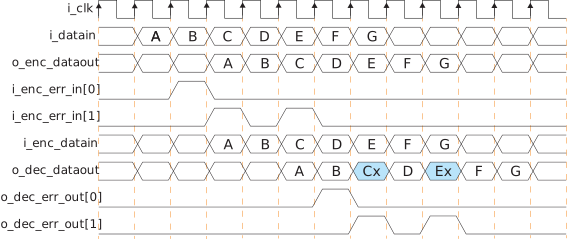
The following figure shows the timing latencies of the ECC encoder and decoder:
Example Application
Wrapper for Simple Dual Port with ECC
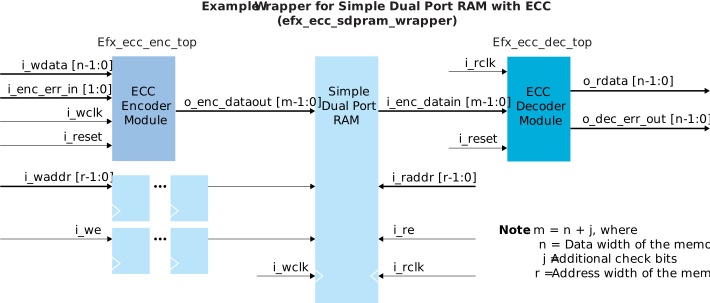
The example design demonstrates the creation of a simple dual port RAM with ECC protection. A wrapper connects the memory modules to the ECC Encoder and Decoder modules. The expected data width of the memory module is extended to add extra check bit with ECC. The write data is encoded by the ECC encoder modules before writing to the memory module. The read data from the memory module is decoded by the ECC decoder modules before an output from the wrapper. The read data could be protected if there is 1-bit or 2-bit (maximum) error detected and reported from the wrapper.
The following figure shows an example of a wrapper for simple dual port RAM with ECC.
Wrapper for FIFO with ECC
The example design demonstrates the creation of a FIFO with ECC protection. A wrapper connects the FIFO modules to the ECC Encoder and Decoder modules. The expected data width of the FIFO is extended to add extra check bit with ECC. The write data is encoded by the ECC encoder modules before writing to the FIFO module. The read data from the FIFO module is decoded by the ECC decoder modules before an output from the wrapper. The read data could be protected if there is 1-bit or 2-bit (maximum) error detected and reported from the wrapper.
The following figure shows an example of using a wrapper for FIFO with ECC.

Customizing the ECC Encoder and Decoder
The following is the parameter settings for the ECC Encoder and Decoder:
| Port | Parameter | Options | Description |
|---|---|---|---|
| ECC Encoder (efx_ecc_enc_top) | Data Width | 8 - 1024 | Defines the data width of the ECC encoder. |
| Double Bits Detect Enable | On, Off | Enable single and double error detection. Default:
On |
|
| Encoder Extra Pipeline | 0, 1 | 0: Disable 1: Enable |
|
| ECC Decoder (efx_ecc_dec_top) | Data Width | 8 - 1024 | Defines the data width of the ECC decoder. |
| Double Bits Detect Enable | On, Off | Enable single and double error detection. Default:
On |
|
| Disable Extra Pipeline | 0, 1 | 0: Disable 1: Enable |
ECC Encoder and Decoder Testbench
Efinix provides a simulation script for you to run the testbench
using the Modelsim software. To run the Modelsim testbench script, run vsim
-do ecc_modelsim.do in a terminal application. You must have Modelsim
installed on your computer to use these scripts.
- ECC Encoder and Decoder testing
- Simple Dual Port RAM with ECC
- FIFO with ECC
- Open the Command Prompt in Windows.
- Go to the /testbench folder.
- Run command vsim -do ecc_modelsim.do or vsim -do sdpram_modelsim.do or vsim -do or fifo_modelsim.do depending on the simulation case to start the simulation.
The result is shown in the terminal of the Modesim after the simulation is completed.
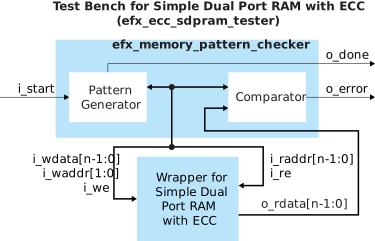

ECC Encoder and Decoder Example Design
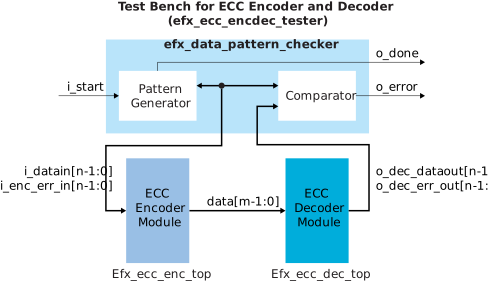
For this example design, the ECC Encoder and Decoder targets the Trion® T120 BGA324 Development Board or Titanium Ti60 F225 Development Board.

- For
efx_ecc_encdec_tester, refer to Figure 7. - For
efx_ecc_sdpram_tester, refer to Figure 8. - For
efx_ecc_fifo_tester, refer to Figure 9.
i_reset.To reset the testbench on the Titanium Ti60 F225 Development Board, press SW5. The development board LED output is as follows:
| LED | Light Status | Description |
|---|---|---|
| D16 | Green on | Test complete |
| D17 | Red on | Test fail |
| Green on | Test pass |
To reset the testbench on the Trion® T120 BGA324 Development Board, press SW6.The development board LEDs are described in the following table.
| LED | Schematic Name | Description |
|---|---|---|
| LED 0 turned on | USER_LED0 | Test complete |
| LED 1 turned on | USER_LED1 | Test pass |
| LED 2 turned on | USER_LED2 | Test fail |
| FPGA | Data Width of Coding | DED Enable | Option Register | Logic Elements (Logic, Adders, Flipflops, etc.) | Memory Blocks | DSP Blocks | fMAX (MHz) 5 | Efinity Version 6 |
|---|---|---|---|---|---|---|---|---|
| Ti60 F225 | 64 | Yes | No | 2,337/60,800 (3.8%) | 3/256 (1.2%) | 0/160 (0.0%) | 518 | 2024.2.294.4.15 |
| 256 | Yes | No | 3,581/60,800 (5.9%) | 3/256 (1.2%) | 0/160 (0.0%) | 459 | ||
| 512 | Yes | No | 5,475/60,800 (9.0%) | 3/256 (1.2%) | 0/160 (0.0%) | 479 | ||
| 1024 | Yes | No | 10,898/60,800 (17.9%) | 3/256 (1.2%) | 0/160 (0.0%) | 357 | ||
| 64 | Yes | Yes | 2,499/60,800 (4.1%) | 3/256 (1.2%) | 0/160 (0.0%) | 509 | ||
| 256 | Yes | Yes | 4,421/60,800 (7.3%) | 3/256 (1.2%) | 0/160 (0.0%) | 450 | ||
| 512 | Yes | Yes | 6,770/60,800 (11.1%) | 3/256 (1.2%) | 0/160 (0.0%) | 489 | ||
| 1024 | Yes | Yes | 13,314/60,800 (21.9%) | 3/256 (1.2%) | 0/160 (0.0%) | 377 |
| FPGA | Data Width of Coding | DED Enable | Option Register | Logic Elements (Logic, Adders, Flipflops, etc.) | Memory Blocks | DSP Blocks | fMAX (MHz) 5 | Efinity Version 6 |
|---|---|---|---|---|---|---|---|---|
| T120 F324 | 64 | Yes | No | 2,394/112,128 (2.1%) | 6/1056 (0.6%) | 0/320 (0.0%) | 130 | 2024.2.294.4.15 |
| 256 | Yes | No | 3,677/112,128 (3.3%) | 6/1056 (0.6%) | 0/320 (0.0%) | 109 | ||
| 512 | Yes | No | 5,640/112,128 (5.0%) | 6/1056 (0.6%) | 0/320 (0.0%) | 115 | ||
| 1024 | Yes | No | 9,683/112,128 (8.6%) | 6/1056 (0.6%) | 0/320 (0.0%) | 91 | ||
| 64 | Yes | Yes | 2,508/112,128 (2.2%) | 6/1056 (0.6%) | 0/320 (0.0%) | 126 | ||
| 256 | Yes | Yes | 4,043/112,128 (3.6%) | 6/1056 (0.6%) | 0/320 (0.0%) | 117 | ||
| 512 | Yes | Yes | 5,688/112,128 (5.1%) | 6/1056 (0.6%) | 0/320 (0.0%) | 111 | ||
| 1024 | Yes | Yes | 10,299/112,128 (9.2%) | 6/1056 (0.6%) | 0/320 (0.0%) | 102 |
| File Name | Description |
|---|---|
| efx_ecc_enc_top.sv | ECC encoder module. |
| efx_ecc_dec_top.sv | ECC decoder module. |
| Memorywrapper/ efx_ecc_fifo_wrapper.v | Wrapper of FIFO and EFX ECC Encoder and Decoder. |
| Memorywrapper/ efx_ecc_sdpram_wrapper.v | Wrapper of simple dual port RAM and EFX ECC Encoder and Decoder. |
| File Name | Description |
|---|---|
| efx_ecc_encdec_tb.v | Testbench simulation for testing ECC Encoder and Decoder. |
| efx_ecc_encdec_tester.sv | Testbench for FIFO with ECC. |
| ecc_modelsim.do | Script for running simulation of the ECC Encoder and Decoder. |
| efx_ecc_fifo_tb.v | Testbench for testing wrapper of FIFO and EFX ECC Encoder and Decoder. |
| efx_ecc_fifo_tester.sv | Testbench for ECC Encoder and Decoder. |
| fifo_modelsim.do | Script for running simulation of FIFO and EFX ECC Encoder and Decoder. |
| efx_ecc_sdpram_tb.v | Testbench for testing wrapper of simple dual port RAM and EFX ECC Encoder and Decoder. |
| efx_ecc_sdpram_tester.sv | Testbench for simple dual port RAM with ECC. |
| sdpram_modelsim.do | Script for running the simulation of simple dual port RAM and EFX ECC Encoder and Decoder. |
| File Name | Description |
|---|---|
| bsp / t120f324_devkit_ecc_encdec / ecc_test.xml | Example project for ECC Encoder and Decoder in Trion® T120 BGA324 Development Board |
| Bsp/ t120f324_devkit_ecc_fifo / ecc_test.xml | Example project for FIFO with ECC in Trion® T120 BGA324 Development Board. |
| Bsp/ t120F324_devkit_ecc_sdpram / ecc_test.xml | Example project for simple dual port RAM in Trion® T120 BGA324 Development Board. |
| Bsp/ ti60f225_devkit_ecc_encdec / ecc_test.xml | Example project for ECC Encoder and Decoder in Titanium Ti60 F225 Development Board. |
| bsp / ti60f225_devkit_ecc_fifo / ecc_test.xml | Example project for FIFO with ECC in Titanium Ti60 F225 Development Board. |
| bsp / ti60f225_devkit_ecc_sdpram / ecc_test.xml | Example project for simple dual port RAM in Titanium Ti60 F225 Development Board. |
Revision History
| Date | Document Version | IP Version | Description |
|---|---|---|---|
| May 2025 | 1.0 | 1.0 | Initial release. (DOC-2074) |