AN 038: Programming with an MCU and the JTAG Interface
Introduction
When designing your system, you may have a microcontroller or microprocessor (MCU) that controls a number of devices in a JTAG chain. To streamline your design, you would like to take advantage of the JTAG chain to program your Trion, Topaz, or Titanium FPGA. This scenario is a type of passive configuration in which the FPGA receives the configuration clock and data from an external active module.
Unlike SPI passive mode, this method only requires the 4-pin JTAG interface plus a few extra pins, depending on the FPGA you are targeting. The configuration data is transferred via JTAG, which is serial, so the configuration time can be slow. Therefore, you do not want to use this method when you need the FPGA to wake up "instantly." This application note descibes how to use a MCU to configure an FPGA via the JTAG interface.
Working with JTAG .svf Files
The JTAG serial vector format (.svf) file is a vendor-independent ASCII text file of JTAG commands. You can use an .svf file for JTAG debugging, boundary-scan testing, and programming with any .svf-compatible JTAG hardware.
The Efinity Programmer can convert a bitstream file to .svf so that you can use third-party JTAG hardware to program an Efinix FPGA. Refer to "Export to .svf Format" in the Efinity Programmer User Guide.
- T4, T8, and T13 in any package
- T20 in W80, Q144, F169, and F256 packages
JTAG Commands for Programming
With this programming method, the MCU is acting as a JTAG programmer. It needs to send commands via the JTAG interface. The Efinity® software can export a bitstream file to serial vector format (.svf), which contains JTAG commands and bitstream data. Typically you would use the .svf to program the FPGA with a JTAG SVF player. However, in this context, the .svf provides a template for the JTAG commands the MCU needs to use for programming.
The following code snippet shows an example of a Trion T35 bitstream file converted to .svf.
- The first five lines are preamble.
- The
FREQUENCYline sets the JTAG clock frequency; in this case, it is the maximum. - The next four lines relate to the position of the device in the JTAG chain; this .svf assumes that the T35 is the only device in the chain.
- The
SIRandSDRlines after theCheck idcodecomment specify theIDCODEinstruction andIDCODEdata. You should always check theIDCODEbefore programming. - The
SIRafter theEnter programming modecomment issues thePROGRAMinstruction. - The following
SDRcommands send the bitstream data. - At the end of the bitstream data it flushes zeroes.
- Finally, the lines after the
Enter user modecomment send theENTERUSERinstruction and send 100TCKclock cycles in theIDLEorSHIFT_DRstate.
TRST OFF;
ENDIR IDLE;
ENDDR IDLE;
STATE RESET;
STATE IDLE;
FREQUENCY 6E6 HZ;
TIR 0;
HIR 0;
TDR 0;
HDR 0;
//
// Check idcode
SIR 4 TDI (3);
SDR 32 TDI (00000000) TDO (00240A79) MASK (ffffffff);
//
// Enter programming mode
SIR 4 TDI (4);
//
// Begin bitstream
//
ENDDR IDLE;
HDR 0;
TDR 0;
SDR 3000 TDI (518CB8065C633E011718CF8045C633E00088100000000...);
SDR 3000 TDI (000000000000000000000000000000000000000000000...);
SDR 3000 TDI (000000000000000000000000000000000000000000000...);
...
SDR 616 TDI (4028140A05028140A05028140A05028140A05028140A04...);
// Extra clock ticks in SDR state
SDR 3000 TDI (000000000000000000000000000000000000000000000...);
//
// Enter user mode
SIR 4 TDI (7);
RUNTEST 100 TCK;
// Converting a Bitstream
The Efinity® software generates a bitstream as a .bit file for JTAG programming. You can use this file for programming, or you can convert it to raw binary (.bin) format. The .bin has a slightly smaller size than the .bit.
When you are sending the bitstream using JTAG commands though, you need to convert it to
little endian and then send it in one or more PROGRAM commands. The
example .svf discussed previously breaks the bitstream into many
separate commands. However, the number of commands you need depends on the capabilities
of the hardware you are using.
Connect the FPGA and MCU
You connect the MCU to the FPGA using the four JTAG pins
TCK, TMS, TDI, and
TDO. Additionally, you need to connect a few other pins for
managing configuration as described in the following table.
| Pins | FPGA | Guideline |
|---|---|---|
| TCK, TMS, TDI, and TDO | All | Pull high during configuration. |
| CSI | Packages that have a CSI pin. | Pull high during configuration. For packages that do not have
a CSI pin, this signal is held high in the package. |
| CRESET_N | All | Pull high during configuration. |
| TEST_N | All | Pull high during configuration. |
| CDONE | All | Optional. Use to monitor configuration done status. |
| SS_N | T4 and T8 all packages T13 all packages T20 W80,
F169, and F256 |
Connect as shown in Trion Schematic and Programming |
The following sections show connection schematics and the programming sequence for Trion, Topaz, and Titanium FPGAs.
Trion Schematic and Programming
The connection schematic and programming sequence differs slightly for different Trion FPGAs. Follow the instructions for your FPGA/package combination.
For JTAG chains, you configure one FPGA at a time in any order.
The FPGAs not being configured are in BYPASS
mode (not user mode).
T4 (All), T8 (All), T13 (All) and T20 (W80, Q100, Q144, F169, and F256)
These FPGAs require you to connect the SS pin
to ground and have some additional configuration sequence requirements.
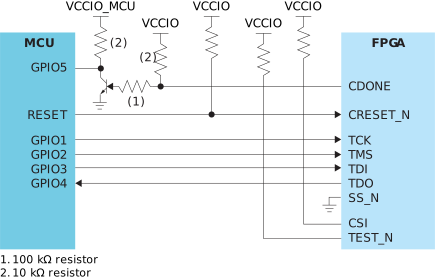
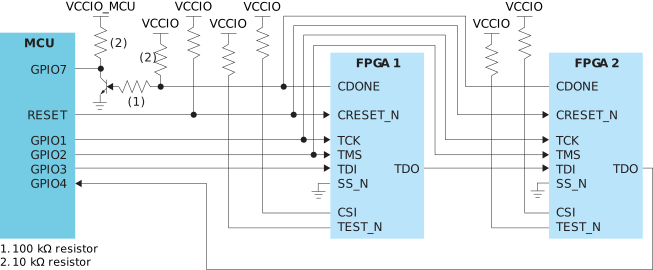
If you want to monitor the CDONE of each FPGA
separately instead of the system status, connect each CDONE to a
separate GPIO on the MCU.
The configuration sequence is:
- For a chain, put all devices except the one you are configuring into
BYPASSmode. - Pulse
CRESET_N(1 to 0 to 1) at the beginning of configuration. The FPGA(s) go into passive mode. You can probe the FPGA'sSCKpin to confirm that it is tri-stated. - Perform an
IDCODEcheck for the FPGA you want to configure. - Send the
PROGRAMcommand and the bitstream data as well as the zeros for flushing. The FPGA is in the JTAGSHIFT_DRstate while the whole bitstream is sent, including flushing zeros at the end. Do not cycle toPAUSE_DRorIDLEin the middle of transferring the bitstream or zeros. - Send the
ENTERUSERcommand. - Send 100 TCK cycles in the
IDLEorSHIFT_DRstate. - The FPGA's
CDONEpin goes high. - Repeat steps 2 - 6 for any other FPGAs in the chain.
When you finish configuring all FPGAs, all of their
CDONE pins should be high.
T20 (F324, and F400) and T35, T55, T85, and T120 (All Packages)

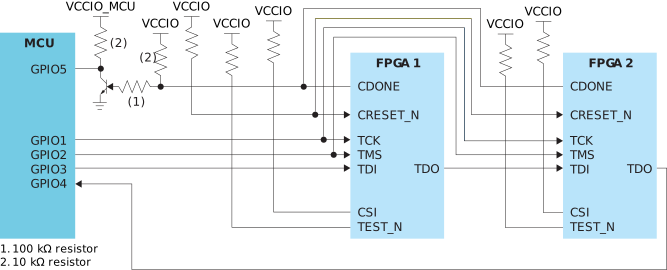
If you want to monitor the CDONE of each FPGA
separately instead of the system status, connect each CDONE to a
separate GPIO on the MCU.
- For a chain, put all devices except the one you are configuring into
BYPASSmode. - Perform an
IDCODEcheck for the FPGA you want to configure. - Send the
PROGRAMcommand and the bitstream data as well as the zeros for flushing. - Send the
ENTERUSERcommand. - Send 100 TCK cycles in the
IDLEorSHIFT_DRstate. - The FPGA's
CDONEpin goes high. - Repeat steps 2 - 6 for any other FPGAs in the chain.
When you finish configuring all FPGAs, all of their
CDONE pins should be high.
Topaz and Titanium Schematic and Programming
For JTAG chains, you configure one FPGA at a time in any order.
The FPGAs not being configured are in BYPASS
mode (not user mode).
If you want to monitor the CDONE of each FPGA
separately instead of the system status, connect each CDONE to a
separate GPIO on the MCU.
- For a chain, put all devices except the one you are configuring into
BYPASSmode. - Perform an
IDCODEcheck for the FPGA you want to configure. - Send
PROGRAMcommands and the bitstream data as well as the zeros for flushing. - Send the
ENTERUSERcommand. - Send 100 TCK cycles in the
IDLEorSHIFT_DRstate. - The FPGA's
CDONEpin goes high. - Repeat steps 2 - 6 for any other FPGAs in the chain.
When you finish configuring all FPGAs, all of their
CDONE pins should be high.
Resistors in Configuration Circuitry
Alternatively, you can calculate your own pull-up or pull-down resistance, RUSER, shown in the following sections.
User-Defined Pull-Up Resistor Values
- RUSER = User-defined pull-up resistance
- RCPU = Combined pull-up resistance
- RIPU = Internal weak pull-up resistance
The combined pull-up resistance, RCPU, can be derived using the following formula:
- VT+ = Schmitt Trigger low-to-high threshold
- VCCIO = I/O bank power supply
- RIPD = Internal weak pull-down resistance
User-Defined Pull-Down Resistor Values
- RUSER = User-defined pull-down resistance
- RCPD = Combined pull-down resistance
- RIPD = Internal weak pull-down resistance
The combined pull-down resistance, RCPD, can be derived using the following formula:
- VT- = Schmitt Trigger high-to-low threshold
- VCCIO = I/O bank power supply
- RIPU = Internal weak pull-up resistance
Appendix
This appendix provides reference information.
Trion Family JTAG Device IDs
The following table lists the Trion JTAG device IDs.
| FPGA | Package | JTAG Device ID |
|---|---|---|
| T4, T8 | BGA81 | 0x0 |
| T8 | QFP144 | 0x00210A79 |
| T13 | All | 0x00210A79 |
| T20 | WLCSP80, QFP100F3, QFP144, BGA169, BGA256 | 0x00210A79 |
| T20 | BGA324, BGA400 | 0x00240A79 |
| T35 | All | 0x00240A79 |
| T55, T85, T120 | All | 0x00220A79 |
Topaz Family JTAG Device IDs
The following table lists the Topaz JTAG device IDs.
| FPGA | Package | JTAG Device ID |
|---|---|---|
| Tz50 | All | 10668A79 |
| Tz75 | All | 006C8A79 |
| Tz100 | All | 006C9A79 |
| Tz110 | All | 00698A79 |
| Tz170 | All | 00699A79 |
| Tz200 | All | 006A8A79 |
| Tz325 | All | 006A9A79 |
Titanium Family JTAG Device IDs
The following table lists the Titanium JTAG device IDs.
| FPGA | Package | JTAG Device ID |
|---|---|---|
| Ti35 | All | 0x10661A79 |
| Ti60 | All | 0x10660A79 |
| Ti85 | All | 0x006C2A79 |
| Ti90 | J361, J484, G400, G529 | 0x00691A79 |
| L484 | 0x00688A79 | |
| Ti120 | J361, J484, G400, G529 | 0x00692A79 |
| L484 | 0x0068CA79 | |
| Ti125 | All | 0x006E0A79 |
| Ti135 | All | 0x006C0A79 |
| Ti165 | All | 0x006A1A79 |
| Ti180 | M484 | 0x00680A79 |
| J361, J484, , G400, G529 | 0x00690A79 | |
| L484 | 0x00684A79 | |
| Ti240 | All | 0x006A2A79 |
| Ti375 | All | 0x006A0A79 |
Supported JTAG Instructions
The following table shows the JTAG instructions Trion FPGAs support.
| Instruction | Binary Code [3:0] | Description |
|---|---|---|
| SAMPLE/PRELOAD | 0010 | Enables the boundary-scan SAMPLE/PRELOAD operation |
| EXTEST | 0000 | Enables the boundary-scan EXTEST operation |
| BYPASS | 1111 | Enables BYPASS |
| IDCODE | 0011 | Enables shifting out the IDCODE |
| PROGRAM | 0100 | JTAG configuration |
| ENTERUSER | 0111 | Changes the FPGA into user mode. |
| JTAG_USER1 | 1000 | Connects the JTAG User TAP 1. |
| JTAG_USER2 | 1001 | Connects the JTAG User TAP 2. |
| JTAG_USER3 | 1010 | Connects the JTAG User TAP 3. |
| JTAG_USER4 | 1011 | Connects the JTAG User TAP 4. |
The following table shows the JTAG instructions that Topaz and Titanium FPGAs support.
| Instruction | Binary Code [4:0] | Description |
|---|---|---|
| BYPASS | 11111 | Enables BYPASS. |
| DEVICE_STATUS | 01100 | Lets you read the device configuration status. |
| EFUSE_PREWRITE | 11000 | Loads user data for fuse operations. |
| EFUSE_USER_WRITE | 11010 | Blows fuses as defined in EFUSE_PREWRITE. |
| EFUSE_WRITE_STATUS | 11011 | Returns status of EFUSE_USER_WRITE operation. |
| ENTERUSER | 00111 | Changes the FPGA into user mode. |
| EXTEST | 00000 | Enables the boundary-scan EXTEST operation. |
| IDCODE | 00011 | Enables shifting out the IDCODE. |
| INTEST | 00001 | Enables the boundary-scan INTEST operation. |
| JTAG_USER1 | 01000 | Connects the JTAG User TAP 1. |
| JTAG_USER2 | 01001 | Connects the JTAG User TAP 2. |
| JTAG_USER3 | 01010 | Connects the JTAG User TAP 3. |
| JTAG_USER4 | 01011 | Connects the JTAG User TAP 4. |
| PROGRAM | 00100 | JTAG configuration. |
| SAMPLE/PRELOAD | 00010 | Enables the boundary-scan SAMPLE/PRELOAD operation. |
| USERCODE | 01101 | Use this instruction to program a 32-bit signature into the FPGA during programming. |
JTAG Waveforms and Timing

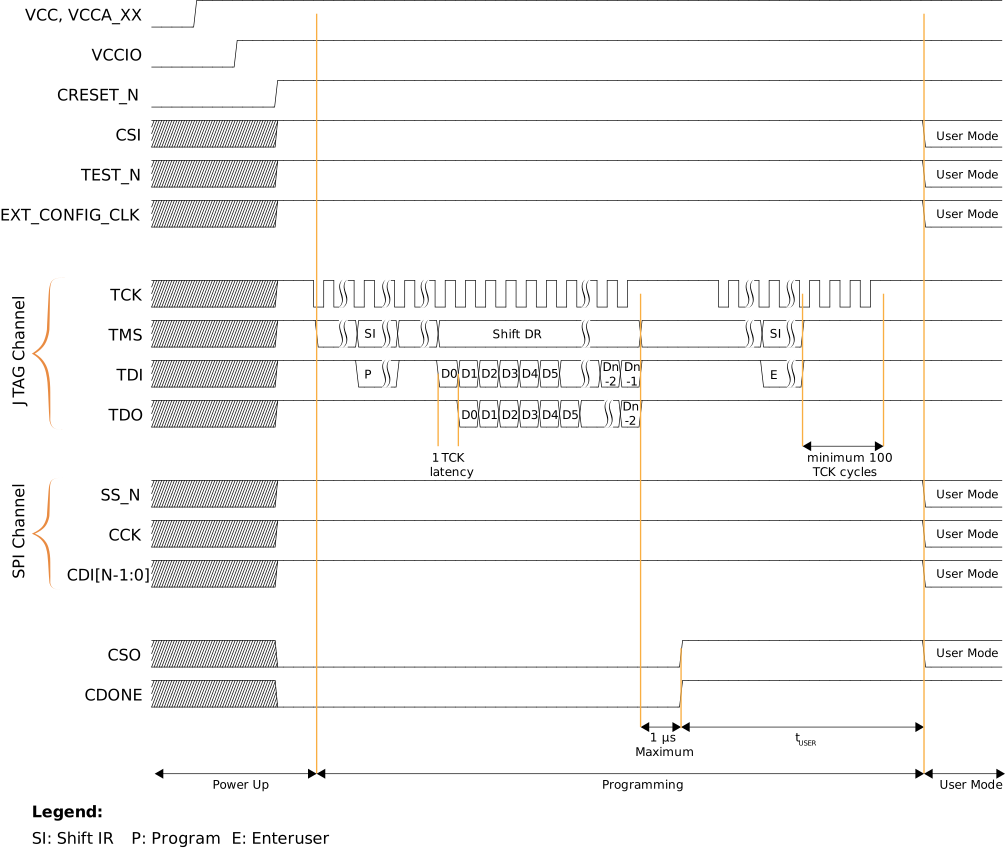

The CRESET_N signal needs to be deasserted before
JTAG configuration begins. When configuration ends, the JTAG host issues the
ENTERUSER instruction to the FPGA. After
CDONE goes high and the FPGA receives
the ENTERUSER instruction, the FPGA waits
for tUSER to elapse, and then it goes into user mode.
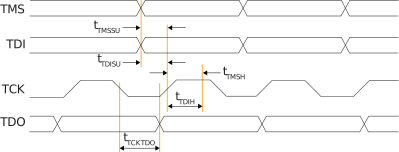
Follow these guidelines for the JTAG signals:
JTAG TAP Flow Chart
The following figure shows the standard JTAG TAP flow chart for your reference.

Revision History
| Date | Version | Description |
|---|---|---|
| December 2024 | 1.2 | Updated JTAG Waveforms and Timing. (DOC-2028) |
| August 2024 | 1.1 | Corrected schematic for Trion
Figure 3 and Titanium
an038.html#concept_nqs_z4b_mrb__titanium_multiple. (DOC-1372, DOC-1633, and DOC-1925)
Updated JTAG codes
for Trion and Titanium FPGAs.
(DOC-1372, DOC-1633, and DOC-1851) Added G400 package JTAG Device ID. (DOC-1385)
|
| November 2021 | 1.0 | Initial release. |