AN 015: Designing with the Trion MIPI Interface
Introduction
The MIPI CSI-2 interface, which defines a simple, high-speed protocol, is the most widely used camera interface for mobile1. Adding a MIPI interface to an FPGA creates a powerful bridge to transmit or receive high-speed video data easily to/from an application processor. With multiple MIPI TX and RX interfaces and 13K to 120K logic elements, Efinix MIPI-enabled Trion® FPGAs are flexible, programable platforms that can perform complex video processing as a complete system solution.
To help you build your MIPI interface, Efinix has created a MIPI utility. This utility lets you explore different interface settings (such as the resolution, color, number of lanes, etc.) while you are building your RTL design.
This user guide provides background information on the parts of the MIPI specification that are relevant to designing with Trion® FPGAs, describes the Trion® MIPI RX and TX interfaces, and explains how to use the MIPI utility.
MIPI Protocol Background
Trion FPGAs have a hardened CSI-2 (camera serial interface) interface and a hardened D-PHY differential interface. CSI-2 is a byte orientated, packet based protocol that defines standard data transmission and control interfaces between a transmitter and receiver. The D-PHY supports 1, 2, or 4 data lanes and one clock lane. Additionally, the CSI-2 block supports a camera control interface (CCI), which is compatible with the I2C standard. You can implement the CCI in soft logic in the core, and use it to control settings on your camera. In a complete system, the Trion FPGA receives video from a camera or sensor, processes it, and then sends it to an application processor.

Relationship between Low-Power State and Blanking
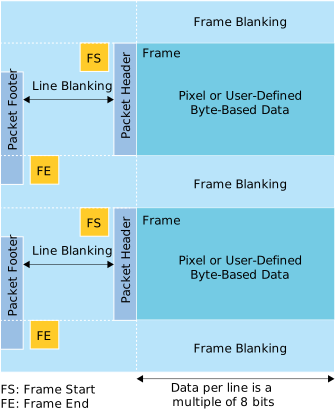
Operation alternates between high-speed bursts of data and low-power states. Each burst contains one data packet. For the YUV, RGB or RAW data types, one packet contains one line of image data.
In between the data packets, the system sends line and frame blanking. The MIPI interface is in low-power state during blanking.
Data Flow through the MIPI Interface
The following figure illustrates the data flow through the MIPI RX and TX interfaces and the Trion FPGA core.

- The D-PHY receives data bursts and sends them to the RX line buffer.
- The RX breaks the line into pixels, packs the pixels, and sends a packed pixel to the core on each clock cycle. The number of pixels packed together depends on the data type. Refer to Trion MIPI RX Video Data TYPE[5:0] Settings for the data types and pixels.
The RX has a line buffer, which stores only one line at a time. Therefore, you need to make sure that the RX pixel clock frequency is fast enough to consume a full line before the next line comes in. Learn more about the RX pixel clock.
- The core sends packed pixels to the TX line buffer. Refer to Trion MIPI TX Video Data TYPE[5:0] Settings for the data types and pixels.
- The TX unpacks the pixels (according to the data type), assembles them into lines, and sends them to the D-PHY.
- The D-PHY sends out data bursts.
Similar to the RX, the TX only has a line buffer. Therefore, the D-PHY rate has to be fast enough to consume the line (and any protocol overhead). Additionally. the TX pixel clock needs to be fast enough to send out data at the video standard rate you want to use. Learn more about the TX pixel clock.
Signals that Indicate Valid Video Data
DATA[63:0] bus has valid video data.VSYNC—Goes high to indicate a valid frame.HSYNC—Goes high to indicate a valid line.VALID—Goes high when the interface samples theDATA[63:0]bus.
The following figure shows the relationship between these signals.
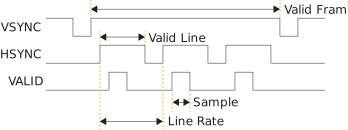
The MIPI CSI-2 specification describes the relationship between these signals, but does
not dictate exactly when the HSYNC and VALID signals
should go high. For example, many cameras send all of the lines in a frame very quickly
and then have a long blanking period until the frame ends. During blanking, the data
lanes are in the low-power state.
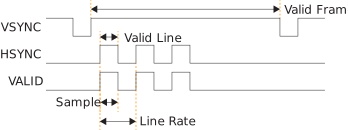
The period of the HSYNC pulses is the line rate. As the previous two
figures show, the line rate can be very different for the same frame rate. Refer to the
specification or data sheet for your camera to find the line rate, or probe the
HSYNC signal to measure it directly.
Sampling RX Data
Your RTL design should sample the RX data bus when the VALID signal is
high, indicating valid video data on the bus. However, the RX pixel clock can run faster
than the MIPI data rate. Therefore, the RTL design can empty the line buffer faster than
the RX interface can fill it. When the RX controller FIFO is empty, the
VALID signal goes low to indicate there is no valid video data on
that clock cycle.

TX Valid Signal Requirements
When you create your RTL design for the MIPI TX interface, your application must meet minimum delay requirements.
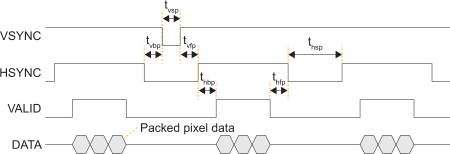
VALID signal goes high, the MIPI TX interface expects
to receive pixel data every clock cycle until the entire line is sent. Additionally,
the TX VALID signal must remain high for the entire line.| Parameter | Description | Minimum Delay |
|---|---|---|
| thbp | Horizontal back porch | 2 TX pixel clock cycles |
| thfp | Horizontal front porch | |
| thsp | Horizontal sync pulse | |
| tvbp | Vertical back porch | 1 blanking line |
| thvfp | Vertical front porch | |
| tvsp | Vertical sync pulse |
Understanding the RX and TX Pixel Clock
In a MIPI system, the pixel clock is the clock used to transfer the video data to or from the MIPI controller. This document calls it the system pixel clock. The system pixel clock is related to the video resolution. If you are using a standard monitor, you can simply look up the clock specification in the SMPTE/CEA or VESA standards. Alternatively, you can calculate the clock you need.
Generally speaking, you calculate the system pixel clock frequency using the following equation:
Pixel Clock Frequency = Total Horizontal Samples x Total Vertical Lines x Refresh Rate3
where the Total Horizontal Samples and Total Vertical Lines include the blanking period.
In the Interface Designer, the MIPI TX and RX interfaces also have RX and TX pixel clocks. These clocks are not the same as the system pixel clock, however, they are related. These pixel clocks take into account both the system pixel clock and the video data type.
The RX and TX pixel clocks must be equal to or faster than the system pixel clock divided by the number of pixels processed by the MIPI interface each clock cycle. The number of pixels processed per clock depends on the video data type.
For example, if the system pixel clock is running at 150 MHz and using the RGB444 RX data type, which processes 4 pixels per clock, the RX pixel clock must be at least 37.5 MHz.
Video Data Type
The video data type includes the color mode (RAW, RGB, and YUV) and the data format, which together determine the amount of video transmitted every pixel clock (that is, the bandwidth). The overal system bandwidth is simply the system pixel clock times the number of bits of video data transferred each clock cycle.
Trion MIPI Interface
- Programmable data lane configuration supporting 1, 2, or 4 lanes
- High-speed mode supports up to 1.5 Gbps data rates per lane
- Operates in continuous and non-continuous clock modes
- 64 bit pixel interface for cameras
- Supports Ultra-Low Power State (ULPS)
| Data Type | Format |
|---|---|
| RAW | RAW6, RAW7, RAW8, RAW10, RAW12, RAW14 |
| YUV | YUV420 8-bit (legacy), YUV420 8-bit, YUV420 10-bit, YUV420 8-bit (CSPS), YUV420 10-bit (CSPS), YUV422 8-bit, YUV422 10-bit |
| RGB | RGB444, RGB555, RGB565, RGB666, RGB888 |
| User Defined | 8 bit format |
Trion MIPI TX
The MIPI TX is a transmitter interface that translates video data from the Trion® core into packetized data sent over the HSSI interface to the board. Five high-speed differential pin pairs (four data, one clock), each of which represent a lane, connect to the board. Control and video signals connect from the MIPI interface to the core.
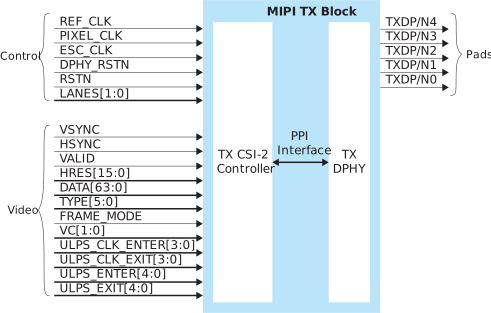
The control signals determine the clocking and how many transceiver lanes are used. All control signals are required except the two reset signals. The reset signals are optional, however, you must use both signals or neither.
The MIPI block requires an escape clock (ESC_CLK) for use when the
MIPI interface is in escape (low-power) mode, which runs between 11 and 20
MHz.
The video signals receive the video data from the core. The MIPI interface block encodes is and sends it out through the MIPI D-PHY lanes.

| Signal | Direction | Clock Domain | Description |
|---|---|---|---|
| REF_CLK | Input | N/A | Reference clock for the internal MIPI TX PLL used to generate the
transmitted data. The FPGA has a
dedicated GPIO resource (MREFCLK) that you must configure to provide
the reference clock. All of the MIPI TX blocks share this
resource. The frequency is set using Interface Designer
configuration options. |
| PIXEL_CLK | Input | N/A | Clock used for transferring data from the core to the MIPI TX
block. The frequency is based on the number of lanes and video
format. Refer to Understanding the RX and TX Pixel Clock. |
| ESC_CLK | Input | N/A | Slow clock for escape mode (11 - 20 MHz). |
| DPHY_RSTN | Input | N/A | (Optional) Reset for the D-PHY logic, active low. Reset with the
controller. See MIPI Reset Timing. |
| RSTN | Input | N/A | (Optional) Reset for the CSI-2 controller logic, active low.
Typically, you reset the controller with the PHY. (See MIPI Reset Timing.) However, when dynamically changing the horizontal
resolution, you only need to trigger RSTN. |
| LANES[1:0] | Input | PIXEL_CLK | Determines the number of lanes enabled. Can only be changed
during reset. 00: lane 0 01: lanes 0 and
1 11: all lanes |
| Signal | Direction | Clock Domain | Description |
|---|---|---|---|
| VSYNC | Input | PIXEL_CLK | Vertical sync. |
| HSYNC | Input | PIXEL_CLK | Horizontal sync. |
| VALID | Input | PIXEL_CLK | Valid signal. |
| HRES[15:0] | Input | PIXEL_CLK | Horizontal resolution. Can only be changed when VSYNC is low, and should be stable for at least one TX pixel clock cycle before VSYNC goes high. |
| DATA[63:0] | Input | PIXEL_CLK | Video data; the format depends on the data type. New data arrives on every pixel clock. |
| TYPE[5:0] | Input | PIXEL_CLK | Video data type. Can only be changed when HSYNC is low, and should be stable for at least one TX pixel clock cycle before HSYNC goes high. |
| FRAME_MODE | Input | PIXEL_CLK | Selects frame format. 4 0: general frame 1: accurate
frame Can only be changed during reset. |
| VC[1:0] | Input | PIXEL_CLK | Virtual channel (VC). Can only be changed when VSYNC is low, and should be stable at least one TX pixel clock cycle before VSYNC goes high. |
| ULPS_CLK_ENTER | Input | PIXEL_CLK | Place the clock lane into ULPS mode. Should not be active at the same time as ULPS_CLK_EXIT. Each high pulse should be at least 5 μs. |
| ULPS_CLK_EXIT | Input | PIXEL_CLK | Remove clock lane from ULPS mode. Should not be active at the same time as ULPS_CLK_ENTER. Each high pulse should be at least 5 μs. |
| ULPS_ENTER[3:0] | Input | PIXEL_CLK | Place the data lane into ULPS mode. Should not be active at the same time as ULPS_EXIT[3:0]. Each high pulse should be at least 5 μs. |
| ULPS_EXIT[3:0] | Input | PIXEL_CLK | Remove the data lane from ULPS mode. Should not be active at the same time as ULPS_ENTER[3:0]. Each high pulse should be at least 5 μs. |
| Pad | Direction | Description |
|---|---|---|
| TXDP[4:0] | Output | MIPI transceiver P pads. |
| TXDN[4:0] | Output | MIPI transceiver N pads. |
| Tab | Parameter | Choices | Notes |
|---|---|---|---|
| Base | PHY Bandwidth (Mbps) | 80.00 - 1500.00 | Choose one of the possible PHY bandwidth values. |
| Frequency (reference clock) | 6, 12, 19.2, 25, 26, 27, 38.4, or 52 MHz | Reference clock frequency. | |
| Enable Continuous PHY Clocking | On or Off | Turns continuous clock mode on or off. | |
| Control | Escape Clock Pin Name | User defined | |
| Invert Escape Clock | On or Off | ||
| Pixel Clock Pin Name | User defined | ||
| Invert Pixel Clock | On or Off | ||
| Lane Mapping | TXD0, TXD1, TXD2, TXD3, TXD4 | clk, data0, data1, data2, or data3 | Map the physical lane to a clock or data lane. |
| Clock Timer | |||
| Timing | TCLK-POST TCLK-TRAIL TCLK-PREPARE TCLK-ZERO |
Varies depending on the PHY frequency | Changes the MIPI transmitter timing parameters per the DPHY specification. Refer to Trion D-PHY Timing Parameters. |
| Escape Clock Frequency (MHz) | User defined | Specify a number between 11 and 20 MHz. | |
| TCLK-PRE | Varies depending on the escape clock frequency | Changes the MIPI transmitter timing parameters per the DPHY specification. Refer to Trion D-PHY Timing Parameters. | |
| Data Timer | |||
| THS-PREPARE THS-ZERO THS-PTRAIL |
Varies depending on the PHY frequency | Changes the MIPI transmitter timing parameters per the DPHY specification. Refer to Trion D-PHY Timing Parameters. | |
TX Requirements for Dynamically Changing the Horizontal Resolution
You can dynamically change the resolution by frame. You change the horizontal resolution
(HRES[15:0] signal) during the frame (or vertical) blanking period,
which happens between the frame start and frame end packets.
To correctly handle the resolution change, you need to fine-tune the TX interface's front
and back porch timing and insert at least 2 dummy HSYNC pulses before
the TX sends the active pixel.
You can pulse the HSYNC signal any number of times before the first
dummy pulse. You change the resolution on HRES[15:0] at the end of the
first dummy pulse.
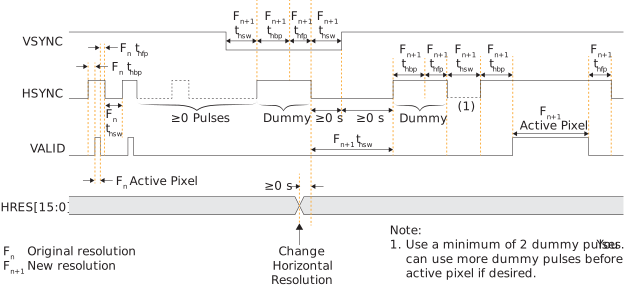
You should pulse the active-low CSI-2 controller logic reset, RSTN,
during the first dummy pixel. You do not need to reset the D-PHY.

Efinix provides an additional worksheet in the MIPI Utility to help you determine the correct back and front porch timing values for the resolutions you are using in your application. Refer to Using the Dynamic Horizontal Resolution (HRES) TX Utility for details.
Trion MIPI TX Video Data TYPE[5:0] Settings
The video data type can only be changed when HSYNC is low.
| TYPE[5:0] | Data Type | Pixel Data Bits per Pixel Clock | Pixels per Clock | Bits per Pixel | Maximum Data Pixels per Line |
|---|---|---|---|---|---|
| 0x20 | RGB444 | 48 | 4 | 12 | 2,880 |
| 0x21 | RGB555 | 60 | 4 | 15 | 2,880 |
| 0x22 | RGB565 | 64 | 4 | 16 | 2,880 |
| 0x23 | RGB666 | 54 | 3 | 18 | 2,556 |
| 0x24 | RGB888 | 48 | 2 | 24 | 1,920 |
| 0x28 | RAW6 | 60 | 10 | 6 | 7,680 |
| 0x29 | RAW7 | 56 | 8 | 7 | 6,576 |
| 0x2A | RAW8 | 64 | 8 | 8 | 5,760 |
| 0x2B | RAW10 | 60 | 6 | 10 | 4,608 |
| 0x2C | RAW12 | 60 | 5 | 12 | 3,840 |
| 0x2D | RAW14 | 56 | 4 | 14 | 3,288 |
| 0x18 | YUV420 8 bit | Odd line: 64 Even line: 64 |
Odd line: 8 Even line: 4 |
Odd line: 8 Even line: 8, 24 |
2,880 |
| 0x19 | YUV420 10 bit | Odd line: 60 Even line: 40 |
Odd line: 6 Even line: 2 |
Odd line: 10 Even line: 10, 30 |
2,304 |
| 0x1A | Legacy YUV420 8 bit | 48 | 4 | 8, 16 | 3,840 |
| 0x1C | YUV420 8 bit (CSPS) | Odd line: 64 Even line: 64 |
Odd line: 8 Even line: 4 |
Odd line: 8 Even line: 8, 24 |
2,880 |
| 0x1D | YUV420 10 bit (CSPS) | Odd line: 60 Even line: 40 |
Odd line: 6 Even line: 2 |
Odd line: 10 Even line: 10, 30 |
2,304 |
| 0x1E | YUV422 8 bit | 64 | 4 | 8, 24 | 2,880 |
| 0x1F | YUV422 10 bit | 40 | 2 | 10, 30 | 2,304 |
| 0x30 - 37 | User defined 8 bit | 64 | 8 | 8 | 5,760 |
MIPI TX Video Data DATA[63:0] Formats
The format depends on the data type. New data arrives on every pixel clock.
| 63 | 60 | 59 | 54 | 53 | 48 | 47 | 42 | 41 | 36 | 35 | 30 | 29 | 24 | 23 | 18 | 17 | 12 | 11 | 6 | 5 | 0 | ||||||||||||||||||||||||||||||||||||||||||
|---|---|---|---|---|---|---|---|---|---|---|---|---|---|---|---|---|---|---|---|---|---|---|---|---|---|---|---|---|---|---|---|---|---|---|---|---|---|---|---|---|---|---|---|---|---|---|---|---|---|---|---|---|---|---|---|---|---|---|---|---|---|---|---|
| 0 | Pixel 10 | Pixel 9 | Pixel 8 | Pixel 6 | Pixel 6 | Pixel 5 | Pixel 4 | Pixel 3 | Pixel 2 | Pixel 1 | |||||||||||||||||||||||||||||||||||||||||||||||||||||
| 63 | 56 | 55 | 49 | 48 | 42 | 41 | 35 | 34 | 28 | 27 | 21 | 20 | 14 | 13 | 7 | 6 | 0 | ||||||||||||||||||||||||||||||||||||||||||||||
|---|---|---|---|---|---|---|---|---|---|---|---|---|---|---|---|---|---|---|---|---|---|---|---|---|---|---|---|---|---|---|---|---|---|---|---|---|---|---|---|---|---|---|---|---|---|---|---|---|---|---|---|---|---|---|---|---|---|---|---|---|---|---|---|
| 0 | Pixel 8 | Pixel 7 | Pixel 6 | Pixel 5 | Pixel 4 | Pixel 3 | Pixel 2 | Pixel 1 | |||||||||||||||||||||||||||||||||||||||||||||||||||||||
| 63 | 54 | 53 | 48 | 47 | 40 | 39 | 32 | 31 | 24 | 23 | 16 | 15 | 8 | 7 | 0 | ||||||||||||||||||||||||||||||||||||||||||||||||
|---|---|---|---|---|---|---|---|---|---|---|---|---|---|---|---|---|---|---|---|---|---|---|---|---|---|---|---|---|---|---|---|---|---|---|---|---|---|---|---|---|---|---|---|---|---|---|---|---|---|---|---|---|---|---|---|---|---|---|---|---|---|---|---|
| Pixel 8 | Pixel 7 | Pixel 6 | Pixel 5 | Pixel 4 | Pixel 3 | Pixel 2 | Pixel 1 | ||||||||||||||||||||||||||||||||||||||||||||||||||||||||
| 63 | 60 | 59 | 50 | 49 | 40 | 39 | 30 | 29 | 20 | 19 | 10 | 9 | 0 | ||||||||||||||||||||||||||||||||||||||||||||||||||
|---|---|---|---|---|---|---|---|---|---|---|---|---|---|---|---|---|---|---|---|---|---|---|---|---|---|---|---|---|---|---|---|---|---|---|---|---|---|---|---|---|---|---|---|---|---|---|---|---|---|---|---|---|---|---|---|---|---|---|---|---|---|---|---|
| 0 | Pixel 6 | Pixel 5 | Pixel 4 | Pixel 3 | Pixel 2 | Pixel 1 | |||||||||||||||||||||||||||||||||||||||||||||||||||||||||
| 63 | 60 | 59 | 48 | 47 | 36 | 35 | 24 | 23 | 12 | 11 | 0 | ||||||||||||||||||||||||||||||||||||||||||||||||||||
|---|---|---|---|---|---|---|---|---|---|---|---|---|---|---|---|---|---|---|---|---|---|---|---|---|---|---|---|---|---|---|---|---|---|---|---|---|---|---|---|---|---|---|---|---|---|---|---|---|---|---|---|---|---|---|---|---|---|---|---|---|---|---|---|
| 0 | Pixel 5 | Pixel 4 | Pixel 3 | Pixel 2 | Pixel 1 | ||||||||||||||||||||||||||||||||||||||||||||||||||||||||||
| 63 | 56 | 55 | 42 | 41 | 28 | 27 | 14 | 13 | 0 | ||||||||||||||||||||||||||||||||||||||||||||||||||||||
|---|---|---|---|---|---|---|---|---|---|---|---|---|---|---|---|---|---|---|---|---|---|---|---|---|---|---|---|---|---|---|---|---|---|---|---|---|---|---|---|---|---|---|---|---|---|---|---|---|---|---|---|---|---|---|---|---|---|---|---|---|---|---|---|
| 0 | Pixel 4 | Pixel 3 | Pixel 2 | Pixel 1 | |||||||||||||||||||||||||||||||||||||||||||||||||||||||||||
| 63 | 48 | 47 | 36 | 35 | 24 | 23 | 12 | 11 | 0 | ||||||||||||||||||||||||||||||||||||||||||||||||||||||
|---|---|---|---|---|---|---|---|---|---|---|---|---|---|---|---|---|---|---|---|---|---|---|---|---|---|---|---|---|---|---|---|---|---|---|---|---|---|---|---|---|---|---|---|---|---|---|---|---|---|---|---|---|---|---|---|---|---|---|---|---|---|---|---|
| 0 | Pixel 4 | Pixel 3 | Pixel 2 | Pixel 1 | |||||||||||||||||||||||||||||||||||||||||||||||||||||||||||
| 63 | 60 | 59 | 45 | 44 | 30 | 29 | 15 | 14 | 0 | ||||||||||||||||||||||||||||||||||||||||||||||||||||||
|---|---|---|---|---|---|---|---|---|---|---|---|---|---|---|---|---|---|---|---|---|---|---|---|---|---|---|---|---|---|---|---|---|---|---|---|---|---|---|---|---|---|---|---|---|---|---|---|---|---|---|---|---|---|---|---|---|---|---|---|---|---|---|---|
| 0 | Pixel 4 | Pixel 3 | Pixel 2 | Pixel 1 | |||||||||||||||||||||||||||||||||||||||||||||||||||||||||||
| 63 | 48 | 47 | 32 | 31 | 16 | 15 | 0 | ||||||||||||||||||||||||||||||||||||||||||||||||||||||||
|---|---|---|---|---|---|---|---|---|---|---|---|---|---|---|---|---|---|---|---|---|---|---|---|---|---|---|---|---|---|---|---|---|---|---|---|---|---|---|---|---|---|---|---|---|---|---|---|---|---|---|---|---|---|---|---|---|---|---|---|---|---|---|---|
| Pixel 4 | Pixel 3 | Pixel 2 | Pixel 1 | ||||||||||||||||||||||||||||||||||||||||||||||||||||||||||||
| 63 | 54 | 53 | 36 | 35 | 18 | 17 | 0 | ||||||||||||||||||||||||||||||||||||||||||||||||||||||||
|---|---|---|---|---|---|---|---|---|---|---|---|---|---|---|---|---|---|---|---|---|---|---|---|---|---|---|---|---|---|---|---|---|---|---|---|---|---|---|---|---|---|---|---|---|---|---|---|---|---|---|---|---|---|---|---|---|---|---|---|---|---|---|---|
| 0 | Pixel 3 | Pixel 2 | Pixel 1 | ||||||||||||||||||||||||||||||||||||||||||||||||||||||||||||
| 63 | 48 | 47 | 24 | 23 | 0 | ||||||||||||||||||||||||||||||||||||||||||||||||||||||||||
|---|---|---|---|---|---|---|---|---|---|---|---|---|---|---|---|---|---|---|---|---|---|---|---|---|---|---|---|---|---|---|---|---|---|---|---|---|---|---|---|---|---|---|---|---|---|---|---|---|---|---|---|---|---|---|---|---|---|---|---|---|---|---|---|
| 0 | Pixel 2 | Pixel 1 | |||||||||||||||||||||||||||||||||||||||||||||||||||||||||||||
| 63 | 56 | 55 | 48 | 47 | 40 | 39 | 32 | 31 | 24 | 23 | 16 | 15 | 8 | 7 | 0 | ||||||||||||||||||||||||||||||||||||||||||||||||
|---|---|---|---|---|---|---|---|---|---|---|---|---|---|---|---|---|---|---|---|---|---|---|---|---|---|---|---|---|---|---|---|---|---|---|---|---|---|---|---|---|---|---|---|---|---|---|---|---|---|---|---|---|---|---|---|---|---|---|---|---|---|---|---|
| Odd Lines | |||||||||||||||||||||||||||||||||||||||||||||||||||||||||||||||
| Pixel 8 Y8 |
Pixel 7 Y7 |
Pixel 6 Y6 |
Pixel 5 Y5 |
Pixel 4 Y4 |
Pixel 3 Y3 |
Pixel 2 Y2 |
Pixel 1 Y1 |
||||||||||||||||||||||||||||||||||||||||||||||||||||||||
| Even Lines | |||||||||||||||||||||||||||||||||||||||||||||||||||||||||||||||
| Pixel 4 | Pixel 3 | Pixel 2 | Pixel 1 | ||||||||||||||||||||||||||||||||||||||||||||||||||||||||||||
| Y4 | V3 | Y3 | U3 | Y2 | V1 | Y1 | U1 | ||||||||||||||||||||||||||||||||||||||||||||||||||||||||
| 63 | 48 | 47 | 40 | 39 | 32 | 31 | 24 | 23 | 16 | 15 | 8 | 7 | 0 | ||||||||||||||||||||||||||||||||||||||||||||||||||
|---|---|---|---|---|---|---|---|---|---|---|---|---|---|---|---|---|---|---|---|---|---|---|---|---|---|---|---|---|---|---|---|---|---|---|---|---|---|---|---|---|---|---|---|---|---|---|---|---|---|---|---|---|---|---|---|---|---|---|---|---|---|---|---|
| 0 | Pixel 4 | Pixel 3 | Pixel 2 | Pixel 1 | |||||||||||||||||||||||||||||||||||||||||||||||||||||||||||
| Odd Lines | Y4 | Y3 | U3 | Y2 | Y1 | U1 | |||||||||||||||||||||||||||||||||||||||||||||||||||||||||
| Even Lines | Y4 | Y3 | V3 | Y2 | Y1 | V1 | |||||||||||||||||||||||||||||||||||||||||||||||||||||||||
| 63 | 60 | 59 | 50 | 49 | 40 | 39 | 30 | 29 | 20 | 19 | 10 | 9 | 0 | ||||||||||||||||||||||||||||||||||||||||||||||||||
|---|---|---|---|---|---|---|---|---|---|---|---|---|---|---|---|---|---|---|---|---|---|---|---|---|---|---|---|---|---|---|---|---|---|---|---|---|---|---|---|---|---|---|---|---|---|---|---|---|---|---|---|---|---|---|---|---|---|---|---|---|---|---|---|
| Odd Lines | |||||||||||||||||||||||||||||||||||||||||||||||||||||||||||||||
| 0 | Pixel 6 Y6 |
Pixel 5 Y5 |
Pixel 4 Y4 |
Pixel 3 Y3 |
Pixel 2 Y2 |
Pixel 1 Y1 |
|||||||||||||||||||||||||||||||||||||||||||||||||||||||||
| Even Lines | |||||||||||||||||||||||||||||||||||||||||||||||||||||||||||||||
| 0 | Pixel 2 | Pixel 1 | |||||||||||||||||||||||||||||||||||||||||||||||||||||||||||||
| Y2 | V1 | Y1 | U1 | ||||||||||||||||||||||||||||||||||||||||||||||||||||||||||||
| 63 | 56 | 55 | 48 | 47 | 40 | 39 | 32 | 31 | 24 | 23 | 16 | 15 | 8 | 7 | 0 | ||||||||||||||||||||||||||||||||||||||||||||||||
|---|---|---|---|---|---|---|---|---|---|---|---|---|---|---|---|---|---|---|---|---|---|---|---|---|---|---|---|---|---|---|---|---|---|---|---|---|---|---|---|---|---|---|---|---|---|---|---|---|---|---|---|---|---|---|---|---|---|---|---|---|---|---|---|
| Pixel 4 | Pixel 3 | Pixel 2 | Pixel 1 | ||||||||||||||||||||||||||||||||||||||||||||||||||||||||||||
| Y4 | V3 | Y3 | U3 | Y2 | V1 | Y1 | U1 | ||||||||||||||||||||||||||||||||||||||||||||||||||||||||
| 63 | 40 | 39 | 30 | 29 | 20 | 19 | 10 | 9 | 0 | ||||||||||||||||||||||||||||||||||||||||||||||||||||||
|---|---|---|---|---|---|---|---|---|---|---|---|---|---|---|---|---|---|---|---|---|---|---|---|---|---|---|---|---|---|---|---|---|---|---|---|---|---|---|---|---|---|---|---|---|---|---|---|---|---|---|---|---|---|---|---|---|---|---|---|---|---|---|---|
| 0 | Pixel 2 | Pixel 1 | |||||||||||||||||||||||||||||||||||||||||||||||||||||||||||||
| Y2 | V1 | Y1 | U1 | ||||||||||||||||||||||||||||||||||||||||||||||||||||||||||||
Trion MIPI RX
The MIPI RX is a receiver interface that translates HSSI signals from the board to video data in the Trion® core. Five high-speed differential pin pairs (one clock, four data), each of which represent a lane, connect to the board. Control, video, and status signals connect from the MIPI interface to the core.
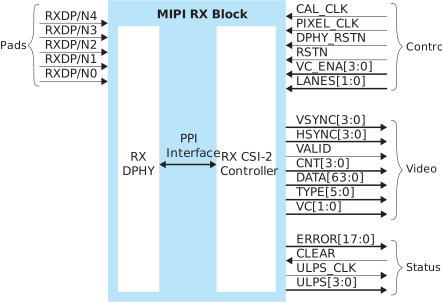
The control signals determine the clocking, how many transceiver lanes are used, and how many virtual channels are enabled. All control signals are required except the two reset signals. The reset signals are optional, however, you must use both signals or neither.
The video signals send the decoded video data to the core. All video signals must fully support the MIPI standard.
The status signals provide optional status and error information about the MIPI RX interface operation.

| Signal | Direction | Clock Domain | Notes |
|---|---|---|---|
| CAL_CLK | Input | N/A | Used for D-PHY calibration; must be between 80 and 120 MHz. |
| PIXEL_CLK | Input | N/A | Clock used for transferring data to the core from the MIPI RX
block. The frequency based on the number of lanes and video format.
Refer to Understanding the RX and TX Pixel Clock. |
| DPHY_RSTN | Input | N/A | (Optional) Reset for the D-PHY logic, active low. Must be used if
RSTN is used. See MIPI Reset Timing. |
| RSTN | Input | N/A | (Optional) Reset for the CSI-2 controller logic, active low. Must
be used if DPHY_RSTN is used. See MIPI Reset Timing. |
| VC_ENA[3:0] | Input | PIXEL_CLK | Enables different VC channels by setting their index high. |
| LANES[1:0] | Input | PIXEL_CLK | Determines the number of lanes enabled: 00: lane
0 01: lanes 0 and 1 11: all lanes Can only be set during reset. |
| Signal | Direction | Clock Domain | Notes |
|---|---|---|---|
| VSYNC[3:0] | Output | PIXEL_CLK | Vsync bus. High if vsync is active for this VC. |
| HSYNC[3:0] | Output | PIXEL_CLK | Hsync bus. High if hsync is active for this VC |
| VALID | Output | PIXEL_CLK | Valid signal. |
| CNT[3:0] | Output | PIXEL_CLK | Number of valid pixels contained in the pixel data. |
| DATA[63:0] | Output | PIXEL_CLK | Video data, format depends on data type. New data every pixel clock. |
| TYPE[5:0] | Output | PIXEL_CLK | Video data type. |
| VC[1:0] | Output | PIXEL_CLK | Virtual channel (VC). |
| Signal | Direction | Signal Interface | Clock Domain | Notes |
|---|---|---|---|---|
| ERROR[17:0] | Output | IN | PIXEL_CLK | Error bus register. Refer to Table 27 for details. |
| CLEAR | Input | OUT | PIXEL_CLK | Reset the error registers. |
| ULPS_CLK | Output | IN | PIXEL_CLK | High when the clock lane is in the Ultra-Low-Power State (ULPS). |
| ULPS[3:0] | Output | IN | PIXEL_CLK | High when the lane is in the ULPS mode. |
| Bit | Name | Description |
|---|---|---|
| 0 | ERR_ESC | Escape Entry Error. Asserted when an unrecognized escape entry command is received. |
| 1 | CRC_ERROR_VC0 | CRC Error VC0. Set to 1 when a checksum error occurs. |
| 2 | CRC_ERROR_VC1 | CRC Error VC1. Set to 1 when a checksum error occurs. |
| 3 | CRC_ERROR_VC2 | CRC Error VC2. Set to 1 when a checksum error occurs. |
| 4 | CRC_ERROR_VC3 | CRC Error VC3. Set to 1 when a checksum error occurs. |
| 5 | HS_RX_TIMEOUT_ERR | HS RX Timeout Error. The protocol should time out when no EoT is received within a certain period in HS RX mode. |
| 6 | ECC_1BIT_ERROR | ECC Single Bit Error. Set to 1 when there is a single bit error. |
| 7 | ECC_2BIT_ERROR | ECC 2 Bit Error. Set to 1 if there is a 2 bit error in the packet. |
| 8 | ECCBIT_ERROR | ECC Error. Asserted when an error exists in the ECC. |
| 9 | ECC_NO_ERROR | ECC No Error. Asserted when an ECC is computed with a result zero. This bit is high when the receiver is receiving data correctly. |
| 10 | FRAME_SYNC_ERROR | Frame Sync Error. Asserted when a frame end is not paired with a frame start on the same virtual channel. |
| 11 | INVLD_PKT_LEN | Invalid Packet Length. Set to 1 if there is an invalid packet length. |
| 12 | INVLD_VC | Invalid VC ID. Set to 1 if there is an invalid CSI VC ID. |
| 13 | INVALID_DATA_TYPE | Invalid Data Type. Set to 1 if the received data is invalid. |
| 14 | ERR_FRAME | Error In Frame. Asserted when VSYNC END received when CRC error is present in the data packet. |
| 15 | CONTROL_ERR | Control Error. Asserted when an incorrect line state sequence is detected. |
| 16 | SOT_ERR | Start-of-Transmission (SoT) Error. Corrupted high-speed SoT leader sequence while proper synchronization can still be achieved. |
| 17 | SOT_SYNC_ERR | SoT Synchronization Error. Corrupted high-speed SoT leader sequence while proper synchronization cannot be expected. |
| Pad | Direction | Description |
|---|---|---|
| RXDP[4:0] | Input | MIPI transceiver P pads. |
| RXDN[4:0] | Input | MIPI transceiver N pads. |
| Tab | Parameter | Choices | Notes |
|---|---|---|---|
| Control | DPHY Calibration Clock Pin Name | User defined | |
| Invert DPHY Calibration Clock | On or Off | ||
| Pixel Clock Pin Name | User defined | ||
| Invert Pixel Clock | On or Off | ||
| Status | Enable Status | On or Off | Indicate whether you want to use the status pins. |
| Lane Mapping | RXD0, RXD1, RXD2, RXD3, RXD4 | clk, data0, data1, data2, or data3 | Map the physical lane to a clock or data lane. |
| Swap P&N Pin | On or Off | Reverse the P and N pins for the physical lane. | |
| Timing | Calibration Clock Freq (MHz) | User defined | Specify a number between 80 and 120 MHz. |
| Clock Timer (TCLK-SETTLE) | 40 - 2,590 ns | Changes the MIPI receiver timing parameters per the DPHY specification. Refer to Trion D-PHY Timing Parameters. | |
| Data Timer (THS-SETTLE) | 40 - 2,590 ns | Changes the MIPI receiver timing parameters per the DPHY specification. Refer to Trion D-PHY Timing Parameters. |
Trion MIPI RX Video Data TYPE[5:0] Settings
The video data type can only be changed when HSYNC is low.
| TYPE[5:0] | Data Type | Pixel Data Bits per Pixel Clock | Pixels per Clock | Bits per Pixel | Maximum Data Pixels per Line |
|---|---|---|---|---|---|
| 0x20 | RGB444 | 48 | 4 | 12 | 2,880 |
| 0x21 | RGB555 | 60 | 4 | 15 | 2,880 |
| 0x22 | RGB565 | 64 | 4 | 16 | 2,880 |
| 0x23 | RGB666 | 54 | 3 | 18 | 2,556 |
| 0x24 | RGB888 | 48 | 2 | 24 | 1,920 |
| 0x28 | RAW6 | 48 | 8 | 6 | 7,680 |
| 0x29 | RAW7 | 56 | 8 | 7 | 6,576 |
| 0x2A | RAW8 | 64 | 8 | 8 | 5,760 |
| 0x2B | RAW10 | 40 | 4 | 10 | 4,608 |
| 0x2C | RAW12 | 48 | 4 | 12 | 3,840 |
| 0x2D | RAW14 | 56 | 4 | 14 | 3,288 |
| 0x18 | YUV420 8 bit | Odd line: 64 Even line: 64 |
Odd line: 8 Even line: 4 |
Odd line: 8 Even line: 8, 24 |
2,880 |
| 0x19 | YUV420 10 bit | Odd line: 40 Even line: 40 |
Odd line: 4 Even line: 2 |
Odd line: 10 Even line: 10, 30 |
2,304 |
| 0x1A | Legacy YUV420 8 bit | 48 | 4 | 8, 16 | 3,840 |
| 0x1C | YUV420 8 bit (CSPS) | Odd line: 64 Even line: 64 |
Odd line: 8 Even line: 4 |
Odd line: 8 Even line: 8, 24 |
2,880 |
| 0x1D | YUV420 10 bit (CSPS) | Odd line: 40 Even line: 40 |
Odd line: 4 Even line: 2 |
Odd line: 10 Even line: 10, 30 |
2,304 |
| 0x1E | YUV422 8 bit | 64 | 4 | 8, 24 | 2,880 |
| 0x1F | YUV422 10 bit | 40 | 2 | 10, 30 | 2,304 |
| 0x30 - 37 | User defined 8 bit | 64 | 8 | 8 | 5,760 |
MIPI RX Video Data DATA[63:0] Formats
The format depends on the data type. New data arrives on every pixel clock.
| 63 | 48 | 47 | 42 | 41 | 36 | 35 | 30 | 29 | 24 | 23 | 18 | 17 | 12 | 11 | 6 | 5 | 0 | ||||||||||||||||||||||||||||||||||||||||||||||
|---|---|---|---|---|---|---|---|---|---|---|---|---|---|---|---|---|---|---|---|---|---|---|---|---|---|---|---|---|---|---|---|---|---|---|---|---|---|---|---|---|---|---|---|---|---|---|---|---|---|---|---|---|---|---|---|---|---|---|---|---|---|---|---|
| 0 | Pixel 8 | Pixel 7 | Pixel 6 | Pixel 5 | Pixel 4 | Pixel 3 | Pixel 2 | Pixel 1 | |||||||||||||||||||||||||||||||||||||||||||||||||||||||
| 63 | 56 | 55 | 49 | 48 | 42 | 41 | 35 | 34 | 28 | 27 | 21 | 20 | 14 | 13 | 7 | 6 | 0 | ||||||||||||||||||||||||||||||||||||||||||||||
|---|---|---|---|---|---|---|---|---|---|---|---|---|---|---|---|---|---|---|---|---|---|---|---|---|---|---|---|---|---|---|---|---|---|---|---|---|---|---|---|---|---|---|---|---|---|---|---|---|---|---|---|---|---|---|---|---|---|---|---|---|---|---|---|
| 0 | Pixel 8 | Pixel 7 | Pixel 6 | Pixel 5 | Pixel 4 | Pixel 3 | Pixel 2 | Pixel 1 | |||||||||||||||||||||||||||||||||||||||||||||||||||||||
| 63 | 56 | 55 | 48 | 47 | 40 | 39 | 32 | 31 | 24 | 23 | 16 | 15 | 8 | 7 | 0 | ||||||||||||||||||||||||||||||||||||||||||||||||
|---|---|---|---|---|---|---|---|---|---|---|---|---|---|---|---|---|---|---|---|---|---|---|---|---|---|---|---|---|---|---|---|---|---|---|---|---|---|---|---|---|---|---|---|---|---|---|---|---|---|---|---|---|---|---|---|---|---|---|---|---|---|---|---|
| Pixel 8 | Pixel 7 | Pixel 6 | Pixel 5 | Pixel 4 | Pixel 3 | Pixel 2 | Pixel 1 | ||||||||||||||||||||||||||||||||||||||||||||||||||||||||
| 63 | 40 | 39 | 30 | 29 | 20 | 19 | 10 | 9 | 0 | ||||||||||||||||||||||||||||||||||||||||||||||||||||||
|---|---|---|---|---|---|---|---|---|---|---|---|---|---|---|---|---|---|---|---|---|---|---|---|---|---|---|---|---|---|---|---|---|---|---|---|---|---|---|---|---|---|---|---|---|---|---|---|---|---|---|---|---|---|---|---|---|---|---|---|---|---|---|---|
| 0 | Pixel 4 | Pixel 3 | Pixel 2 | Pixel 1 | |||||||||||||||||||||||||||||||||||||||||||||||||||||||||||
| 63 | 48 | 47 | 36 | 35 | 24 | 23 | 12 | 11 | 0 | ||||||||||||||||||||||||||||||||||||||||||||||||||||||
|---|---|---|---|---|---|---|---|---|---|---|---|---|---|---|---|---|---|---|---|---|---|---|---|---|---|---|---|---|---|---|---|---|---|---|---|---|---|---|---|---|---|---|---|---|---|---|---|---|---|---|---|---|---|---|---|---|---|---|---|---|---|---|---|
| 0 | Pixel 4 | Pixel 3 | Pixel 2 | Pixel 1 | |||||||||||||||||||||||||||||||||||||||||||||||||||||||||||
| 63 | 56 | 55 | 42 | 41 | 28 | 27 | 14 | 13 | 0 | ||||||||||||||||||||||||||||||||||||||||||||||||||||||
|---|---|---|---|---|---|---|---|---|---|---|---|---|---|---|---|---|---|---|---|---|---|---|---|---|---|---|---|---|---|---|---|---|---|---|---|---|---|---|---|---|---|---|---|---|---|---|---|---|---|---|---|---|---|---|---|---|---|---|---|---|---|---|---|
| 0 | Pixel 4 | Pixel 3 | Pixel 2 | Pixel 1 | |||||||||||||||||||||||||||||||||||||||||||||||||||||||||||
| 63 | 48 | 47 | 36 | 35 | 24 | 23 | 12 | 11 | 0 | ||||||||||||||||||||||||||||||||||||||||||||||||||||||
|---|---|---|---|---|---|---|---|---|---|---|---|---|---|---|---|---|---|---|---|---|---|---|---|---|---|---|---|---|---|---|---|---|---|---|---|---|---|---|---|---|---|---|---|---|---|---|---|---|---|---|---|---|---|---|---|---|---|---|---|---|---|---|---|
| 0 | Pixel 4 | Pixel 3 | Pixel 2 | Pixel 1 | |||||||||||||||||||||||||||||||||||||||||||||||||||||||||||
| 63 | 60 | 59 | 45 | 44 | 30 | 29 | 15 | 14 | 0 | ||||||||||||||||||||||||||||||||||||||||||||||||||||||
|---|---|---|---|---|---|---|---|---|---|---|---|---|---|---|---|---|---|---|---|---|---|---|---|---|---|---|---|---|---|---|---|---|---|---|---|---|---|---|---|---|---|---|---|---|---|---|---|---|---|---|---|---|---|---|---|---|---|---|---|---|---|---|---|
| Pixel 4 | Pixel 3 | Pixel 2 | Pixel 1 | ||||||||||||||||||||||||||||||||||||||||||||||||||||||||||||
| 63 | 48 | 47 | 32 | 31 | 16 | 15 | 0 | ||||||||||||||||||||||||||||||||||||||||||||||||||||||||
|---|---|---|---|---|---|---|---|---|---|---|---|---|---|---|---|---|---|---|---|---|---|---|---|---|---|---|---|---|---|---|---|---|---|---|---|---|---|---|---|---|---|---|---|---|---|---|---|---|---|---|---|---|---|---|---|---|---|---|---|---|---|---|---|
| Pixel 4 | Pixel 3 | Pixel 2 | Pixel 1 | ||||||||||||||||||||||||||||||||||||||||||||||||||||||||||||
| 63 | 54 | 53 | 36 | 35 | 18 | 17 | 0 | ||||||||||||||||||||||||||||||||||||||||||||||||||||||||
|---|---|---|---|---|---|---|---|---|---|---|---|---|---|---|---|---|---|---|---|---|---|---|---|---|---|---|---|---|---|---|---|---|---|---|---|---|---|---|---|---|---|---|---|---|---|---|---|---|---|---|---|---|---|---|---|---|---|---|---|---|---|---|---|
| 0 | Pixel 3 | Pixel 2 | Pixel 1 | ||||||||||||||||||||||||||||||||||||||||||||||||||||||||||||
| 63 | 48 | 47 | 24 | 23 | 0 | ||||||||||||||||||||||||||||||||||||||||||||||||||||||||||
|---|---|---|---|---|---|---|---|---|---|---|---|---|---|---|---|---|---|---|---|---|---|---|---|---|---|---|---|---|---|---|---|---|---|---|---|---|---|---|---|---|---|---|---|---|---|---|---|---|---|---|---|---|---|---|---|---|---|---|---|---|---|---|---|
| 0 | Pixel 2 | Pixel 1 | |||||||||||||||||||||||||||||||||||||||||||||||||||||||||||||
| 63 | 56 | 55 | 48 | 47 | 40 | 39 | 32 | 31 | 24 | 23 | 16 | 15 | 8 | 7 | 0 | ||||||||||||||||||||||||||||||||||||||||||||||||
|---|---|---|---|---|---|---|---|---|---|---|---|---|---|---|---|---|---|---|---|---|---|---|---|---|---|---|---|---|---|---|---|---|---|---|---|---|---|---|---|---|---|---|---|---|---|---|---|---|---|---|---|---|---|---|---|---|---|---|---|---|---|---|---|
| Odd Lines | |||||||||||||||||||||||||||||||||||||||||||||||||||||||||||||||
| Pixel 8 Y8 |
Pixel 7 Y7 |
Pixel 6 Y6 |
Pixel 5 Y5 |
Pixel 4 Y4 |
Pixel 3 Y3 |
Pixel 2 Y2 |
Pixel 1 Y1 |
||||||||||||||||||||||||||||||||||||||||||||||||||||||||
| Even Lines | |||||||||||||||||||||||||||||||||||||||||||||||||||||||||||||||
| Pixel 4 | Pixel 3 | Pixel 2 | Pixel 1 | ||||||||||||||||||||||||||||||||||||||||||||||||||||||||||||
| Y4 | U3 | Y3 | V3 | Y2 | U1 | Y1 | V1 | ||||||||||||||||||||||||||||||||||||||||||||||||||||||||
| 63 | 48 | 47 | 40 | 39 | 32 | 31 | 24 | 23 | 16 | 15 | 8 | 7 | 0 | ||||||||||||||||||||||||||||||||||||||||||||||||||
|---|---|---|---|---|---|---|---|---|---|---|---|---|---|---|---|---|---|---|---|---|---|---|---|---|---|---|---|---|---|---|---|---|---|---|---|---|---|---|---|---|---|---|---|---|---|---|---|---|---|---|---|---|---|---|---|---|---|---|---|---|---|---|---|
| 0 | Pixel 4 | Pixel 3 | Pixel 2 | Pixel 1 | |||||||||||||||||||||||||||||||||||||||||||||||||||||||||||
| Odd Lines | Y4 | U3 | Y3 | Y2 | U1 | Y1 | |||||||||||||||||||||||||||||||||||||||||||||||||||||||||
| Even Lines | Y4 | V3 | Y3 | Y2 | V1 | Y1 | |||||||||||||||||||||||||||||||||||||||||||||||||||||||||
| 63 | 40 | 39 | 30 | 29 | 20 | 19 | 10 | 9 | 0 | ||||||||||||||||||||||||||||||||||||||||||||||||||||||
|---|---|---|---|---|---|---|---|---|---|---|---|---|---|---|---|---|---|---|---|---|---|---|---|---|---|---|---|---|---|---|---|---|---|---|---|---|---|---|---|---|---|---|---|---|---|---|---|---|---|---|---|---|---|---|---|---|---|---|---|---|---|---|---|
| Odd Lines | |||||||||||||||||||||||||||||||||||||||||||||||||||||||||||||||
| 0 | Pixel 4 Y4 |
Pixel 3 Y3 |
Pixel 2 Y2 |
Pixel 1 Y1 |
|||||||||||||||||||||||||||||||||||||||||||||||||||||||||||
| Even Lines | |||||||||||||||||||||||||||||||||||||||||||||||||||||||||||||||
| 0 | Pixel 1 | Pixel 2 | Pixel 1 | ||||||||||||||||||||||||||||||||||||||||||||||||||||||||||||
| V1 | Y2 | U1 | Y1 | ||||||||||||||||||||||||||||||||||||||||||||||||||||||||||||
| 63 | 56 | 55 | 48 | 47 | 40 | 39 | 32 | 31 | 24 | 23 | 16 | 15 | 8 | 7 | 0 | ||||||||||||||||||||||||||||||||||||||||||||||||
|---|---|---|---|---|---|---|---|---|---|---|---|---|---|---|---|---|---|---|---|---|---|---|---|---|---|---|---|---|---|---|---|---|---|---|---|---|---|---|---|---|---|---|---|---|---|---|---|---|---|---|---|---|---|---|---|---|---|---|---|---|---|---|---|
| Pixel 4 | Pixel 3 | Pixel 2 | Pixel 1 | ||||||||||||||||||||||||||||||||||||||||||||||||||||||||||||
| Y4 | V3 | Y3 | U3 | Y2 | V1 | Y1 | U1 | ||||||||||||||||||||||||||||||||||||||||||||||||||||||||
| 63 | 40 | 39 | 30 | 29 | 20 | 19 | 10 | 9 | 0 | ||||||||||||||||||||||||||||||||||||||||||||||||||||||
|---|---|---|---|---|---|---|---|---|---|---|---|---|---|---|---|---|---|---|---|---|---|---|---|---|---|---|---|---|---|---|---|---|---|---|---|---|---|---|---|---|---|---|---|---|---|---|---|---|---|---|---|---|---|---|---|---|---|---|---|---|---|---|---|
| 0 | Pixel 1 | Pixel 2 | Pixel 1 | ||||||||||||||||||||||||||||||||||||||||||||||||||||||||||||
| V1 | Y2 | U1 | Y1 | ||||||||||||||||||||||||||||||||||||||||||||||||||||||||||||
Trion D-PHY Timing Parameters
During CSI-2 data transmission, the MIPI D-PHY alternates between low power mode and high-speed mode. The D-PHY specification defines timing parameters to facilitate the correct hand-shaking between the MIPI TX and MIPI RX during mode transitions.


| Parameter | Description | Min | Typ | Max | Unit |
|---|---|---|---|---|---|
| TCLK-POST | Time that the transmitter continues to send HS clock after the last associated Data Lane has transitioned to LP Mode. Interval is defined as the period from the end of THS-TRAIL to the beginning of TCLK-TRAIL. | 60 ns + 52*UI | – | – | ns |
| TCLK-PRE | Time that the HS clock shall be driven by the transmitter prior to any associated Data Lane beginning the transition from LP to HS mode. | 8 | – | – | UI |
| TCLK-PREPARE | Time that the transmitter drives the Clock Lane LP-00 Line state immediately before the HS-0 Line state starting the HS transmission. | 38 | – | 95 | ns |
| TCLK-SETTLE | Time interval during which the HS receiver should ignore any Clock Lane HS transitions, starting from the beginning of TCLK-PREPARE. | 95 | – | 300 | ns |
| TCLK-TRAIL | Time that the transmitter drives the HS-0 state after the last payload clock bit of a HS transmission burst. | 60 | – | – | ns |
| TCLK-PREPARE + TCLK-ZERO | TCLK-PREPARE + time that the transmitter drives the HS-0 state prior to starting the Clock. | 300 | – | – | ns |
| THS-PREPARE | Time that the transmitter drives the Data Lane LP-00 Line state immediately before the HS-0 Line state starting the HS transmission | 40 ns + 4*UI | – | 85 ns + 6*UI | ns |
| THS-SETTLE | Time interval during which the HS receiver shall ignore any Data
Lane HS transitions, starting from the beginning of
THS-PREPARE. The HS receiver shall ignore any
Data Lane transitions before the minimum value, and the HS
receiver shall respond to any Data Lane transitions after the
maximum value. |
85 ns + 6*UI | – | 145 ns + 10*UI | ns |
| THS-TRAIL | Time that the transmitter drives the flipped differential state after last payload data bit of a HS transmission burst. | max( n*8*UI, 60 ns + n*4*UI)5 | – | – | ns |
| TLPX | Transmitted length of any Low-Power state period | 50 | – | – | ns |
| THS-PREPARE + THS-ZERO | THS-PREPARE + time that the transmitter drives the HS-0 state prior to transmitting the Sync sequence. | 145 ns + 10*UI | – | – | ns |
Trion MIPI Reset Timing
The MIPI RX and TX interfaces have two reset signals (DPHY_RSTN and
RSTN) to reset the D-PHY controller logic. These signals are active
low, and you should use them together to reset the MIPI interface.
The following waveform illustrates the minimum time required to reset the MIPI interface.

| Symbol | Parameter | Min | Typ | Max | Units |
|---|---|---|---|---|---|
| tINIT_A | Minimum time between the rising edge of DPHY_RSTN and the start of MIPI RX or TX data. | 100 | – | – | μs |
| tINIT_D | Minimum time between the rising edge of RSTN and the start of MIPI RX or TX data. | 1 | – | – | clk |
Power Up Sequence
- VCC—Digital supply voltage
- VCC25A_MIPI—2.5 V analog supply voltage
- VCC12A_MIPI_TX—1.2 V analog voltage supply to the MIPI TX
- VCC12A_MIPI_RX—1.2 V analog voltage supplies to the MIPI RX

Using the MIPI Utility
The MIPI utility is an Excel spreadsheet with macros. You enter information about the type of video you want to process, the interface configuration, and for TX, you can also specify timing parameters. The utility uses the data to perform a series of calculations to verify whether your selections pass various tests. The utility displays the results with a simple pass or fail. If a test does not pass, the utility suggests possible changes you can make.
The utility also includes a worksheet for calculating the TX front and back porch timing
requirements when dynamically changing the horizontal resolution. The RX does not have
any additional timing requirements for the HRES signal.
You can download the MIPI utility from the Design Support page in the Support Center. You must have an account and login to download the utility.
Editable fields are shaded blue. Some fields have a drop-down selection list while others allow you to enter a value, typically a positive integer.
MIPI Transmitter Settings
| Setting | Choices | Description |
|---|---|---|
| Data Type | RAW6, RAW7, RAW8, RAW10, RAW12, RAW14, RGB444, RGB555, RGB565, RGB666, RGB888, YUV420 8-bit, YUV420 8-bit (legacy), YUV420 10-bit, YUV422 8-bit, YUV422 10-bit, User defined | Choose the data type for the pixel color code. |
| # of data pixels per line | Positive integer | Number of horizontal data pixels per line. The number must be less than or equal to the maximum number of lines supported by the data type you choose. See Trion MIPI TX Video Data TYPE[5:0] Settings for the maximums. |
| # of data lines per frame | Positive integer | Include the number of data lines only, do not include blanking lines. |
| # of blanking lines per frame | Positive integer greater than or equal to 3 | Specify the number of blanking lines. The minimum is 3. |
| # of frames per second (Hz) | Positive integer | Number of video frame per second. |
| Horizontal blanking per line (μs) | Positive integer | Enter the horizontal blanking duration of each line in microseconds. For YUV420 data types, enter the blanking duration of the even lines. |
| Pixel clock frequency (MHz) | Positive integer | Synchronizes the transfer of pixel data from the FPGA fabric to the MIPI controller. The requirements for this number are dependent on the data type. |
| Settings | Choices | Description |
|---|---|---|
| Data rate (Mbps) | 80 - 1500 | Data rate in Mbps. |
| # of lanes | 1, 2, or 4 | Number of data lanes. |
| Clock mode | Continuous or Non-Continuous | Indicate the clock mode. |
| Settings | Choices | Description |
|---|---|---|
| THS-PREPARE (ns) | Positive integer | MIPI D-PHY timing parameters. Refer to Trion D-PHY Timing Parameters for details. |
| THS-ZERO (ns) | Positive integer | |
| THS-TRAIL (ns) | Positive integer | |
| TCLK-POST (ns) | Positive integer | |
| TCLK-TRAIL (ns) | Positive integer | |
| TCLK-PREPARE (ns) | Positive integer | |
| TCLK-ZERO (ns) | Positive integer | |
| TCLK-PRE (ns) | Positive integer |
Understanding the TX Utility Results
- Maximum Line Buffer Test—Determines whether the number of horizontal pixels per line is within the range of values the data type supports.
- Minimum Horizontal Blanking Test—Determines whether the horizontal blanking period is long enough for the interface to operate correctly.
- Minimum Line Rate Test—Determines whether the line rate you specify can support the video bandwidth you chose.
- Minimum Bandwidth Test—Determines whether the combined bandwidth of the MIPI serial data lanes can support the your video application bandwidth.
The utility marks each test as PASS or Action Required. If action is required, the utility make suggestions for how you can adjust your selections to pass the test.
Using the Dynamic Horizontal Resolution (HRES) TX Utility
If your application needs to support changes in resolution for different frames, you need
to use an additional calculation to help determine the front and back porch timing
values for the HSYNC signal.
- Enter values in the MIPI TX tab as described in MIPI Transmitter Settings for one of the resolutions you want to use until it passes.
- Click the DYNAMIC HRES GEN tab. This sheet should display "READY TO GEN” when the MIPI TX worksheet passes.
- Enter the resolution values you want in the rows under HRES. The utility includes some example values. Delete ones that you do not want and add any additional values.
- Click Generate Porch and Max. # of Lines. The utility generates the required maximum and minimum porch values for each resolution.
MIPI Receiver Settings
The MIPI receiver utility helps you determine a combination of RX interface settings that will work with your camera. The following tables describe the settings and choices.
| Setting | Choices | Description |
|---|---|---|
| Data Type | RAW6, RAW7, RAW8, RAW10, RAW12, RAW14, RGB444, RGB555, RGB565, RGB666, RGB888, YUV420 8-bit, YUV420 8-bit (legacy), YUV420 10-bit, YUV422 8-bit, YUV422 10-bit, User defined | Choose the data type, which specifies the format and content of the payload data. |
| # of data pixels per line | Positive integer | Number of horizontal data pixels per line. The number must be less than or equal to the maximum number of lines supported by the data type you choose. |
| Pixel clock frequency (MHz) | Positive integer | Synchronizes the transfer of pixel data from the MIPI controller to the FPGA fabric. The requirements for this number are dependent on the data type. |
| Settings | Choices | Description |
|---|---|---|
| Data rate (Mbps) | 80 - 1500 | Data rate in Mbps. |
| # of lanes | 1, 2, or 4 | Number of data lanes. |
| Clock mode | Continuous or Non-Continuous |
Select Continuous if the clock lane stays in high-speed mode
continuously or enters the LP-11 state only during frame
blanking.
Select Non-continuous if the clock lane enters the
LP-11 state at least once per line. |
| Line rate (kHz) | Positive integer | Indicates how often the interface transmits a new line. For YUV420
data types, use the same line rate and HSYNC period for
both odd and even lines. Refer to Signals that Indicate Valid Video Data
for more information. |
| Camera's THS-TRAIL delay (ns) | Positive integer | Camera delay setting; refer to the camera data sheet. |
| Camera's TCLK-POST delay (ns) | Positive integer | Camera delay setting; refer to the camera data sheet. Only applicable in non-continuous clock mode. |
| Camera's THS-EXIT delay (ns) | Positive integer | Camera delay setting; refer to the camera data sheet. |
Understanding the RX Utility Results
- Maximum Line Buffer Test—Determines whether the number of horizontal pixels per line is within the range of values the data type supports.
- Minimum Rx Pixel Clock Frequency Test—Determines whether the RX pixel clock is fast enough to capture the incoming data correctly.
- Minimum THS-EXIT Test—Determines whether the THS-EXIT delay from the camera is long enough.
- Minimum THS-TRAIL Test—Determines whether the THS-TRAIL delay from the camera is long enough.
- Minimum THS-TRAIL+TCLK-POST Test—Determines whether the sum of the THS-TRAIL and TCLK-POST delays from the camera is long enough. This test only applies to non-continuous clock mode.
The utility marks each test as PASS or Action Required. If action is required, the utility make suggestions for how you can adjust your selections to pass the test.
Revision History
| Date | Version | Description |
|---|---|---|
| January 2025 | 2.5 | Note added Understanding the RX and TX Pixel Clock. Footnote added
following Table 47. Corrected conditional text for MIPI Reset Timing. (DOC-2190) |
| August 2021 | 2.4 | Removed duplicated MIPI RX error signals topic. |
| May 2021 | 2.3 | Corrected MIPI RX pads direction. |
| January 2021 | 2.2 | Added MIPI Reset Timing topic. Added MIPI RX error signals and
descriptions. Corrected MIPI reset timing to at least 1
clk. |
| August 2020 | 2.1 | Update MIPI TX and RX Interface Block Diagram to include signal
names. Updated REF_CLK description for
clarity. Updated FRAME_MODE description. |
| June 2020 | 2.0 | Added description on how to use an additional utility for calculating the timing specifications needed when changing the horizontal resolution dynamically. |
| December 2019 | 1.1 | Updated bits per pixel for RX and TX YUV 420 8 bit. |
| November 2019 | 1.0 | Initial release. |