AN 066: Performing Boundary-Scan Testing on Topaz FPGAs
Introduction
The Efinix® Topaz™ FPGAs support the Joint Test Action Group (JTAG) IEEE Std. 1149.1 Boundary-Scan Testing (BST). BST allows you to test pin connections without physically probing the specific pin, which is beneficial when there is a need to perform a pin connection test quickly and efficiently.
FPGAs include the following required IEEE Std. 1149.1 circuitry components:
- JTAG pins—BST interface
- TAP Controller—Controls the BST operation based on the Test Access Port (TAP) Controller State Machine
- Instruction Register—Registers for reading and decoding BST instructions
- Data Registers—Device ID, bypass, and boundary-scan registers

| FPGA | Package | Supported |
|---|---|---|
| Tz50 | All |  |
| Tz75 | All | |
| Tz100 | All | |
| Tz110 | All | |
| Tz170 | All | |
| Tz200 | All | |
| Tz325 | All | |
JTAG Pins
The following table lists the pins required when performing BST on FPGAs. These pins provide access to the TAP controller.
| Pin Name | Direction | Description |
|---|---|---|
| TCK | Input | JTAG test clock input. The rising edge loads signals applied at the TAP input pins (TMS and TDI). The falling edge clocks out signals through the TAP TDO pin. |
| TMS | Input | JTAG test mode select. Mode select pin for the TAP controller. The value of TMS on the rising edge of TCK determines the next state in the TAP controller state machine. TMS is typically a weak pull-up; when external source does not drive it, the test logic perceives a logic 1. |
| TDI | Input | JTAG test data input. Data applied at this serial input goes to the instruction register or a test data register, depending on the state in the TAP controller. Typically, the signal applied at TDI changes states following the TCK's falling edge while the registers shift in the value received on the rising edge. TDI is typically a weak pull-up; when external source does not drive it, the test logic perceives a logic 1. |
| TDO | Output | JTAG test data output. The serial output from the instruction register or the test data register, depending on the state in the TAP controller. During shifting, data applied at TDI appears at TDO after several cycles of TCK determined by the length of the instruction register or test data register included in the serial path. The signal driven through TDO changes state following the falling edge of TCK. When no data is shifted through the device, TDO is set to an inactive drive state (e.g., high-impedance). |
TCK, TDI, TDO,
TMS) are not testable as these pins are not connected to the
boundary-scan cells.TAP Controller
The TAP Controller is controlled by the TMS pin and TCK
pin, which controls the BST operation based on the TAP Controller State Machine. The
status of the TMS pin on every rising edge of TCK
brings the TAP Controller to a specific state.

RESET State
The TAP Controller reaches this state when TMS is held high for five
TCK pulses. This state is useful when the test logic needs to
be disabled to perform FPGAs' regular operation. The TRST pin is
not available in FPGAs. Pulse the TMS high for at least five times to
disable the test logic or reset the TAP Controller.
RUN_TEST / IDLE State
TAP Controller state move from RESET state to this state when TMS is
low. In FPGAs, you cannot use any instruction when the TAP
controller is in this state.
SELECT_IR_SCAN to UPDATE_IR States
The instruction register is connected between the TDI pin and
TDO pin to allow opcode instruction to be shifted into the
instruction register from the TDI pin. Next, the opcode instruction
is updated to enable TAP Controller to perform the corresponding actions.
SELECT_DR_SCAN to UPDATE_DR States
The data registers are connected between the TDI pin and
TDO pin based on the opcode instruction updated in the
instruction register.
Instruction Register
FPGAs support the following instruction registers.
| Register | Length (bits) | Description |
|---|---|---|
| Instruction | You can provide opcodes to the instruction register to determine the actions and select the data registers (device ID, bypass, or boundary-scan). |
| Instruction | Opcode [4:0] | Description |
|---|---|---|
| IDCODE | Selects the device ID register and returns the device ID of the FPGA through TDO. | |
| BYPASS | Selects the bypass register, thus allowing the TDI pin to be connected to the TDO by a 1-bit register. When the FPGA is connected to a daisy chain on the board to other JTAG devices, you can use this instruction if BST is not required on the FPGA. | |
| EXTEST | Selects the boundary-scan register. EXTEST allows off-chip circuitry testing by allowing the boundary-scan register to drive out the pin and monitor the data coming from the pin. | |
| SAMPLE/PRELOAD | PRELOAD allows the boundary-scan register to be preloaded with known
data by shifting in the known data through the TDI pin before the EXTEST
instruction is used. SAMPLE allows the boundary-scan register to
sample the states of the pin and to be shifted out through TDO for
analysis. |
Topaz Family JTAG Device IDs
The following table lists the Topaz JTAG device IDs.
| FPGA | Package | JTAG Device ID |
|---|---|---|
| Tz50 | All | 10668A79 |
| Tz75 | All | 006C8A79 |
| Tz100 | All | 006C9A79 |
| Tz110 | All | 00698A79 |
| Tz170 | All | 00699A79 |
| Tz200 | All | 006A8A79 |
| Tz325 | All | 006A9A79 |
Data Registers
The following table lists the available circuitry data registers.
| Register | Length (bits) | Description |
|---|---|---|
| Device ID | 32 | Device ID register. Selected when the IDCODE instruction is provided to the instruction register. |
| Bypass | 1 | Bypass register. Selected when the BYPASS instruction is provided to the instruction register. |
| Boundary-scan | n | Boundary-scan register. Selected when the EXTEST or SAMPLE/PRELOAD
instruction is provided to the instruction register. Refer to the
BSDL file of the respective FPGA package to
obtain its boundary-scan register length, n. |
Boundary-Scan Register
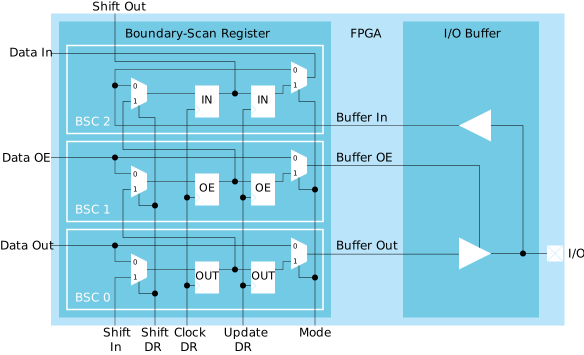
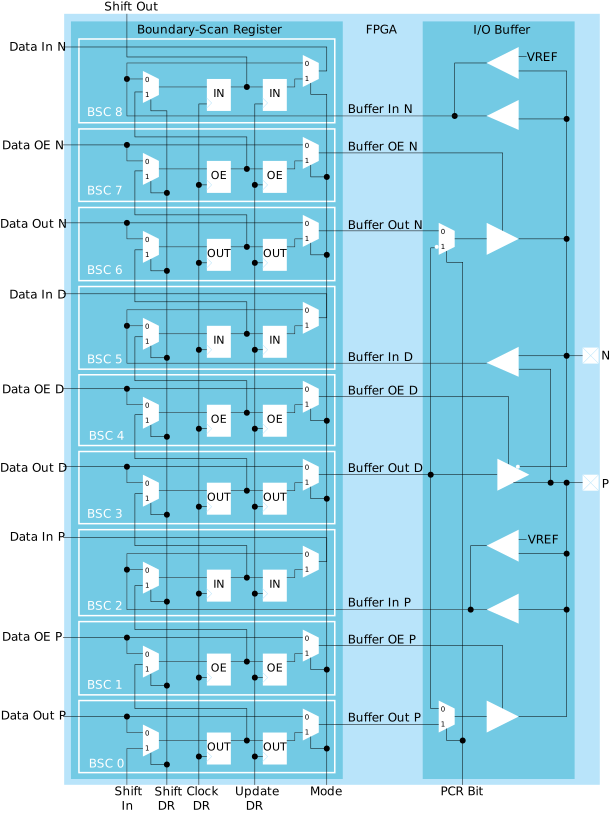
The boundary-scan register has data in, data OE, and data out signals connected to the
FPGA core while buffer in, buffer OE, and buffer out signals are connected to the pad
through the buffers. The Shift DR, Clock DR, and
Update DR signals are the control signals generated by the TAP
controller. The Clock DR signal supplies the clock to the capture
register (flip-flops on the left). The Shift DR signal which controls
the input multiplexers allows the register to capture the pin's states when low and
shift the data when high. The Update DR signal supplies the clock to
the update register (flip-flops on the right), which causes the data used to control the
pin stored in the register. The Mode signal is generated by the
instruction register to control the output multiplexers. The Mode
signal is low during SAMPLE/PRELOAD instruction and high during
EXTEST instruction.
HVIO Pins
The following figure shows the boundary-scan register on HVIO pins.
HSIO Pins
The following figure shows the boundary-scan register on HSIO pins.
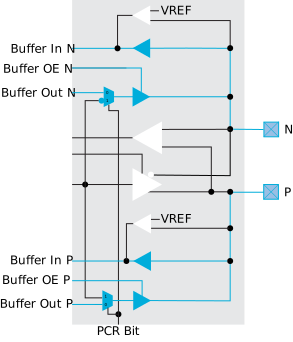
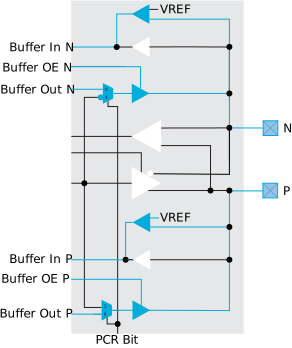
The signal path that passes from the pad through to the I/O buffer changes depending on the I/O standard you are using. The following figures show the paths for the supported standards. The blue color line indicates the signal path. The black lines are unused paths.
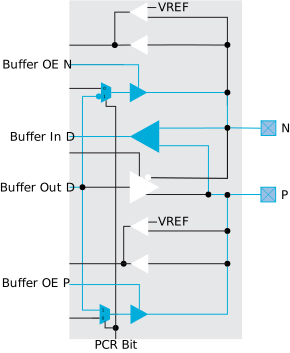

Boundary-Scan Testing
HVIO Pins
Each HVIO pins consist of 3 boundary-scan cells which are used for input, output, and output enable.
During the boundary-scan testing on the unconfigured device, the boundary-scan register can control and monitor the input, output, and output enable states. The HVIO pins are in weak pullup mode.
During the boundary-scan testing on the configured device, the boundary-scan register can control and monitor the states of the enabled I/O buffer paths. The I/O buffer paths are determined by the GPIO modes in the Interface Designer. Unused HVIO pins are tri-stated and are configured in weak pullup mode. You can change the default mode to weak pulldown in the Interface Designer.
HSIO Pins
Each pair of HSIO pins consists of 9 boundary-scan cells. The input, output, and output enable are provided in every 3 boundary-scan cells.
During the boundary-scan testing on the unconfigured device, all the differential buffer paths are disabled. However, the boundary-scan register can control and monitor the input, output, and output enable states in the single-ended buffer paths. The HSIO pins are in weak pullup mode.
During the boundary-scan testing on the configured device, the boundary-scan register can control and monitor the states of the enabled I/O buffer paths. The I/O buffer paths are determined by the GPIO modes and the I/O standards in the Interface Designer. Unused HSIO pins are in weak pullup mode. You can change the default mode to weak pulldown in the Interface Designer. For the HSIO pin pair which is configured as differential I/O, you need to use the P pin to drive and monitor the differential signal. The same name of the P pin is also used in the BSDL file.
Dedicated Configuration Pins
The JTAG pins (TCK, TDI, TDO, and
TMS) are not testable as these pins are not connected to the
boundary-scan cells. The CONDONE and CRESET_N pins
consist of observe-only cells which are able to monitor the signal states but are not
able to drive the pins.
Dedicated MIPI Pins
The dedicated MIPI pins are not testable as these pins do not have boundary-scan cells.
Boundary-Scan Description Language
Efinix provides Boundary-Scan Description Language (BSDL) files to describe the IEEE Std. 1149.1 features of each FPGA. You can use the BSDL files to perform test program generation, boundary-scan testing, and failure analysis. Each FPGA has its dedicated BSDL file. You can obtain the BSDL files from the Support Center and the post-configuration BSDL file in your project's outflow. The Interface Designer creates the post-configuration BSDL file when you generate constraints.
Timing Parameters
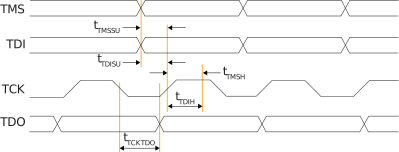
Revision History
| Date | Version | Description |
|---|---|---|
| January 2025 | 1.0 | Initial release. |