AN 057: Controlling VQPS with the Efinity SVF Player
Introduction
Titanium FPGAs have a bitstream security feature that prevents tampering with the FPGA and protects your intellectual property. You use tools provided with the Efinity® software to turn on bitstream encryption or authentication, generate keys, blow security fuses, and sign bitstreams.
Your security settings are permanently stored in the FPGA in
fuses. After these fuses are blown, you cannot change the settings. To ensure that the
fuses are blown only when intended, Titanium
FPGAs have a dedicated power supply pin (VQPS).
You follow a specific power sequence for this pin when blowing the fuses.
This document describes how to power up VQPS automatically using a FTDI
mini-module (FTDI n232H chipset), the Efinity SVF Player, and an on-board
circuit to blow Titanium fuses.
VQPS pin. The general procedure is:
- Design your board to include a circuit to control the
VQPSpin's power. - Include a header to connect the JTAG mini-module to the enable pin of the
VQPSpower circuit (you can use a 2-pin header or an available pin from the existing JTAG header). - Set an environment variable.
- "Security Feature" in the Titanium data sheet.
- "Securing Titanium Bitstreams" in the Efinity Software User Guide
VQPS Power Guidelines
Follow these guidelines for your circuit board:
- Your board must connect the
VQPSpin to ground before powering up the FPGA and after fuse programming. - During fuse programming, power the
VQPSpin with 1.8 V using an on-board circuit or via an external power supply. - Use one signal from the FTDI mini-module to turn on power to the
VQPSpin so you can easily control it with the mini-module and the Efinity SVF Player.
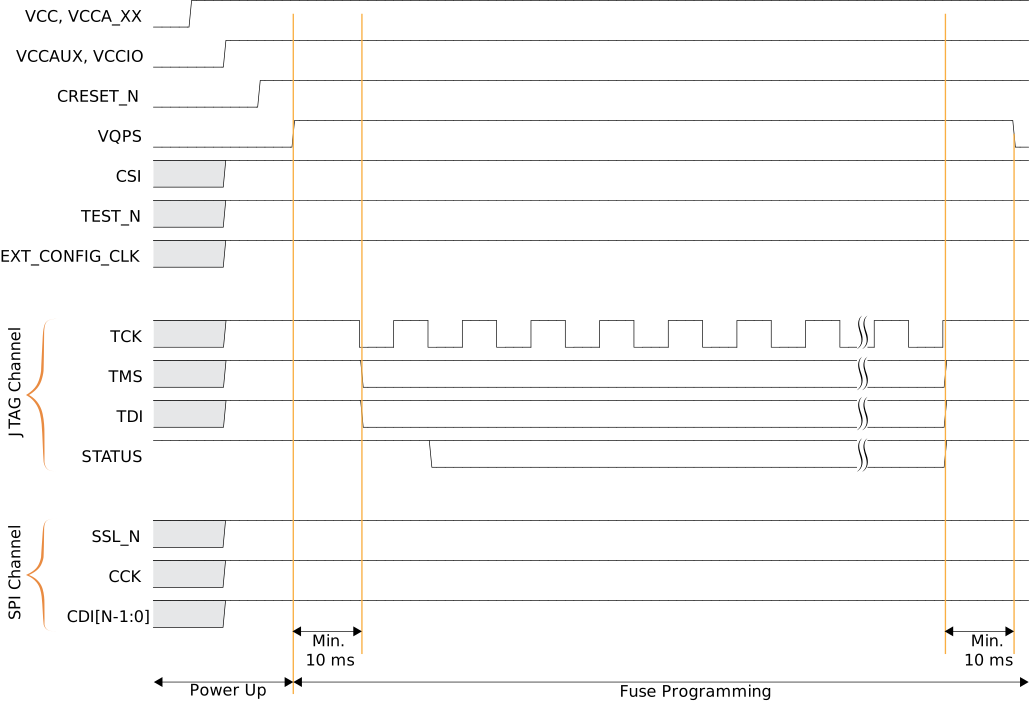
EXT_CONFIG_CLK must be inactive during efuse
programming.VQPS ramp rate requirement.VQPS Circuit
Your circuit board should include an external circuit to control the
VQPS power supply (e.g., an LDO linear voltage regulator or relay).
This circuit should have:
- A 1.8 V output voltage to power up
VQPS. - An output current of 100 mA minimum.
- A method to turn the power to the
VQPSpin on or off. - An automatic discharge when disabled or turned off.
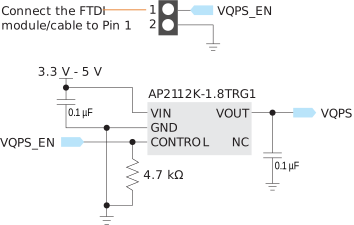
VQPS pin is
powered down per the ramp rate requirement when fuse programming is done.JTAG Mini-Module Connection
The following figure shows a conceptual diagram of how your board connects to the JTAG mini-module.
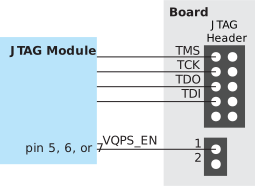
You connect the JTAG signals as usual. You connect pin 4, 5, 6, or 7 to the 2-pin header
that connects to the VQPS_EN pin. You can use any channel on the
mini-module. Note the channel and pin number; you use them to set an environment
variable for the SVF Player.
Efinity Environment Variable
You use an environment variable to tell the Efinity SVF Player which
min-module pin is controlling the VQPS_EN signal. You add the variable
to your environment using the set command (Windows) or
export command (Linux) in a command window or terminal. The
variable format is:
set SET_mBUSn_HIGH_DURING_TEST = 1export SET_mBUSn_HIGH_DURING_TEST = 1where:
- m is the FTDI mini-module channel (e.g.,
BD). - n is pin
5,6, or7.
set SET_BDBUS5_HIGH_DURING_TEST = 1export SET_BDBUS5_HIGH_DURING_TEST = 1The SVF Player controls the powering up and down of VQPS.
Methodology
About this task
The following steps describe the methodology:
Procedure
-
Set up the environment variable for the pin that connects to the
VQPScircuit. -
With power to your board turned off, connect the FTDI mini-module to the
headers that connect to the FPGA and
VQPScircuit. - Open the Efinity SVF Player.
- Ensure that the SVF Player can connect to the FTDI mini-module by clicking the Refresh USB Target button.
-
Power up the FPGA and
VQPScircuit. - Use the SVF Player to run the .svf file.
Revision History
| Date | Version | Description |
|---|---|---|
| February 2025 | 1.3 | Fixed typo in Efinity Environment Variable. (DOC-2346) |
| December 2024 | 1.2 | Updated Figure 1 and added additional notes. (DOC-2028) |
| May 2024 | 1.1 | Updated VQPS Power Guidelines. |
| March 2024 | 1.0 | Initial release. |