AN 036: Using the Standby Mode Feature
Introduction
Trion® FPGAs are manufactured on a low-power process and use a 1.1 V or 1.2 V core power supply during normal operation. To reduce the power consumption even further, these FPGAs support a standby mode in which you can power the FPGA down to 0.8 V and then wake it up to resume normal operation at 1.1 or 1.2 V. During standby mode, the FPGA retains it's configuration so that it can resume operation immediately upon waking without taking the time to reconfigure. This feature is useful for applications that need to preserve battery power or require very low power consumption.
This application note describes how to trigger the Trion® FPGA to enter standby mode and exit it. Additionally, it provides the power consumption you can expect while in standby mode.
Entering Standby Mode
To place the Trion® FPGA into standby mode, perform these actions in sequence:
- Assert the reset signals for the PLL (
RSTN). For FPGAs with MIPI CSI-2 and/or DDR DRAM hard blocks, assert the reset signals for the MIPI CSI-2 RX and TX (DPHY_RSTNandRSTN), and DDR controller (CFG_RST_N). These signals should remain asserted while the FPGA is in standby mode. - Disable the clock tree. Efinix recommends instantiating a EFX_GBUFCE primitive for each clock signal and using it to control the clocks. See Controlling Clocks with the EFX_GBUFCE Primitive for details.Alternatively, you can disable the clock source externally.
- Float the VCCIO_DDR voltage (for FPGAs with hardened DDR interfaces).
- Reduce the core power supply (VCC) to 0.8 V.Note: Do not change the VCCIO voltages.
While the FPGA is in standby mode, minimal input transitions are required.
Exiting Standby Mode
To wake the Trion® FPGA from standby mode, perform these actions in sequence:
- Increase the core power supply (VCC) from 0.8 V to 1.1 V or 1.2 V using the
correct power supply ramp rate.
Table 1. Power Supply Ramp Rates Symbol Description Min Max Units tRAMP Power supply ramp rate for all supplies. VCCIO/10 10 V/ms - Power on the VCCIO_DDR (for FPGAs with hardened DDR interfaces).
- Turn on the clock tree. See Controlling Clocks with the EFX_GBUFCE Primitive.
- Release the reset signals for the PLL (
RSTN)For FPGAs with MIPI CSI-2 and/or hardened DDR interfaces, release the reset signals for the MIPI CSI-2 RX and TX (DPHY_RSTNandRSTN) and DDR controller (CFG_RST_N). - Perform a system reset.
Controlling Clocks with the EFX_GBUFCE Primitive
To use the Trion® standby mode feature, you need to instantiate
EFX_GBUFCE primitives on every clock input. To turn off a given clock, drive the
CE port low. To turn the clock back on, drive the
CE port high.
The EFX_GBUFCE logic block represents the global clock buffer driving the global clock network. The CE port gates the clock and is active high.
You must connect all EFX_GBUFCE input ports. If you do not use a port, connect it to ground or VCC depending on its polarity. The software issues an error if the clock input I is set to VCC or ground.

| Port Name | Direction | Description |
|---|---|---|
| I | Input | Input data |
| CE | Input | Clock enable |
| O | Output | Output data |
The function table assumes all inputs are active-high polarity.
| Inputs | Output | |
|---|---|---|
| CE | I | O |
| 0 | X | 0 |
| 1 | 0 | 0 |
| 1 | 1 | 1 |
EFX_GBUFCE # (
   .CE_POLARITY(1'b1)   // 0 active low, 1 active high
) EFX_GBUFCE_inst (
   .O(O),               // Clock output to global clock network
   .I(I),               // Clock input
   .CE(CE)              // Clock gate
);
library IEEE;
use IEEE.STD_LOGIC_1164.ALL;
library efxphysicallib;
use efxphysicallib.efxcomponents.all;

entity gbufce_i_VHDL is
   port
   (
      clk, d, ce : in std_logic;
      q : out std_logic
   );
end gbufce_i_VHDL;

architecture behavioral of gbufce_i_VHDL is
signal clknet : std_logic;
begin

  dut : EFX_GBUFCE
    port map (
       CE => ce,
       I => clk,
       O => clknet
    );

  ffx : EFX_FF
    port map (
       Q => q,
       D => d,
       CLK => clknet,
       CE => '1',
       SR => '0'
    );

end behavioral;
Standby Mode System Example
The following diagram shows an example system using a microcontroller, two low dropout voltage regulators (LDO), and a single pole double throw (SPDT) analog switch to use the standby mode feature. The microcontroller puts the FPGA into standby mode and wakes it up using the steps described previously.
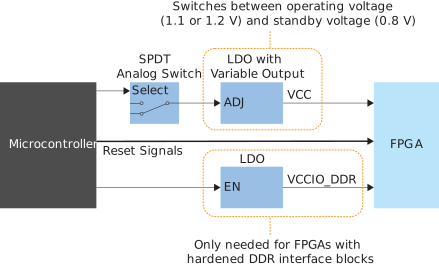
The microcontroller controls the FPGAs reset signals (for the PLL, MIPI CSI-2, and DDR controller), the LDO for the VCCIO_DDR, and the SPDT switch. The microcontroller can also control the clock tree, or you can use another method to enable/disable the FPGA's external clock sources.
The variable output LDO supplies the VCC power to the FPGA at the operating voltage of 1.1 or 1.2 V or the standby voltage of 0.8 V, depending on the setting coming from the SPDT analog switch. You only need the LDO to enable or disable the VCCIO_DDR power for FPGAs that have hardened DDR interface blocks.
Expected Power Consumption
Efinix tested the power used in standby mode after following the recommended sequence. The following table summarizes the results.
| FPGA | Standby Power |
|---|---|
| T120 F324 | 20 mW |
| T20 F256 | 400 μW |
Revision History
| Date | Version | Description |
|---|---|---|
| June 2021 | 1.0 | Initial release. |