AN 046: Reset Guidelines for Efinix FPGAs
Introduction
CDONE pin goes high and tUSER has elapsed. Efinix recommends that you issue a reset to your design in this initial
stage to:- Ensure that the registers are cleared.
- Avoid registers capturing unintended data input due to clock glitches or unstable clocks
- If required, you can also initialize the registers with the intended values during reset.
You can use an external or internally-generated signal as the reset signal. Either way, the reset should only be released after the device has gone into user mode. This application note explains how to implement reset in your design.
Flipflop Set/Reset
SR) port, flipflops
support the following functions without the need for additional logic resources:- Synchronous reset
- Synchronous set
- Asynchronous reset
- Asynchronous set
Additionally, you can configure the flipflops to expect an active-high or active-low
set/reset signals. The set/reset signals can drive the SR port directly.

The following table shows the flopflop set/reset implementations examples and the corresponding parameter settings for EFX_FF primitive.
| Reset Implementation | EFX_FF Parameter Setting | Verilog HDL Example | VHDL Example |
|---|---|---|---|
| Active-Low Synchronous Reset | SR_POLARITY = 0 SR_SYNC = 1 SR_VALUE = 0 |
|
|
| Active-High Synchronous Reset | SR_POLARITY = 1 SR_SYNC = 1 SR_VALUE = 0 |
|
|
| Active-Low Synchronous Set | SR_POLARITY = 0 SR_SYNC = 1 SR_VALUE = 1 |
|
|
| Active-Low Asynchronous Reset | SR_POLARITY = 0 SR_SYNC = 0 SR_VALUE = 0 |
|
|
| Active-Low Asynchronous Set | SR_POLARITY = 0 SR_SYNC = 0 SR_VALUE = 1 |
|
|
infer-sync-set-reset Synthesis Option
The reset signal can drive the flipflop SR port directly. However, the Efinity® software can also use additional resources so that the set/reset signal feeds the D input port instead of the SR port for more flexibility. To allow Efinity software to implement this feature, set the --infer-sync-set-reset synthesis option to 0 (disable) in the Project Editor's Synthesis tab.
The following figure shows the example of an additional logic implementation where the reset signal is connected to the D input port through an additional logic.
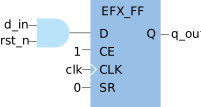
Reset Synchronizer
You can use a reset synchronizer circuitry to synchronize an external asynchronous reset signal to the clock domain of your synchronous logic design. With the reset synchronizer, the reset assertion to the flipflops is asynchronous, but the de-assertion is synchronous to the clock. The reset synchronizer can also filter glitches that might occur in an asynchronous reset signal and prevent metastability issues. Different clock domains should not share the same reset synchronizer.
The following examples describe common reset synchronizer circuitries with active-low or active-high reset input and output. You can extend the duration of the reset signal assertion by adding additional flipflop stages.
Active-Low Reset Input and Active-Low Reset Output

Verilog HDL
Example |
VHDL
Example |
Active-Low Reset Input and Active-High Reset Output

Verilog HDL
Example |
VHDL
Example |
Active-High Reset Input and Active-Low Reset Output

Verilog HDL
Example |
VHDL
Example |
Active-High Reset Input and Active-High Reset Output

Verilog HDL
Example |
VHDL
Example |
Reset Sequencing
Some designs with more than one clock domain requires the logic in different clock domains to be released from reset in a particular order. For these designs, you can implement reset sequencing. The reset sequencing is done by cascading reset synchronizers of the respective clock domains. The following figure illustrates an example where the reset for logic A under the clock domain A is released first, then followed by logic B under the clock domain B.

Generating Reset Signals Internally
This section describes ways to implement internally generated reset signals. You can use a PLL, a counter, or an output pin to trigger resets.
Using the PLL Locked Signal
If you use a PLL to clock the flipflops, the flipflops must be held in reset until the PLL is locked and the clock output is stable. You can use the PLL locked signal to gate the reset signal feeding the flipflops. Add a counter to hold the registers in reset even after configuration is done until tUSER has elapsed. The counter also acts as a reset synchronizer, ensuring the reset de-assertion is synchronous to the PLL clock output.

You need to calculate the number of PLL output clock cycles required to ensure the reset signal is de-asserted after tUSER elapsed. The following example calculates the required number of PLL output clock cycles for a Titanium FPGA (tUSER = 25 μs) with a PLL output clock frequency of 50 MHz.
Clock cycles required = tUSER/ PLL output clock period = 25 μs / (1/50 MHz) = 1,250
The counter should hold the reset for at least 1,250 clock cycles.
Verilog HDL
Example |
VHDL
Example |
There may be times when the PLL loses lock, or the reset_n signal is
triggered while the FPGA is in user mode. In these situations, the reset counter
restarts the count on the number of cycles to wait before releasing the registers from
reset. The counter starts after the PLL regains lock or the reset_n
signal is de-asserted.
Using a Counter
You can use a counter to generate a reset signal to hold your design in reset after configuration has completed and automatically releases the design after tUSER has elapsed.

Using I/O Pins
You can also use an output pin to generate a signal that indicates when the device goes into the user mode. This signal can be used as a reset signal to your design.
Feeding the Reset Input Pin

- The I/O pins are tri-stated with an internal weak pull-up during
configuration.Important: Include a weak pull-up resistor around 10 kΩ on the board if both reset input and output pins used do not support weak pull-up during configuration, for example, LVDS configured as GPIO pins in Trion FPGAs.
- The core logic is released first when the configuration is complete, while the I/O pins are still tri-stated with weak pull-up.
- The synchronous logic in your design is held in reset until the I/O pins are released, during which the output pin generates an asynchronous reset signal by driving the input pin low.
- The asynchronous reset signal feeds a reset synchronizer to generate a synchronous active-high or active-low reset signal to the synchronous logic in your design.
To generate the reset signal and feed the reset input pin of your design, connect an output pin to the reset input pin at the board level. Drive this output pin low internally in your design. Before compiling your design, turn off the Release Tri-States before Reset programming option in the Project Editor's Bitstream Generation tab. Turning this option off ensures the core logic is ready before the I/O pins are released and prevents glitches at output pins when the configuration completes and the device transitions into user mode.
You can also combine the reset from the output pin with other external resets such as the system reset.

Single Pin Reset Generation
You can combine the input and output pin functions as discussed in the previous section into one single pin. To perform a reset with a single pin, add a bidirectional pin in your design in the Efinity Interface Designer. In your RTL code, drive the pin’s output buffer low, and the output enable (OE) high. Connect the pin’s input buffer to the reset synchronizer as the reset input.

Verilog HDL
Example |
VHDL
Example |
Initializing Flipflop Value
The flipflops are cleared when the FPGA enters user mode. If required, you can initialize the flipflops with a logic 1 using RTL code or a reset.
Initializing Flipflops with a Reset
You can use the reset signal to initialize the flipflops in your design. The following code example shows how resetting the design also sets the flipflop to a logic 1 before starting an operation.
Verilog HDL
Example |
VHDL
Example |
Initializing Flipflops with RTL
Typically, you initialize flipflops with RTL codes for simulation but it is also synthesizable by the Efinity software. The Efinity software implements additional logic during synthesis to ensure the output is initialized to the desired value. The following figure and example codes show the implementation result with additional logic to initialize the output to logic 1.

Verilog HDL Example
1 |
VHDL
Example |
Resetting other Blocks
Other than the flipflops, you can also reset and/or initialize other logic blocks such as the shift register, embedded memory, and DSP/multiplier block.
8-bit Shift Registers
The EFX_SRL8 primitive in Titanium FPGAs allows you to implement an 8-bit shift register function in XLR cells. The 8-bit shift register content can be initialized with the EFX_SRL8 primitive, so the reset is not required for content initialization.
Additional logic is required if you implement the 8-bit shift register function in the XLR cell through your own RTL code.
Embedded Memory Blocks
The Titanium FPGA memory blocks support asynchronous and synchronous reset of the RAM output, and asynchronous reset of the RAM output register. The RAM output and RAM output register reset share the same reset input port but can be enabled independently. The embedded memory block in the true-dual-port mode has two reset ports, one for port A and the other for port B. Asserting the reset signal does not clear the RAM content.
You can initialize the memory block content for Trion and Titanium FPGAs when instantiating through the primitives.
DSP and Multiplier Blocks
The Titanium DSP blocks include a reset port that supports synchronous and asynchronous reset. This reset port can drive the reset for registers A, B, C, OP, P, W, and O. You can enable or disable the reset for each register independently. You can enable the synchronous reset and reset the registers together with other sequential logic in your design using the system reset when the FPGA goes into user mode.
The Trion multiplier blocks include reset ports to set or reset registers A, B, and O. The registers support synchronous and asynchronous reset or set. You can enable the synchronous reset and reset the registers together with other sequential logic in your design through the system reset when the FPGA goes into user mode.
Revision History
| Date | Version | Description |
|---|---|---|
| November 2022 | 1.1 | Fixed typo in the Verilog HDL example for Using the PLL Locked Signal. (DOC-1034) |
| June 2022 | 1.0 | Initial release. |