LVDS Delay Modes
The LVDS TX and RX in FPGAs support several delay modes that you can use for LVDS clock and data alignment. The following table shows the supported delay modes in FPGAs.
| Mode | LVDS TX Clock and Data | LVDS RX Clock and Data |
|---|---|---|
| Static delay | Yes | Yes |
| Dynamic delay | No | Yes |
| DPA | No | Yes |
Static Delay
Both LVDS TX and LVDS RX support static delay mode. You can apply static delays to the clock and data lanes. Each lane offers 64 taps, where each tap adds approximately 25 ps of delay. You have to enable the Static Mode Delay Setting in Interface Designer and enter the delay value manually.
Refer to 'Using the GPIO Block' in Titanium Interfaces User Guide for the detailed settings.
Dynamic Delay
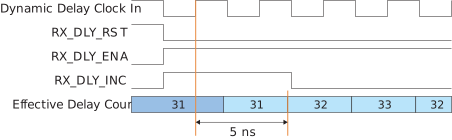
Only the LVDS RX supports the dynamic delay mode. You can apply dynamic delays to clock and data lanes by enabling the Dynamic Mode Delay Setting in Interface Designer. Additional control signals are made available for you to change the delay value.
When you enable the delay control on the device (RX_DLY_ENA = 1 and
RX_DLY_RST = 0), you can increase or decrease the delay count
by 1 clock per cycle through the increment port, RX_DLY_INC, (1 to
increase, 0 to decrease). Each lane offers 64 taps (value 0 to 63), where each tap
adds approximately
20
ps of delay. The reset signal (RX_DLY_RST) resets the
delay
count
to half of the maximum count value.
DPA
The Dynamic Phase Alignment (DPA) automatically eliminates skew for clock-to-data channels and data-to-data channels by adjusting a delay chain setting so that the data is sampled at the center of the bit period.
To enable the DPA function on LVDS, you need to switch the Delay Mode setting to dynamic in LVDS Block Editor under Interface Designer. You can control the DPA ports from RTL as timing diagram in next session.
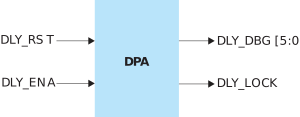
| Signal | Direction (from RTL) | Description |
|---|---|---|
| DLY_RST | Output | Reset DPA circuit |
| DLY_ENA | Output | Enable DPA circuit |
| DLY_LOCK | Input | Value '1' indicates that the DPA process has achieved training lock and data can be passed. |