Calibrating FPGAs using DPA
About this task
The serial clock from PLL (slowclk_pll) is the source clock for the
DPA module. The DPA feature is only supported in full-rate serialization and the
LVDS RX must have the same frequency stability, in parts per million (PPM), as the
LVDS TX side.
To enable the DPA, choose under Advanced Settings in the Interface Designer LVDS RX Block Editor.
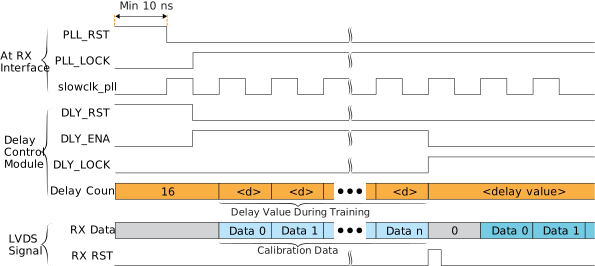
You need to create a training module for the DPA to get the best input delay setting on LVDS RX. The following steps describe the delay training:
Procedure
- Prepare toggling LVDS RX data on data lane for the delay training.
-
Before starting the LVDS RX delay training (before or during user mode), assert
the PLL reset and
DLY_RSTsignals. Keep the PLL reset signal asserted for at least 10 ns. - De-assert the PLL reset signal and monitor the PLL locked signal.
-
De-assert the
DLY_RSTand assertDLY_ENAafter PLL locked signal is asserted and stable. -
Apply the DPA training pattern to LVDS RX and allow the DPA circuit to lock.
The DPA may take up to 3,000
slowclk_pllcycles to lock. -
After the
DLY_LOCKsignal is asserted, de-assert theDLY_ENAsignal and assert LVDS RX reset signal for at least onefastclkcycle.