Security Feature
The security feature1 includes:
- Intellectual property protection using bitstream encryption with the AES-GCM-256 algorithm
- Anti-tampering support using asymmetric bitstream authentication with the RSA-4096 algorithm
You can enable encryption, authentication, or both. You enable the security features at the project level.
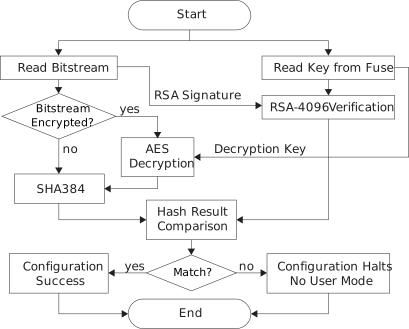
Bitstream Encryption
Symmetric bitstream encryption uses a 256-bit key and the AES-GCM-256 algorithm. You create the key and then use it to encrypt the bitstream. You also need to store the key into the 's fuses. During configuration, the built-in AES-GCM-256 engine decrypts the encrypted configuration bitstream using the stored key. Without the correct key, the bitstream decryption process cannot recover the original bitstream.
Bitstream Authentication
For bitstream authentication, you use a public/private key pair and the RSA-4096 algorithm. You create a public/private key pair and sign the bitstream with the private key. Then, you save a hashed version of the public key into fuses in the . During configuration, the validates the signature on the bitstream using the public key.
If the signature is valid, the knows that the bitstream came from a trusted source and has not been altered by a third party. The continues configuring normally and goes into user mode. If the signature is invalid, the stops configuration and does not go into user mode.
The private key remains on your computer and is not shared with anyone. The only has the public key: the bitstream contains the public key data and a signature, while the fuses contain a hashed public key. You can only sign the bitstream with the private key. An attacker cannot re-sign a tampered bitstream without the private key.
Disabling JTAG Access
's support JTAG blocking, which disables JTAG access to
the by blowing a fuse. Once the fuse is blown, you
cannot perform any JTAG operation except for reading the FPGA
IDCODE, reading DEVICE_STATUS, using
SAMPLE/PRELOAD, and enabling BYPASS mode. To
fully secure the , you must blow the JTAG
fuse.
If you still want to use the JTAG interface for debugging, you can use the DISABLE_EFUSE_ONLY option, which permanently disables the JTAG efuse instructions only. Other JTAG instructions are not affected, for example, you can still perform debugging. Refer to "Using the Bitstream Security Key Generator" in the Software User Guide for more information.
IDCODE, DEVICE_STATUS,
SAMPLE/PRELOAD, and BYPASS). So blowing this
fuse should be the very last step in your manufacturing process.Fuse Programming Requirements
- All V64, F100, and F256 packages
- F100S3F2 and F225 packages with the letter
Sin the lot number
S in the lot number do not have these
requirements.- During fuse programming, avoid device configuration and other JTAG operations that are not related to fuse programming.
- Ramp up the
VQPSpin only after all other power supplies have ramped to their nominal voltages. TheVQPSramp rate follows the requirements shown in Table 3Table 3. - After powering up the
VQPSpin, wait for a minimum of 10 ms before issuing JTAG instructions for fuse programming. - After completing fuse programming through JTAG, wait for a minimum of 10
ms before powering down the
VQPSpin. - If required, other power supplies can be powered down only after the
VQPSpin has been powered down below 25% of its nominal voltage level.
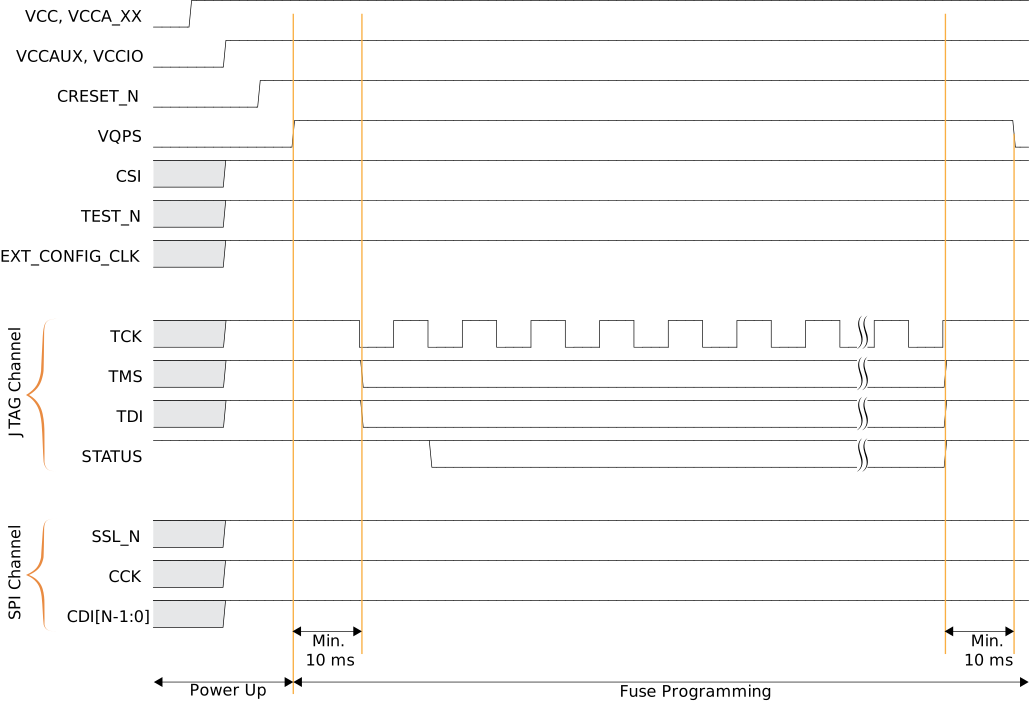
EXT_CONFIG_CLK pin must be inactive during fuse
programming.