Securing Bitstreams
s have built-in security features to help you protect your
intellectual property and to prevent tampering.
- Encryption—Encrypt your bitstream using an AES-256 key.
- Authentication—Sign your bitstream with an RSA-4096 private key.
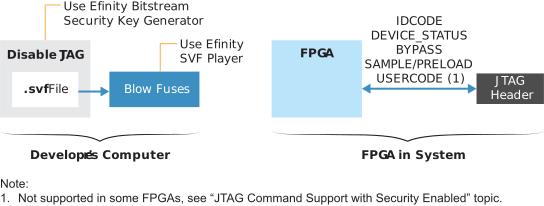
- JTAG Disable—Permanently disables all JTAG instructions except for those used to get device information.
- JTAG Disable Efuse Only—Permanently disables the JTAG efuse instructions only.
Note: Refer to JTAG Command Support with Security Enabled for details on the JTAG disabling
modes and which commands they support.
You use the following tools to implement these bitstream security features:
| Tool | Used for |
|---|---|
 |
Create or specify an AES-256 key. Create or specify an
RSA-4096 private key. Specify whether to disable
JTAG. |
 |
Program the fuses in the
with the AES-256 key and/or RSA certificate
data. After you blow the fuses with an RSA key, the only accepts a bistream signed with the
correct private key. After you blow fuses with an AES-256
key, the only accepts a plaintext
bitstream or a bitstream signed with the correct
key. Program the JTAG fuse to disable JTAG
function. |
 |
Turn on bitstream encryption and/or authentication, and specify
the .bin file created by the Bitstream Security Key
Generator. Turn on bitstream authentication and specify the
private key (.pem) file to sign the
bitstream. Note: You need the full
version of software to work with projects
and to generate bitstreams. The Windows Standalone Programmer
does nbot support these features.
|
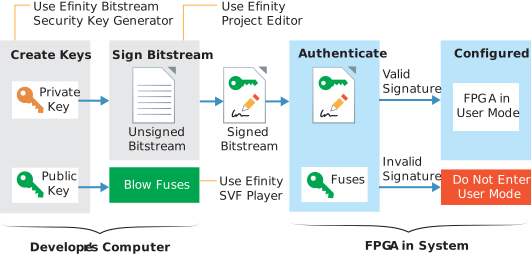
The public key is derived from the private key; the .pem is essentially a private/public key pair. The private key only exists in the .pem. The software uses it to sign the bitstream, but the bitstream and fuses only contain public key information. The uses the public key to validate the bitstream's signature; it cannot be used to re-sign a modified bitstream.
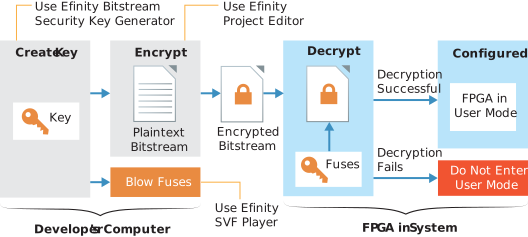
The following sections describe how to use each of these tools to enable security features.